

Fiverr Notification Icon in Title
65 个评分
)
概述
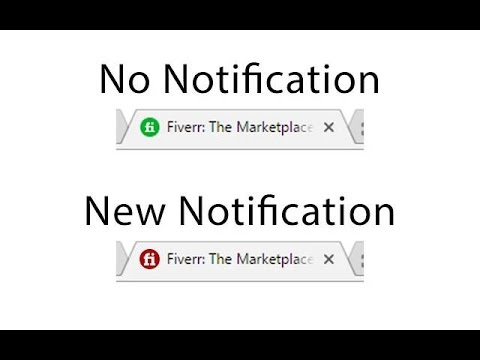
Turns the Fiverr tab icon red and plays an optional chime when a new message or notification arrives.
Never miss a Fiverr message again. This extension turns the Fiverr tab icon red the moment a new message or notification arrives. Keep working in your other tabs and you'll still catch it out of the corner of your eye — no need to check Fiverr over and over. What's new: - Sound alert (optional). Get a short chime when a new message or notification comes in. Turn it on or off and set the volume from the toolbar — just click the extension icon. - Works with the latest Fiverr. Notification detection was rebuilt for Fiverr's redesigned header, so the red icon is reliable again. - Lighter and up to date. Rebuilt on Manifest V3 with no third-party libraries. How to use it: 1. Install it and open Fiverr (stay logged in). 2. Click the extension icon in your toolbar to toggle the sound and set volume. 3. Keep Fiverr open in a tab and get back to work — the icon turns red, and chimes if you've enabled sound, whenever something new lands. Note: browsers only allow sound after you've interacted with the page, so the first chime after a page reload plays on your next click on Fiverr. Privacy: the extension only reads the Fiverr page to spot new notifications. It doesn't collect or transmit your messages or any personal data. Your sound on/off and volume settings are saved through Chrome's own storage. Questions or issues? Email onepoordeveloper@gmail.com. YouTube: https://www.youtube.com/watch?v=ZWcGFBoebO4 GitHub: https://github.com/onepoordeveloper/fiverr-notification-alert-in-title
4.6 星(5 星制)65 个评分
详情
- 版本1.6.0
- 上次更新日期2026年6月19日
- 提供方Ahmad Hassan
- 大小37.04KiB
- 语言English (United States)
- 开发者
邮箱
onepoordeveloper@gmail.com - 非交易者该开发者尚未将自己标识为交易者。欧盟地区消费者须知:消费者权利可能不适用于您与该开发者达成的合约。
隐私权

该开发者已声明,您的数据:
- 不会因未获批准的用途出售给第三方
- 不会为实现与产品核心功能无关的目的而使用或转移
- 不会为确定信用度或放贷目的而使用或转移
支持
若有任何疑问、建议或问题,请在桌面浏览器中打开此页面