

Fispera — GİB Portals
Overview
Fills your e-Archive and e-Invoice documents on the GİB portals and saves issued and incoming invoices to Fispera.
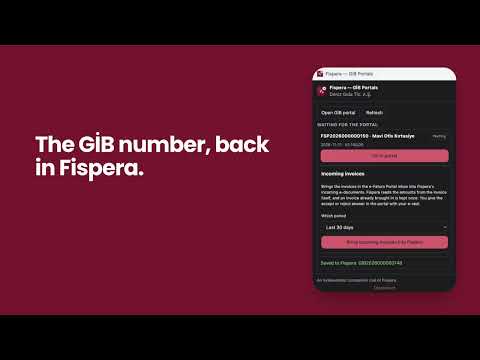
Fispera — GİB Portals lets you issue the e-Archive and e-Invoice documents you prepared in Fispera on the Turkish Revenue Administration's (GİB) own portals without typing them again, and brings the e-Invoices sent to you into Fispera in one click. ISSUING INVOICES 1. In Fispera, approve the invoice and choose "Issue e-Archive invoice" or "Issue e-Invoice". 2. Sign in to the GİB e-Archive Portal or e-Fatura Portal with your own password. 3. Press "Fill in portal" in the side panel: buyer, rows, units, VAT and withholding go into the portal form. 4. The extension compares the portal's row amounts, VAT and amount payable with Fispera. You review and press "Oluştur". 5. After GİB's SMS confirmation (e-Archive) or the e-seal signature and "Gönder" (e-Invoice), the GİB document number is written to the invoice in Fispera on its own. INCOMING INVOICES 1. Sign in to the e-Fatura Portal and pick the period in the side panel's "Incoming invoices" section (last 30 days, 3 months or 6 months). 2. Press "Bring incoming invoices into Fispera": the invoices in the portal inbox land in Fispera's incoming e-documents. 3. Fispera reads the sender, date, VAT and total from the invoice's signed XML; each invoice is kept once. 4. An invoice you accept in Fispera becomes a draft purchase invoice. You give the accept or reject answer to a commercial invoice in the portal with your e-seal. TRUST • You sign in to the GİB portal yourself; your GİB password stays with you. • Fispera connects in one click with your open Fispera session, through an authorisation made for this extension. • The extension works only on the GİB portal addresses and on Fispera. • The tax number signed in to the portal is matched with your Fispera company; an incoming invoice is saved only when it is addressed to that company. WHO IT IS FOR Businesses and accountants who use Fispera and issue e-Archive and e-Invoice documents on GİB's free portals. An independent companion tool of Fispera.
0 out of 5No ratings
Details
- Version0.2.0
- UpdatedNovember 15, 2026
- Offered byEGEROBOT
- Size46.34KiB
- Languages2 languages
- DeveloperEGEROBOT OTOMASYON MUHENDISLIK PROJE DANISMANLIK SANAYI VE TICARET LIMITED SIRKETI
Mansuroglu Mh. 1593/1 Sk. B:4/1 D:5 BAYRAKLI Izmir, İzmir 35535 TREmail
info@egerobot.com.trPhone
+90 533 548 45 69 - TraderThis developer has identified itself as a trader per the definition from the European Union and committed to only offer products or services that comply with EU laws.
- D-U-N-S751152606
Privacy

Fispera — GİB Portals has disclosed the following information regarding the collection and usage of your data. More detailed information can be found in the developer's privacy policy.
Fispera — GİB Portals handles the following:
This developer declares that your data is
- Not being sold to third parties, outside of the approved use cases
- Not being used or transferred for purposes that are unrelated to the item's core functionality
- Not being used or transferred to determine creditworthiness or for lending purposes
Support
For help with questions, suggestions, or problems, visit the developer's support site