

Fiori Launchpad Helper
3 ratings
)
Overview
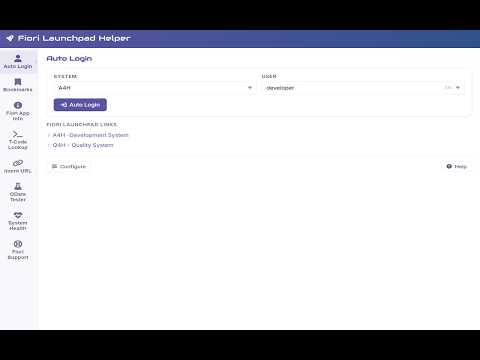
Speed up SAP Fiori work with launchpad shortcuts, bookmarks, OData testing, app lookup, and debug tools.
Fiori Launchpad Helper is a productivity extension for SAP Fiori users who work across multiple systems, users, and apps every day. It reduces repetitive steps by making launchpad access faster, simplifying system and user switching, and giving you quick access to the tools you use most often. Built for SAP developers, functional consultants, testers, support teams, and power users, the extension brings common Fiori tasks into one place so you can move faster across development, test, and production environments. ⭐ WHAT YOU CAN DO 🚀 Open SAP Fiori Launchpads quickly from the extension popup. 🔄 Save multiple systems and user profiles locally for faster switching between environments. ⭐ Bookmark frequently used Fiori apps for quick navigation. 🔎 Look up standard SAP Fiori app details, including versions and technical information. ⌨️ Find standard Fiori apps by classic SAP transaction code. 🧪 Test OData services with support for methods, headers, query options, request body, authentication, and formatted responses. 🔗 Decode existing Fiori intent URLs or build new deep links from semantic object, action, and parameters. 🛠️ Use Debug Fiori tools for debug parameters, UI5 inspection, cache actions, and quick support shortcuts. 📡 Check whether saved systems are reachable without opening each launchpad manually. 📚 Open curated SAP Fiori, UI5, and support resources directly from the extension. 💡 WHY USERS LIKE IT If you regularly move between SAP environments, test users, launchpad apps, and service endpoints, repetitive login, navigation, and testing steps can slow down your day. Fiori Launchpad Helper keeps those actions close at hand, making common SAP Fiori workflows faster, simpler, and easier to repeat. 👥 WHO IT IS FOR • SAP developers • Functional consultants • Testers and QA teams • Support and operations teams • Power users working across multiple SAP systems 🔒 PRIVACY AND SECURITY Your configuration data and bookmarks are stored locally in the browser on your device. The extension does not use a vendor-operated backend to collect, track, or store your data. Some features interact with the active SAP page or your configured systems to provide launch, debug, and testing workflows. ⚠️ IMPORTANT INFORMATION Enterprise browser policies or internal network restrictions may limit extension behavior on corporate domains. Check with your IT team if a feature is unavailable in your environment. SAP Fiori and SAP UI5 are trademarks of SAP. Fiori Launchpad Helper is an independent productivity tool and is not affiliated with, endorsed by, or sponsored by SAP.
4.7 out of 53 ratings
Details
- Version1.10.1
- UpdatedMay 8, 2026
- Offered byDJ
- Size158KiB
- LanguagesEnglish
- Developer
Email
deepjoshapps@gmail.com - Non-traderThis developer has not identified itself as a trader. For consumers in the European Union, please note that consumer rights do not apply to contracts between you and this developer.
Privacy

This developer declares that your data is
- Not being sold to third parties, outside of the approved use cases
- Not being used or transferred for purposes that are unrelated to the item's core functionality
- Not being used or transferred to determine creditworthiness or for lending purposes
Support
For help with questions, suggestions, or problems, please open this page on your desktop browser