


概述
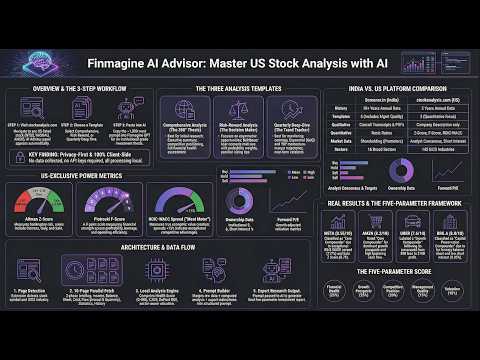
AI prompts for Indian & US stocks. 15 templates: Business KPIs, Investor Panel, Ask Anything. Screener.in + stockanalysis.com.
Generate precision-engineered AI analysis prompts for Indian and US stocks — directly from Screener.in and stockanalysis.com pages. 📌 Full feature guide & tutorials: https://finmagine.com/ai-advisor.php 🌍 WORKS ON TWO PLATFORMS • Screener.in — Indian stocks (11 analysis templates) • stockanalysis.com — US stocks (4 analysis templates) 📋 15 ANALYSIS TEMPLATES 🇮🇳 INDIA (Screener.in): • 📊 Business KPIs Deep Dive ★ NEW — automatically reads the Screener.in Operational Insights table (CPCU, Conversions, Device Reach, Patents, Debtor Days, and all company-specific KPIs) and builds a full KPI trend analysis: growth trajectory, quality vs quantity, management guidance vs actuals, red flags & hidden strengths, peer benchmarking, and a 5-parameter weighted investment score. Best with ChatGPT. • 🌍 Sector & Theme Analysis — industry structure, dominant theme, TAM, policy tailwinds & headwinds, historical cycle mapping, global analogues (China/US/Korea), and bear case if the theme fails. Best with Gemini Deep Research. • 💬 Ask Anything — type any question about the stock; AI answers using only the company's own concalls and annual reports with citations (no hallucination). Works like NotebookLM for stocks. • Investor Panel ★ UPDATED — 3-round live debate: 6 legendary investors (Jhunjhunwala, Pabrai, Mukherjea, Andrade, Maheshwari, Graham) argue the stock in real time — opening reads, live clashes with named disagreements, then final verdicts with position-shift tracking • Comprehensive Analysis — full-spectrum investment evaluation with unit economics • Risk-Reward Assessment — downside protection vs upside potential • Management Quality — capital allocation and governance deep-dive • Quarterly Deep-Dive — latest quarter in context of full-year trends • Deep Research — exhaustive multi-angle research brief (reads concalls & annual reports) • Forensic Governance — RPTs quantified, promoter pledging, earnings call language analysis, auditor flags • Peer Comparison — manually select or auto-detect peers, fetches live data snapshots, builds 4-analyst head-to-head 🇺🇸 US STOCKS (stockanalysis.com): • Forensic Analysis — Altman Z-Score, Piotroski F-Score, ROIC-WACC spread, sector benchmarking (145 GICS industries) • Comprehensive Analysis — full financials, ownership, analyst consensus • Risk-Reward Assessment — Beta, RSI, 52-week range, drawdown analysis • Quarterly Review — earnings quality, cash conversion, guidance context ⚡ HOW IT WORKS 1. Open any stock page on Screener.in or stockanalysis.com 2. The Finmagine AI Advisor panel appears inline on the page 3. Select your analysis template — each shows the best AI to use 4. Click Generate — prompt built from live page data in seconds 5. Copy and paste into ChatGPT, Gemini, Claude, or Perplexity 🤖 4 AI DESTINATIONS — ONE CLICK EACH • ChatGPT Custom GPT: Finmagine Extension Analyst (Finmagine methodology pre-loaded) • Google Gemini Gem: Deep Research mode — reads concall PDFs directly (best for Comprehensive, Deep Research, Forensic Governance) • Claude Project: Finmagine Extension Analyst (best structured output for complex templates) • Perplexity Space: Finmagine Extension Analyst (web-grounded analysis) Each template now shows "✦ Best with [AI]" so you always know which platform to use. 🔬 FORENSIC GOVERNANCE (India — NEW) The most powerful free governance analysis tool for Indian stocks: • Promoter pledging trend and RPTs quantified as % of revenue • Management remuneration benchmarked vs peers • Earnings call language analysis — question avoidance, blame-shifting patterns • CARO remarks and auditor change flags • CFO/PAT ratio table across 5 years — earnings quality indicator Works best with Gemini Deep Research or Claude (reads BSE/NSE PDFs natively) ⚔️ PEER COMPARISON (India — NEW) The only free tool that auto-assembles sector peer data for AI analysis: • Auto-detects peers from Screener.in Peers tab • Fetches live snapshots: P/E, ROCE, ROE, OPM, Revenue CAGR 3yr, D/E, Promoter Holding for each peer • 4-analyst framework: Business Model, Unit Economics, Capital Allocation, Competitive Moat • Pre-filled peer scorecard table (1–5 on 5 dimensions) • Identifies best-in-class, best risk-reward, structural laggard 📡 FINMAGINE TRADER INTEGRATION ★ NEW Install Finmagine Trader alongside AI Advisor and a live signals bar appears at the top of the panel for every Indian stock on Screener.in — showing which momentum scans the stock currently qualifies for: ⭐ All Three — Stage 2 + Near 52W High + High Volume simultaneously 🚀 Stage 2 + Near High — confirmed uptrend with no overhead resistance 📈 Stage 2 — Minervini Stage 2 uptrend (moving averages in correct order) 🎯 Near 52W High — within 2% of annual high 📊 High Volume — volume surging above 20-day average on an up day 💎 VCP Breakout — Volatility Contraction Pattern (Minervini-style) 📐 3-Week Tight — three consecutive weekly closes within 1.5% of each other 🌟 IPO Breakout — recently listed stock pressing all-time high on above-average volume Trader auto-refreshes scan data in the background every 6 hours — no need to open Trader first. One glance before you generate your AI prompt tells you whether the stock you're about to analyse is also a live momentum candidate. 🔒 PRIVACY FIRST • All prompts generated 100% client-side in your browser • No account required, free forever 📊 PART OF THE FINMAGINE ECOSYSTEM • Chart Builder — visualize 12 years of financials with 5-tab deep analysis: https://finmagine.com/chart-builder.php • Trader — NSE momentum scanner (Stage 2, VCP, Near 52W High): https://finmagine.com/finmagine-trader.php • Portfolio Manager — multi-broker portfolio tracker with XIRR and signals: https://finmagine.com/portfolio-manager.php Full ecosystem: https://finmagine.com/ai-advisor.php --- 🆕 WHAT'S NEW v2.13.0 (April 2026) • Business KPIs template now hidden for Screener.in accounts without Operational Insights data — free-tier users no longer see an empty template card that produces a blank prompt. The template appears only when KPI data is detected on the page. v2.12.0 (March 2026) • Deeper analysis across 4 templates — every template now forces the AI to benchmark, explain mechanisms, and quantify implications rather than narrate numbers. Based on direct user feedback that outputs were "surface level." • Comprehensive Analysis: Analytical Depth Standard added — AI must now benchmark every metric against sector norms, the company's own 5-year history, and management targets; explain the mechanism behind each change (volume/price/cost/mix/leverage/one-time); translate findings into ₹ Cr or EPS impact; and classify each trend as structural or cyclical. Eliminates the "WC days up X, margins down X%" number-narration pattern. • Risk-Reward Analysis: Quantification required throughout — every risk must estimate earnings impact in ₹ Cr and % EPS; every catalyst must estimate valuation re-rating potential. Scenario table now specifies bear-case stock price levels and triggers. Monitorables now require a threshold, direction, and check frequency — not just "watch margins." • Quarterly Deep-Dive: Guidance vs Actuals scoring added as Section 0 — AI reads the previous quarter's concall first, extracts every forward-looking statement management made, then scores each item Beat / In-line / Miss before touching the financial tables. Establishes management credibility before the numbers analysis begins. • Ask Anything: Question-type detection added — AI now classifies your question as FACTUAL (answered with cite-only FINDINGS format, exact source + quote) or ANALYTICAL (answered with structured synthesis, judgment allowed, still evidence-backed). Removes the previous limitation where complex analytical questions got the same rigid citation-list treatment as simple factual lookups. v2.11.0 (March 2026) • Business KPIs Deep Dive template — a new 15th template that automatically reads the Screener.in Operational Insights table and builds a full KPI-based investment analysis. Extracts all company-specific operational metrics (e.g. for Affle: CPCU Rate, Conversions, Connected Device Reach, Patents Granted, Debtor Days; for DMart: Sales per sq ft, SSSG, Store Count; for Zomato: GOV, Order Frequency, Customer Count), structures them into a time-series table, and generates: KPI trend analysis with growth trajectory assessment, quality vs quantity scoring, management guidance vs actuals comparison, red flags from cross-KPI combinations, hidden strengths invisible in the P&L, peer benchmarking against the top 3 sector KPIs, and a 5-parameter weighted investment score. Best with ChatGPT. Works on any Screener.in company page where Operational Insights are available. v2.10.0 (March 2026) • Add to PM Watchlist — "★ + Watch" button now appears in the AI Advisor panel header on every stock page. If Finmagine Portfolio Manager is installed, one click adds the current stock directly to your PM Watchlist — no need to open PM separately. Button confirms "✓ Watching" on success or "✓ In WL" if already added. v2.9.0 (March 2026) • Sector & Theme Analysis template — the only free tool that gives you a full thematic research brief on any Indian stock's sector: industry structure, current macro theme, TAM with source citations, key tailwinds and headwinds, government policy support (PLI, budget, regulatory stance), historical cycle analysis (when did the prior upcycle start/peak/end and can it repeat?), global analogues (how the same story played out in China, US, or Korea), bear case scenarios if the theme fails, and early warning indicators. Ends with how the specific company is positioned within the theme. Works best with Gemini Deep Research (live web research + PDF citation) or Perplexity. • Investor Panel template rebuilt — restructured from sequential independent verdicts to a 3-round live debate format. Round 1: each investor states their opening read with a specific number. Round 2: investors react to each other, named clashes surface, the sharpest disagreement (two investors reaching opposite conclusions from identical data) is called out explicitly. Round 3: final verdicts with position-shift tracking — if an argument moved someone, the prompt records what changed and why. Ends with Panel Consensus, "Where the Panel Agrees", and the one question to management whose answer would most change the verdict. Works best with Claude or ChatGPT. v2.8.0 (March 2026) • Ask Anything template — type any free-form question and the AI answers using only the company's own concall transcripts and annual reports, with mandatory source citations (document + quarter/year). Five click-to-fill example questions. Works like NotebookLM but pre-loaded with the stock's document library. Best with Claude or Gemini Deep Research (both read PDFs natively). • Manual peer selection — Screener.in auto-detects peers using GICS codes, which often gives wrong comparables (e.g. a pharma CDMO gets bulk drug peers). Now you can deselect wrong peers and add custom NSE codes before generating the comparison. Enter comma-separated symbols like AKUMS, WINDLAS to replace the auto-detected list entirely. v2.7.0 (March 2026) • Investor Panel template — a virtual panel of 6 legendary investors debates every Indian stock. Rakesh Jhunjhunwala (conviction + compounding), Mohnish Pabrai (moat + margin of safety), Saurabh Mukherjea (clean accounting + coffee can), Kenneth Andrade (emerging businesses + sector tailwinds), Basant Maheshwari (PE re-rating + earnings momentum), and Ben Graham (balance sheet first + skepticism of growth). Each investor gives a structured verdict — Strong Buy to Strong Sell — with their conviction sentence, biggest concern, and key metric to watch. Ends with Panel Consensus, the sharpest disagreement, and the one question the entire panel would ask management. Works best with Claude or ChatGPT. v2.6.0 (March 2026) • Trader Signals bar — install Finmagine Trader alongside AI Advisor and a live signals bar appears at the top of every Screener.in company page showing which of the 8 momentum scans the stock currently qualifies for: ⭐ All Three, 🚀 Stage 2 + Near High, 📈 Stage 2, 🎯 Near 52W High, 📊 High Volume, 💎 VCP Breakout, 📐 3-Week Tight, 🌟 IPO Breakout. Trader auto-refreshes scan data in the background every 6 hours — no need to ever open the Trader popup for signals to appear. v2.5.0 (March 2026) • Data coverage status bar — shown below the template grid, surfaces contextual alerts before you generate: missing financial tables (critical), no concall transcripts loaded, peer table not yet opened, sector not detected. No more blank prompts from incomplete page loads. • Promo card in template grid — quick-reference card showing all 4 supported AI platforms, key capabilities, and a direct link to the full feature guide at https://finmagine.com/ai-advisor.php. v2.4.0 (March 2026) • Forensic Governance template — institutional-grade governance forensics: RPTs as % of revenue, promoter pledging trend, CFO/PAT quality table, earnings call language patterns, CARO flags, board independence score. No free tool does this for Indian stocks. • Peer Comparison template — auto-detects up to 8 sector peers from Screener.in, fetches live P/E, ROCE, ROE, OPM, D/E, Promoter Holding snapshots, builds 4-analyst head-to-head with pre-filled scorecard table. • Unit Economics in Comprehensive — every Comprehensive prompt now asks AI to identify the relevant operating unit (₹/sq ft, ₹/tonne, ₹/subscriber, revenue/employee) and reconcile per-unit economics with consolidated financials. • "Best with" AI recommendation on every template card — no more guessing which LLM to use. • Button order corrected: Finmagine GPT → Gemini → Claude → Perplexity (best to least for complex analysis). v2.3.1 (March 2026) • Incremental ROCE in prompts — every prompt now includes 3-year Incremental ROCE (ΔOperating Profit / ΔCapital Employed). Identifies true compounders vs melting ice cubes. v2.3.0 (February 2026) • Claude Project support — "Open Claude" button opens the Finmagine Extension Analyst Claude Project in one click. v2.2.0 (February 2026) • Perplexity Space support — "Open Perplexity" button for web-grounded analysis • Download prompt as .txt file v2.1.0 (February 2026) • US stocks support via stockanalysis.com — 4 templates including Forensic Analysis • Altman Z-Score, Piotroski F-Score, ROIC vs WACC spread • 145 GICS industries for sector-accurate benchmarking
4 星(5 星制)1 个评分
详情
隐私权

该开发者已声明,您的数据:
- 不会因未获批准的用途出售给第三方
- 不会为实现与产品核心功能无关的目的而使用或转移
- 不会为确定信用度或放贷目的而使用或转移
支持
若有任何疑问、建议或问题,请访问开发者的支持网站