Item logo image for Find My Bookmarks: Search Your Bookmarks

Find My Bookmarks: Search Your Bookmarks

extendchrome.com
4.0(

50 ratings

)
Item media 5 (screenshot) for Find My Bookmarks: Search Your Bookmarks
Item media 6 (screenshot) for Find My Bookmarks: Search Your Bookmarks
Item video thumbnail
Item media 2 (screenshot) for Find My Bookmarks: Search Your Bookmarks
Item media 3 (screenshot) for Find My Bookmarks: Search Your Bookmarks
Item media 4 (screenshot) for Find My Bookmarks: Search Your Bookmarks
Item media 5 (screenshot) for Find My Bookmarks: Search Your Bookmarks
Item media 6 (screenshot) for Find My Bookmarks: Search Your Bookmarks
Item video thumbnail
Item media 2 (screenshot) for Find My Bookmarks: Search Your Bookmarks
Item video thumbnail
Item media 2 (screenshot) for Find My Bookmarks: Search Your Bookmarks
Item media 3 (screenshot) for Find My Bookmarks: Search Your Bookmarks
Item media 4 (screenshot) for Find My Bookmarks: Search Your Bookmarks
Item media 5 (screenshot) for Find My Bookmarks: Search Your Bookmarks
Item media 6 (screenshot) for Find My Bookmarks: Search Your Bookmarks

Overview

Find your bookmarks for the current website, automatically.

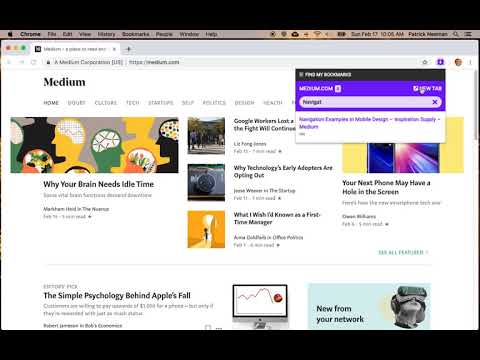
Ever visit a website and wish you could find you bookmarked there and manage your Chrome bookmarks easily? Find My Bookmarks Chrome Extension locates your bookmarks for the current site you are on automatically. An icon appears giving you single click access to bookmarks that match so you can search and browse your Chrome bookmarks. Features: - View your Chrome bookmarks for the current site - Search your Chrome bookmarks to narrow the list - Open found Chrome bookmarks in a new tab - Share bookmarks through email and social media - Delete bookmarks at a single click Found a bug? Want a feature? Go to the 'Details' tab and click on 'Support'.

Details

  • Version
    1.3.1
  • Updated
    September 11, 2026
  • Size
    46.24KiB
  • Languages
    English
  • Developer
    Patrick Neeman
    606 2nd Ave 303 Seattle, WA 98104 US
    Website
    Email
    extendchrome@gmail.com
  • Non-trader
    This developer has not identified itself as a trader. For consumers in the European Union, please note that consumer rights do not apply to contracts between you and this developer.

Privacy

Manage extensions and learn how they're being used in your organization
The developer has disclosed that it will not collect or use your data. To learn more, see the developer’s privacy policy.

This developer declares that your data is

  • Not being sold to third parties, outside of the approved use cases
  • Not being used or transferred for purposes that are unrelated to the item's core functionality
  • Not being used or transferred to determine creditworthiness or for lending purposes

Support

Related

Bookmarks Button

4.4

Opens Bookmarks tab in single click from toolbar and context menu. Options available to change icon, use custom icon, etc

Bookmark Pro

4.5

Save native bookmarks in Chrome faster.

SuperSorter

3.6

Clean up your bookmark mess! Sort bookmarks automatically, delete duplicates, merge folders, etc.

Bookmark Search

4.4

Search for bookmarks from the omnibox.

Bookmark Manager and Viewer

3.9

An elegant bookmark manager with fuzzy search and more

Popup my Bookmarks

4.5

A more efficient way to view and manage your bookmarks menu.

Awesome Window & Tab Manager

3.8

Displays a list of all windows and tabs open in Google Chrome. Allows filtering, sorting, refreshing, bookmarking, and saving.

Finder Bookmarks

4.4

A bookmarks manager like macOS Finder.

Awesome Button Bar

4.1

Button bar, combining downloads, bookmarks, extensions, history, view source, print, and more from a single button. Awesome!

Super Focus Tabs

3.8

Quickly find out tab/page. Reduce much more time while working with multiple tabs/pages.

Minimal Bookmarks Tree

4.5

Display a tree of bookmarks under a toolbar button, and search your bookmarks in the omnibox using the keyword 'bm'.

Visual bookmarks

4.6

Simple speed dial bookmarks page, including search, add, edit, delete and dragging bookmarks.

Bookmarks Button

4.4

Opens Bookmarks tab in single click from toolbar and context menu. Options available to change icon, use custom icon, etc

Bookmark Pro

4.5

Save native bookmarks in Chrome faster.

SuperSorter

3.6

Clean up your bookmark mess! Sort bookmarks automatically, delete duplicates, merge folders, etc.

Bookmark Search

4.4

Search for bookmarks from the omnibox.

Bookmark Manager and Viewer

3.9

An elegant bookmark manager with fuzzy search and more

Popup my Bookmarks

4.5

A more efficient way to view and manage your bookmarks menu.

Awesome Window & Tab Manager

3.8

Displays a list of all windows and tabs open in Google Chrome. Allows filtering, sorting, refreshing, bookmarking, and saving.

Finder Bookmarks

4.4

A bookmarks manager like macOS Finder.

Google apps