

FillKaro: Form Autofill & Form Filler

Overview
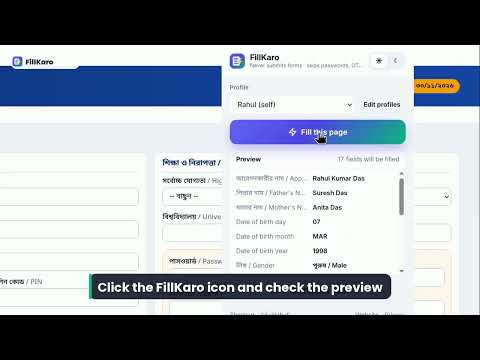
Free unlimited form autofill from saved profiles. No account, data stays on your device. Works with Indian exam and job forms.
Tired of typing the same name, date of birth, address and PIN into every application form? FillKaro saves your details once and fills web forms in one click — and it never submits anything for you. Built for long Indian forms: government exam and job applications, admission, scholarship and registration forms, and modern React/Angular websites. WHAT IT DOES • One-click fill: text boxes, dropdowns, radio buttons and checkboxes • Preview first: the popup shows which fields were found and what will go in them • Understands form labels in English and 11 Indian languages, including Hindi, Bengali, Tamil, Telugu and Marathi (पिता का नाम, জন্ম তারিখ …), plus common labels in Spanish, French, German, Arabic and more • Interface available in 22 languages • Dates in any format: DD/MM/YYYY, separate day/month/year dropdowns, “MAR” or “March”, date pickers • Works inside frames and modern single-page apps • Teach a field: right-click an unusual field → “Teach this field”, and FillKaro remembers it for that site • Keyboard shortcut (Alt+Shift+F) and right-click menu • Up to 3 profiles (for you and family members) • Light and dark themes SAFE BY DESIGN • Never clicks Submit, Next or Pay — you review and submit yourself • Never fills password, OTP, captcha or card/payment fields • Never ticks declaration checkboxes • ID numbers (Aadhaar, PAN etc.) are off by default; if you turn them on they are shown masked • Only runs on the tab you choose, when you click Fill, press the shortcut or use the menu PRIVATE • No account, no servers, no analytics, no tracking • Makes no network requests at all; your profiles stay in your browser’s local extension storage • Remove the extension to delete everything Free: unlimited fills, up to 3 profiles. FillKaro is an independent tool and is not affiliated with any government body, exam board or website. Always check filled details against your documents before submitting. Privacy policy: https://kadirlaskar012.github.io/fillkaro/privacy.html Website: https://kadirlaskar012.github.io/fillkaro/
0 out of 5No ratings
Details
- Version1.0.0
- UpdatedOctober 26, 2026
- Offered byKadir Laskar
- Size160KiB
- Languages22 languages
- DeveloperIndividual
Bazarpara Panarath uluberia howra bazarpara panarath Howrah, West Bengal 711316 INEmail
kadirlaskar012@gmail.com - Non-traderThis developer has not identified itself as a trader. For consumers in the European Union, please note that consumer rights do not apply to contracts between you and this developer.
Privacy

FillKaro: Form Autofill & Form Filler has disclosed the following information regarding the collection and usage of your data. More detailed information can be found in the developer's privacy policy.
FillKaro: Form Autofill & Form Filler handles the following:
This developer declares that your data is
- Not being sold to third parties, outside of the approved use cases
- Not being used or transferred for purposes that are unrelated to the item's core functionality
- Not being used or transferred to determine creditworthiness or for lending purposes
Support
For help with questions, suggestions, or problems, visit the developer's support site