Item logo image for FillHistory

FillHistory

5.0(

2 ratings

)
Item video thumbnail

Overview

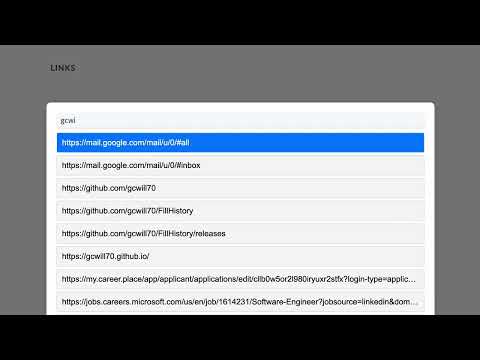
Quickly fill in links from browser history.

How to use: 1. To open the search window, you can: a. Right-click on the page and select "Search Links" b. Use the keyboard shortcut (defaults to `Ctrl+Shift+K`) 2. Start typing to search through history. 3. Use keyboard arrows to highlight the result you want. 4. Once you have the result selected, you can: a. Press `Enter` to insert the link into the text box (will copy to clipboard if nothing is selected) b. Click the clipboard icon to copy the link. c. Click the arrow icon to open the link in a new tab.

Details

  • Version
    2.0.0
  • Updated
    February 4, 2025
  • Features
    Offers in-app purchases
  • Offered by
    Geoffrey Cramer
  • Size
    104KiB
  • Languages
    English
  • Developer
    Email
    gcwill70@gmail.com
  • Non-trader
    This developer has not identified itself as a trader. For consumers in the European Union, please note that consumer rights do not apply to contracts between you and this developer.

Privacy

The developer has disclosed that it will not collect or use your data.

This developer declares that your data is

  • Not being sold to third parties, outside of the approved use cases
  • Not being used or transferred for purposes that are unrelated to the item's core functionality
  • Not being used or transferred to determine creditworthiness or for lending purposes

Support

For help with questions, suggestions, or problems, visit the developer's support site

Related

Links Panel

3.7

Collate all the links on the page into an easily accessible panel

Historium - Browser History Manager

5.0

Your complete browser history, beautifully organized.

Search Select

5.0

Navigate and view search results quickly with shortcuts.

Quick Find for Google Chrome™

4.1

Port of Firefox Quick Find features + awesome new ones. Search results in one location. Navigate to links in just a few keystrokes.

History Shortcut

5.0

Quick access button to the history page

Onlyshortcuts - Quick access to links with shortcuts

3.8

Reach frequently used web links faster by using pre-set, easy-to-remember shortcuts instead of typing out the full URL.

Delete Specific Websites History

4.2

Quickly deletes specific websites history from your browser.

Quick Chrome History Export

5.0

Effortlessly export your Chrome history with Quick Chrome History Export extension.

Clear History

3.9

Quickly clears the browser history.

Site History Express: Quick Navigate

5.0

Quickly access recently visited pages on the current site.

Full Text Tabs Forever

4.3

Search your full browsing history

Taby

5.0

Quickly move between tabs, bookmarks and history

Links Panel

3.7

Collate all the links on the page into an easily accessible panel

Historium - Browser History Manager

5.0

Your complete browser history, beautifully organized.

Search Select

5.0

Navigate and view search results quickly with shortcuts.

Quick Find for Google Chrome™

4.1

Port of Firefox Quick Find features + awesome new ones. Search results in one location. Navigate to links in just a few keystrokes.

History Shortcut

5.0

Quick access button to the history page

Onlyshortcuts - Quick access to links with shortcuts

3.8

Reach frequently used web links faster by using pre-set, easy-to-remember shortcuts instead of typing out the full URL.

Delete Specific Websites History

4.2

Quickly deletes specific websites history from your browser.

Quick Chrome History Export

5.0

Effortlessly export your Chrome history with Quick Chrome History Export extension.

Google apps