

Fillhand: Excel to Web Form Autofill & Data Entry

Overview
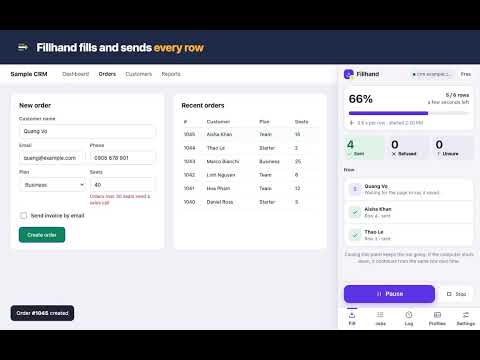
Form filler & data entry: upload Excel/CSV and fill any web form, row by row. Free 250 rows a month, no macro needed.
Free: 250 rows from files every month. Pro from $8.99/month, Team from $4.99/user/month. Paid plans are sold by Polar (our reseller), not by Google. Pricing: https://macappkit.com/chrome/fillhand/pricing.html · Terms & refunds: https://macappkit.com/chrome/fillhand/terms.html · Privacy: https://macappkit.com/chrome/fillhand/privacy.html The free plan needs an internet connection to count its rows. Fillhand fills web forms from your own Excel or CSV file — your data, into forms you are allowed to use. Open the page with the form, drop the file into the side panel and press one button: Fillhand matches each column to a field, fills and submits row after row, and tells you which rows went in (✓), which the page refused (✗) and which need a look (?). No row is ever sent twice. Check and fix your data before the run • Finds empty required cells, values that are not in a dropdown, wrong formats, duplicate rows and Excel errors — each with a one-click fix or "skip these rows". • Cleans common mess: phone numbers, money written in words, dates in mixed styles, name capitalisation, cells that should repeat the value above, find & replace, addresses split into province / district / ward. • Converts data to what the form wants: map values (Yes → Có), split or join columns, set a fixed value, change date and number formats. Every change can be undone; the original file is never modified. Runs that survive problems • Chrome closed or the computer slept mid-run? Open the panel and continue from the exact row. • A row failed? Fix it in the table and re-run only the failed rows. Export the results to CSV. • CAPTCHA? Fillhand pauses and notifies you; solve it yourself and the run continues. Fillhand never solves or bypasses CAPTCHAs. Beyond a single form • Record clicks, typing and choices once, replay them for every row — multi-step forms, pop-ups, new tabs. • Autofill profiles fill a site's form the moment it opens. • Handles hard forms: React/Vue widgets, searchable dropdowns, date pickers, rich editors, iframes. • Log tab: who ran what, which file, which rows went in. • For teams: IT can deploy shared jobs, settings and the licence with Chrome policy. Privacy Your files, jobs and profiles stay in your browser. The free plan sends a random install ID and the number of rows you ran to our server to count your 250 free rows per month. File contents, page names and form data never leave your computer. Paid plans and jobs without a file do not contact this server. Anonymous usage counts are sent only if you agree, and you can turn them off any time in Settings. Licence keys are checked with Polar. Plans Free — 250 rows from files every month. Loops and recording without a file stay unlimited. 5 jobs, 5 profiles. Pro — $8.99/month, $69/year or $99 once: no row limit, unlimited jobs and profiles, sync through your Chrome account, CSV export, schedules. 2 computers per key. Team — $4.99 per user per month from 3 users ($7.49 per user for 1–2 users): Pro for everyone, admin settings, shared jobs, one invoice. Refund within 14 days, no questions asked. Cancel any time from the Polar customer portal.
0 out of 5No ratings
Details
- Version2.0.0
- UpdatedNovember 25, 2026
- Size618KiB
- Languages18 languages
- DeveloperTrịnh Đình HoàngWebsite
Chợ Bãi Sim - Thôn Văn Ổ - Xã Đại Đồng - Tỉnh Hưng Yên Chợ Bãi Sim - Thôn Văn Ổ - Xã Đại Đồng - Tỉnh Hưng Yên Hưng Yên, Hưng Yên 17000 VNEmail
hoanghoang29031993@gmail.comPhone
+84 865 156 680 - TraderThis developer has identified itself as a trader per the definition from the European Union and committed to only offer products or services that comply with EU laws.
Privacy

Fillhand: Excel to Web Form Autofill & Data Entry has disclosed the following information regarding the collection and usage of your data. More detailed information can be found in the developer's privacy policy.
Fillhand: Excel to Web Form Autofill & Data Entry handles the following:
This developer declares that your data is
- Not being sold to third parties, outside of the approved use cases
- Not being used or transferred for purposes that are unrelated to the item's core functionality
- Not being used or transferred to determine creditworthiness or for lending purposes
Support
For help with questions, suggestions, or problems, visit the developer's support site