


Overview
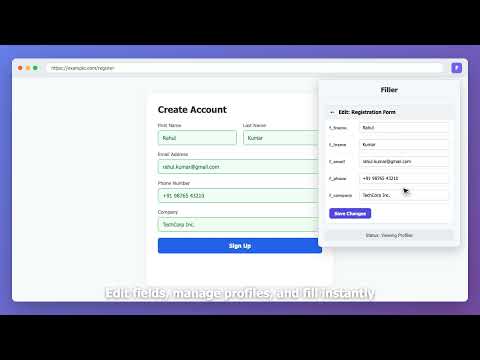
Fill forms with fake data, save profiles, and refill instantly.
Filler — The fastest way to fill, save, and refill forms. Filler helps developers, QA engineers, and anyone filling repetitive forms save time with realistic fake data, reusable profiles, and smart autofill tools. FEATURES Fill Forms Instantly - One click to fill visible fields with realistic fake data - Detects common field types automatically: name, email, phone, address, password, date, company, card fields, and more - Works with modern websites and frameworks, including React-style inputs and custom form UIs - Can fill file inputs with sample files for testing Save, Refill, and Organize Profiles - Save any filled form as a named profile - Refill forms instantly from saved profiles - View profile title, URL, field count, group, and saved date - Organize profiles into groups - Pause inactive profiles without deleting them - Edit saved text, checkboxes, radio buttons, files, and dynamic template values inline My Data and Smart Rules - Fill forms with your own saved values instead of random data - Use My Data only, or fall back to fake data when needed - Add keyword-based text mappings for faster personalized fills - Create conditional rules to auto-fill, clear, skip, or generate values based on other field values - Use the visual rule builder to pick fields directly from the page Custom Settings - Choose country-based data for phone numbers, cities, states, postal codes, and country names - Supported countries: US, UK, India, Australia, Germany, Japan, Brazil, Canada, France - Choose an email domain or use your own custom domain - Set custom first names, last names, usernames, and company names - Control password strength, gender mix, date range, number range, text length, phone format, and fill delay Fast Access - Right-click any page to fill with fake data - Fill from saved profiles directly from the context menu - Use keyboard shortcuts to fill forms or save the current form - Turn on inspect mode to see detected field details while testing Backup and Privacy - Import and export profiles, settings, rules, and My Data as JSON backups - All data is stored locally in your browser - Nothing is sent to any server - No analytics, no tracking, no accounts PERFECT FOR - Frontend developers testing forms - QA engineers running test scenarios - Teams reusing profile-based test data - Anyone filling repetitive registrations, applications, and checkout flows Lightweight. Fast. Private.
5 out of 52 ratings
Details
- Version1.2.0
- UpdatedApril 23, 2026
- Size79.95KiB
- LanguagesEnglish
- DeveloperWebsite
Email
prajapatipratik460@gmail.com - Non-traderThis developer has not identified itself as a trader. For consumers in the European Union, please note that consumer rights do not apply to contracts between you and this developer.
Privacy

This developer declares that your data is
- Not being sold to third parties, outside of the approved use cases
- Not being used or transferred for purposes that are unrelated to the item's core functionality
- Not being used or transferred to determine creditworthiness or for lending purposes