


Overview
Fill web forms and PDFs on any site with one click using prompts or snippets. Automate workflows & data entry with Agent Mode.
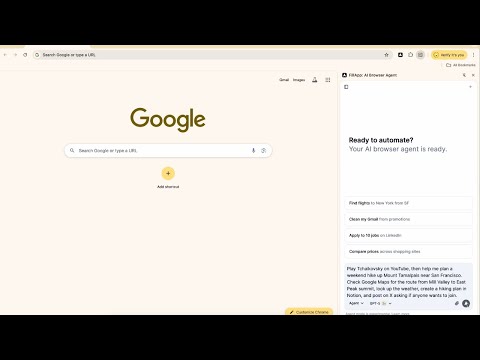
Fill web forms, PDF forms, and automate browser workflows in your Browser with AI. FillApp runs inside your browser session. Save your data as snippets, then fill any form on any site with one click. For bigger tasks, Agent Mode plans and runs multi-step workflows across tabs, with every action visible on screen. What FillApp does • Fill Mode: Fill web forms and browser-embedded PDF forms in one click using saved snippets or a short text prompt. Supports text fields, dropdowns, checkboxes, date fields, and long text blocks. • Agent Mode: Describe a task in plain text. FillApp plans the steps, opens the tabs it needs, clicks, types, uploads files, submits forms, and shows every action on screen as it runs. Works across multiple sites in a single task. You can pause or stop at any point. • Assist Mode: Read a page, PDF, or image and pull out the data you need. Use the extracted fields directly in a fill or agent task. Key features • Reusable snippets for any data you enter repeatedly across forms and sites • File uploads handled as part of automated workflows • Multi-tab navigation, clicking, typing, and form submission in a single agent task • Side panel workspace for chat, screenshots, and file attachments • Runs in your existing browser session, no credential sharing needed • Confirmation prompts before sensitive actions like submitting or deleting Privacy and control FillApp operates entirely inside your browser. It does not run background monitoring and does not store or transmit your session data. You control what gets automated, when it runs, and when it stops. Start with the free trial, fill a few forms, then automate a full workflow when you are ready.`
4.4 out of 522 ratings
Details
- Version2.2.9
- UpdatedOctober 24, 2026
- Offered byFillApp
- Size13.52MiB
- LanguagesEnglish
- Developer
Email
hello@fillapp.ai - Non-traderThis developer has not identified itself as a trader. For consumers in the European Union, please note that consumer rights do not apply to contracts between you and this developer.
Privacy

FillApp: AI Form Filler & Data Entry has disclosed the following information regarding the collection and usage of your data. More detailed information can be found in the developer's privacy policy.
FillApp: AI Form Filler & Data Entry handles the following:
This developer declares that your data is
- Not being sold to third parties, outside of the approved use cases
- Not being used or transferred for purposes that are unrelated to the item's core functionality
- Not being used or transferred to determine creditworthiness or for lending purposes
Support
For help with questions, suggestions, or problems, please open this page on your desktop browser