


概述
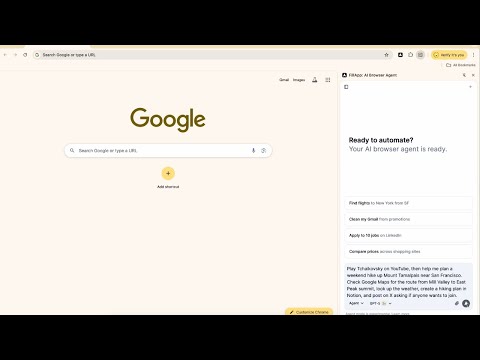
AI browser agent that runs in your session. Fill forms, automate multi-tab workflows, handle data entry, and summarize content.
Fill forms and automate browser tasks, right where you work FillApp is an AI assistant that completes forms and multi-step web workflows in your own browser session. It shows every action on screen so you stay in control while the busywork gets done. What it does • Fill Mode: one-click, precise form completion from your saved snippets or a short prompt. • Agent Mode: plans and executes multi-step tasks across tabs with a visible cursor trail and step previews. • Assist Mode: summarizes pages, PDFs, and images, and extracts fields you can reuse while filling. What you get • Time back from repetitive data entry and copy-paste. • Fewer context switches thanks to automation that runs inside the pages you already use. • Full visibility and control with confirmations for sensitive steps and the ability to pause or stop anytime. Key features • Reusable Snippets for consistent data across forms. • Multi-tab automation that navigates, clicks, types, uploads, and submits when instructed. • Side panel workspace for chat, screenshots, and files. • Works broadly across modern websites and web apps without custom integrations. • Clear action logs you can review and export. How it works When you open a compatible page, you’ll see an Ask AI or Fill with AI button. Click it to open the FillApp Assistant in the browser side panel. Choose Fill, Agent, or Assist, give a short instruction or pick a snippet, then watch each step with on-screen highlights. You approve before anything critical happens. Privacy and control FillApp operates in your browser session. It does not require sharing credentials and does not run silent background monitoring. You decide what to automate, when to confirm, and when to stop. Start free, explore simple fills, then level up to multi-step workflows when you’re ready.
4.5 星(5 星制)17 个评分
详情
- 版本2.0.4
- 上次更新日期2026年3月29日
- 提供方FillApp
- 大小2.47MiB
- 语言English
- 开发者
邮箱
hello@fillapp.ai - 非交易者该开发者尚未将自己标识为交易者。欧盟地区消费者须知:消费者权利可能不适用于您与该开发者达成的合约。
隐私权

“FillApp: AI Browser Agent”已就收集和使用用户数据披露了以下信息。 如需了解详情,请查看开发者的privacy policy。
FillApp: AI Browser Agent会处理以下数据:
该开发者已声明,您的数据:
- 不会因未获批准的用途出售给第三方
- 不会为实现与产品核心功能无关的目的而使用或转移
- 不会为确定信用度或放贷目的而使用或转移
支持
若有任何疑问、建议或问题,请在桌面浏览器中打开此页面