

Fill2Form — Fill Form, Scan, Photo in PDF or JPG: detect fields, enter data

Overview
AI form filler online. Fill in the form fields in the PDF or JPG. Submit, print or download the form after you’ve filled it out.
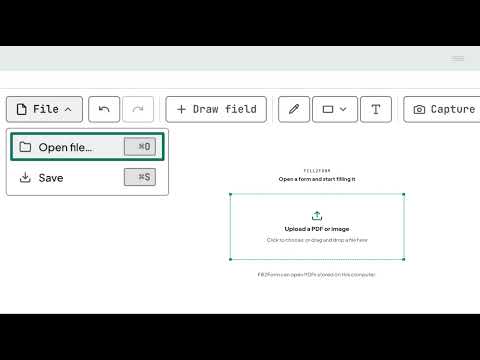
⭐️ What is Fill2Form Fill2Form is an AI Chrome extension that turns any PDF or JPG you open in your browser into a fillable form. Fill in forms, letterheads and stationery in one click. It detects fields and inputs in scans, photos and documents. ⭐️ How it works Fill2Form uses computer vision to find every text input, checkbox and signature line on the page, even on scanned or "flat" PDFs that were never made as interactive forms, and lets you type straight onto the document. The finished PDF downloads to your computer as a normal file, with no upload to a third-party storage service. ⭐️ How to fill in forms with Fill2Form 1. Open any PDF in Chrome. A small banner appears at the top, offering "Open in Fill2Form". 2. Click it, and the viewer takes over. Every detected field (text input, checkbox, signature line) gets a coloured rectangle on the page. 3. Fill it in. Click a rectangle to type, or tick a box. A side panel lists every field, so you can also tab through them. 4. Download. Click "Fill & download PDF" and you get a clean, filled-in PDF. That's all there is to it. No wasted time, and no uploads to third parties. ⭐️ Why you need Fill2Form You've opened a PDF or PNG in your browser. It has empty boxes you need to fill in: a tax return, a bank application or a school enrolment form. The usual options aren't great: • Print it, fill it in by hand and scan it back. Slow, and the result looks messy. • Download a 40 MB PDF editor. Overkill for a single form. • Try a "fillable" PDF viewer. Most only work if the form was built with interactive fields, which scanned and flat PDFs don't have. Fill2Form fixes this. It detects every field on any PDF, fillable or not, and lets you type straight onto the page. One minute, and it's done and downloaded. ⭐️ Fill2Form's advantages • No uploads • No sign-up • No wasted time • Quick • Easy With Fill2Form you can: 💻 Fill in forms online in PDF or SVG and other formats. ✏️ Edit fields and add text to photos, scans and flat documents. ℹ️ Complete PDF forms online in your browser in one click. 📄 Download, print, send and share the completed form. ✍️ Redo forms with errors, correct typos, make changes and update them. 📁 Open any PDF or JPG from a link, an email attachment or a file on your computer. ⭐️ What types of forms does Fill2Form support? Complete any form you want. You can fill in a job application, edit a franchise agreement or modify a Schengen visa application. The AI form filler supports root cause analysis (RCA) reports, letters of recommendation or grant applications. Smart tool works with partnership deeds, letters of intent for startup investment, rental applications and more. Use it to fill in PDF documents such as Form 1149 (Visitor Visa 600), the SS-5 application, birth certificates or transfer of registration forms. ⭐️ FAQ What can you do with the AI form filler? Fill in, edit, modify, revise, correct and update forms. What file types does the AI form filler support? PDF, PNG and other formats. How do I use Fill2Form? Upload a form in PDF or JPG format. Fill2Form recognises the fields automatically. Then just enter your details, review the form and download it. How does the AI form filler work? It recognises the form's fields and makes them editable. Once you've filled them in, you can download the finished PDF. What kind of information can I enter in the form? Text, dates, numbers, addresses, currency amounts and more. Are there any file size limits? No. Fill in any forms you need. Can I use Fill2Form to edit a form and correct a mistake in a field? Yes. You can upload forms that are already filled in, as well as templates and samples, edit them and add the information you need. Is my data safe? Yes. The form is filled in right in your browser. Completed pages are not sent to our servers. Can I fill in a scanned form with hard-to-read fields? Yes. Fill2Form detects fields even in low-quality images. Can Fill2Form fill in a form with 10, 40 or more pages? Yes. You can fill in forms with any number of pages and fields, depending on your plan. Privacy policy: https://fill2form.tugmake.com/privacy Terms of service: https://fill2form.tugmake.com/terms
0 out of 5No ratings
Details
- Version1.0.16
- UpdatedOctober 23, 2026
- Size6.85MiB
- Languages7 languages
- DeveloperWebsite
Email
support@tugmake.com - Non-traderThis developer has not identified itself as a trader. For consumers in the European Union, please note that consumer rights do not apply to contracts between you and this developer.
Privacy

Fill2Form — Fill Form, Scan, Photo in PDF or JPG: detect fields, enter data has disclosed the following information regarding the collection and usage of your data. More detailed information can be found in the developer's privacy policy.
Fill2Form — Fill Form, Scan, Photo in PDF or JPG: detect fields, enter data handles the following:
This developer declares that your data is
- Not being sold to third parties, outside of the approved use cases
- Not being used or transferred for purposes that are unrelated to the item's core functionality
- Not being used or transferred to determine creditworthiness or for lending purposes