

FileYourMail — Follow-up folders for Gmail

Overview
Organize Gmail with follow-up folders, useful email descriptions, and a calmer inbox.
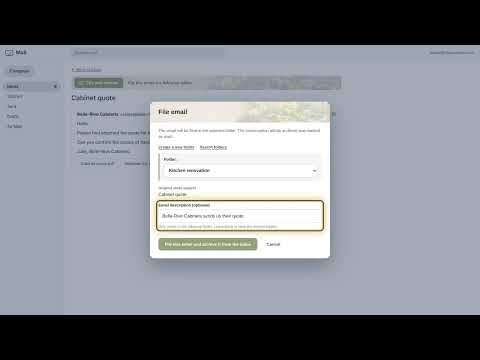
FileYourMail helps you organize Gmail by project. Create follow-up folders right in your inbox, then file and archive your emails in one step. Add a short description to each filed email: one sentence, in your own words, that sums up the email, so you can read the story of a folder at a glance. When the work is done, mark the folder as finished; you can reopen it at any time. WHAT YOU CAN DO • Create a follow-up folder for each client, project or topic. • File an email by dragging it onto a folder, or check several emails to file them all at once. • File your reply as you send it, together with the email you received if you want. • Find an email by its subject or its description, and see its attachments right next to the subject. • Turn a folder red with a right-click to spot your priorities. • Rename a sender whose name is unclear. • Choose from several themes, make the text larger, and pick one of six languages. • Find your folders and settings on each of your computers, with the same Google account. PRICE • Free for 30 days, no credit card required. All features are included. • Then US$1.99 per month or US$19.99 per year, plus applicable taxes. One subscription covers one Gmail account. • Without a subscription, your folders and filed emails stay viewable; filing new emails requires a subscription. • Secure payment through Link, Stripe's payment service. Cancel at any time. YOUR DATA STAYS WITH YOU FileYourMail runs in your browser. Your emails stay in Gmail: an archived email leaves the inbox, but it is never deleted. Your folder list is saved in a space reserved for FileYourMail in your own Google Drive. Our only server handles the free trial and the subscription: it never receives your emails. Help and video tutorial: https://fileyourmail.com/help/ Privacy policy: https://fileyourmail.com/privacy/
0 out of 5No ratings
Details
- Version2.7.129
- UpdatedNovember 23, 2026
- FeaturesOffers in-app purchases
- Offered byFileYourMail
- Size4.42MiB
- Languages2 languages
- DeveloperGabriel Dubois
4310 Principal Saint-Felix-De-Valoie, QC J0K 2M0 CAEmail
fileyourmail@gmail.com - Non-traderThis developer has not identified itself as a trader. For consumers in the European Union, please note that consumer rights do not apply to contracts between you and this developer.
Privacy

FileYourMail — Follow-up folders for Gmail has disclosed the following information regarding the collection and usage of your data. More detailed information can be found in the developer's privacy policy.
FileYourMail — Follow-up folders for Gmail handles the following:
This developer declares that your data is
- Not being sold to third parties, outside of the approved use cases
- Not being used or transferred for purposes that are unrelated to the item's core functionality
- Not being used or transferred to determine creditworthiness or for lending purposes