

FilePaster

Overview
Copy files and folders from Google Drive, Dropbox, OneDrive or SharePoint. Paste into any website or a folder on your computer.
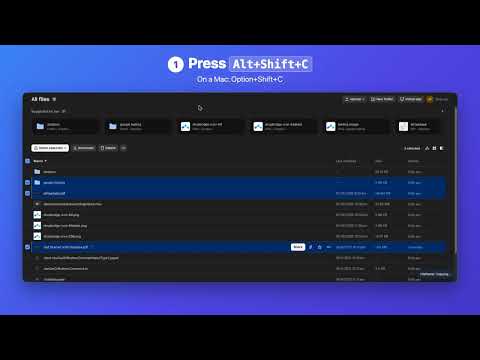
Copy from any cloud drive. Paste anywhere. FilePaster adds copy and paste for your files in Google Drive, Dropbox, OneDrive and SharePoint (work and school accounts too). Stop downloading files just to upload them again: • Paste into any website: Gmail, Slack, ChatGPT, a client's upload form. Click the upload box, press the paste shortcut, done. No Downloads folder in between. • Folders work too: websites get a folder as one .zip. • Drag and drop: drag files from your drive onto another tab's upload box or an email you're writing, and drag images from any website into another as real image files. • Every drive your clients use, one shortcut: Google Drive, Dropbox, OneDrive and SharePoint all work the same way. No new dashboard, no account to create. • Instant: files and whole folders copy in one keypress with the sign-ins already in your browser. No sign-in screens, no permissions to grant. • Private by design: FilePaster only downloads what you copy or drag, and there is no FilePaster server your files pass through. HOW IT WORKS 1. In Google Drive, Dropbox, OneDrive or SharePoint, select files or folders and press Alt+Shift+C (Option+Shift+C on a Mac). 2. That's it: the files (and everything inside folders) are ready to paste. 3. Click a website's upload box and press Alt+Shift+V (Option+Shift+V on a Mac). You can also save copied files into a folder on your computer from the FilePaster menu. Pasting with ⌘V / Ctrl+V straight into Finder or File Explorer needs the small FilePaster Helper app, coming soon. PRICING 7-day free trial with full access, no card needed. Then $29 USD per year. Cancel anytime. Google Docs, Sheets, Slides and Drawings are saved as Word, Excel, PowerPoint and PNG files. Google Forms and Sites, and Dropbox Paper docs, have no file to save and are skipped. Website pastes are limited to 1 GB at a time. Questions: support@filepaster.com · https://filepaster.com
0 out of 5No ratings
Details
- Version1.0.1
- UpdatedNovember 6, 2026
- Offered byparinjoed@gmail.com
- Size92.29KiB
- LanguagesEnglish
- DeveloperJoed Zara Parin
BLK 33 LOT 47 PALOMA STREET GRAND OAKRIDGE ANTEL VILLAGE General Trias, Cavite 4107 PHEmail
ezalorsara@gmail.comPhone
+63 915 607 0154 - TraderThis developer has identified itself as a trader per the definition from the European Union and committed to only offer products or services that comply with EU laws.
Privacy

FilePaster has disclosed the following information regarding the collection and usage of your data. More detailed information can be found in the developer's privacy policy.
FilePaster handles the following:
This developer declares that your data is
- Not being sold to third parties, outside of the approved use cases
- Not being used or transferred for purposes that are unrelated to the item's core functionality
- Not being used or transferred to determine creditworthiness or for lending purposes
Support
For help with questions, suggestions, or problems, visit the developer's support site