Item logo image for File Viewer — Markdown, JSON

File Viewer — Markdown, JSON

partnerflow.co.za
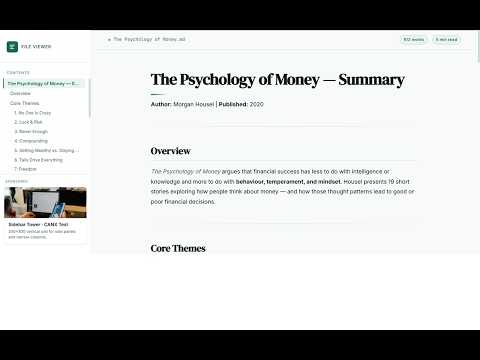
Item media 3 (screenshot) for File Viewer — Markdown, JSON
Item video thumbnail
Item media 2 (screenshot) for File Viewer — Markdown, JSON
Item media 3 (screenshot) for File Viewer — Markdown, JSON
Item video thumbnail
Item media 2 (screenshot) for File Viewer — Markdown, JSON
Item media 3 (screenshot) for File Viewer — Markdown, JSON

Overview

Polished viewer for local .md and .json files, with cloud storage and Google sign-in.

File Viewer turns plain .md and .json files in Chrome into a readable, polished experience—whether you open them from disk or manage them in the cloud. LOCAL FILES • Open any file:// Markdown or JSON page in Chrome • Clean typography, table of contents for headings, and structured JSON panels • Works when you browse to local files or open them from your machine CLOUD DASHBOARD • Sign in with Google to save and edit files in your personal dashboard • Same viewer UI for cloud previews as for local files • Organize and update content without leaving the extension SHARE LINKS • Generate public share links from the dashboard • Recipients open a read-only view on the File Viewer website—no account required • Ideal for docs, configs, and notes you want to send as a link GETTING STARTED 1. Install the extension and click the toolbar icon. 2. Sign in with Google to open your dashboard, or open a local .md / .json file in Chrome. 3. Use Share on a cloud file to copy a link you can send to others. Account required only for cloud storage and sharing. Local file viewing does not require sign-in. Built by PartnerFlow. Cloud sync uses Supabase; sign-in uses Google OAuth.

Details

  • Version
    1.1.0
  • Updated
    June 5, 2026
  • Size
    1.17MiB
  • Languages
    English
  • Developer
    Website
    Email
    beukzgroup@outlook.com
  • Non-trader
    This developer has not identified itself as a trader. For consumers in the European Union, please note that consumer rights do not apply to contracts between you and this developer.

Privacy

Manage extensions and learn how they're being used in your organization

File Viewer — Markdown, JSON has disclosed the following information regarding the collection and usage of your data. More detailed information can be found in the developer's privacy policy.

File Viewer — Markdown, JSON handles the following:

Personally identifiable information
Authentication information
Website content

This developer declares that your data is

  • Not being sold to third parties, outside of the approved use cases
  • Not being used or transferred for purposes that are unrelated to the item's core functionality
  • Not being used or transferred to determine creditworthiness or for lending purposes

Support

Related

CloudClip – Multicopy Clipboard History Manager with Dark Mode & CSV Export

5.0

CloudClip saves copied text, lets you search, reuse, delete, and export as CSV. Works offline with local storage and no tracking

Bookshelf: Folder Manager for NotebookLM

4.3

Add folders, subfolders & cloud sync to NotebookLM. Drag-and-drop, search, sort, dark mode, export/import. Tile & list view.

GitHub Raw HTML Preview

0.0

Preview HTML, CSS, JS, and JSON files from GitHub repositories with a single click.

Cloud File Viewer

5.0

Chrome extension for easy file viewing on Google Cloud Storage with improved UI, stats, pagination, and search features.

JSON Viewer – Visualize JSON as Interactive Graphs

4.0

Visualize JSON data with the JSON Viewer Extension! Explore structures in a dynamic graph, with zoom, pan, and export features

Prompt Library - One-Click Hub

5.0

Store and manage AI prompts. Collections, favorites, copy to clipboard, search. Export/import JSON.

GBTools - LocalStorage JSON Exporter

5.0

GBTools - LocalStorage JSON Exporter

Tab Cluster

4.7

Organize your tabs with drag & drop, search, merge windows, deduplicate, and restore recently closed tabs. All local, no cloud.

Markdown Chrome

5.0

View, edit, and save local Markdown files with Mermaid preview.

Bookmark with full page screenshots - YesKeeper Clipper

4.8

Save full page snapshots, links, text to cloud with one click. Sync and back up bookmarks. View and manage them in the sidebar.

Storage Area Viewer

4.6

A storage area viewer for chrome.storage, support local, sync, session and managed

Keep to Markdown Export

5.0

Export Google Keep note to Markdown file.

CloudClip – Multicopy Clipboard History Manager with Dark Mode & CSV Export

5.0

CloudClip saves copied text, lets you search, reuse, delete, and export as CSV. Works offline with local storage and no tracking

Bookshelf: Folder Manager for NotebookLM

4.3

Add folders, subfolders & cloud sync to NotebookLM. Drag-and-drop, search, sort, dark mode, export/import. Tile & list view.

GitHub Raw HTML Preview

0.0

Preview HTML, CSS, JS, and JSON files from GitHub repositories with a single click.

Cloud File Viewer

5.0

Chrome extension for easy file viewing on Google Cloud Storage with improved UI, stats, pagination, and search features.

JSON Viewer – Visualize JSON as Interactive Graphs

4.0

Visualize JSON data with the JSON Viewer Extension! Explore structures in a dynamic graph, with zoom, pan, and export features

Prompt Library - One-Click Hub

5.0

Store and manage AI prompts. Collections, favorites, copy to clipboard, search. Export/import JSON.

GBTools - LocalStorage JSON Exporter

5.0

GBTools - LocalStorage JSON Exporter

Tab Cluster

4.7

Organize your tabs with drag & drop, search, merge windows, deduplicate, and restore recently closed tabs. All local, no cloud.

Google apps