

Meeting Cost Ticker

Overview
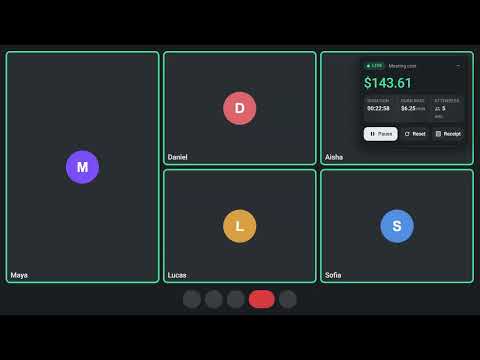
Overlays a live, ticking meeting cost counter on Google Meet calls.
See what your Google Meet call is really costing — live, second by second. Every meeting has a price: the time of everyone in it. Meeting Cost Ticker puts that number on screen with a small floating widget that counts up while you're in a call. It's a simple way to keep meetings short, focused and worth it. WHAT YOU SEE • Total cost of the meeting, updating live • Meeting timer (hh:mm:ss) • Burn rate per minute • Number of attendees HOW IT WORKS • Set the average hourly rate per person and your currency ($, € or £) • Attendees are counted automatically from the call, or you can set the number yourself • Cost per second = attendees × hourly rate ÷ 3600 • The counter starts when you join, pauses when you leave and picks up again if you rejoin • Reloading the tab doesn't lose the total CONTROLS • Pause / Resume • Reset (asks for confirmation) • Copy Receipt: copies a one-line summary you can paste into chat or email, for example: 📊 Meeting Cost Report: $340.00 | Duration: 42m | Attendees: 8 | Avg Rate: $60/hr • Minimize to a small pill that shows only the total • Drag the widget anywhere on the screen; it remembers where you put it PRIVACY • Everything stays on your computer. No account, no tracking, no data sent anywhere. • The extension only runs on meet.google.com. TIP Use a "fully loaded" hourly rate (salary plus taxes and overhead) to get a realistic cost. Meeting Cost Ticker is an independent tool and is not affiliated with or endorsed by Google. Google Meet is a trademark of Google LLC.
0 out of 5No ratings
Details
- Version2.0.3
- UpdatedOctober 25, 2026
- Offered byelmaidani.omar2013
- Size49.14KiB
- LanguagesEnglish
- Developer
Email
elmaidani.omar2013@gmail.com - Non-traderThis developer has not identified itself as a trader. For consumers in the European Union, please note that consumer rights do not apply to contracts between you and this developer.
Privacy

This developer declares that your data is
- Not being sold to third parties, outside of the approved use cases
- Not being used or transferred for purposes that are unrelated to the item's core functionality
- Not being used or transferred to determine creditworthiness or for lending purposes
Support
For help with questions, suggestions, or problems, please open this page on your desktop browser