

PrivyMermaid

Overview
Private, local-first diagram editor for Mermaid, D2, Graphviz & PlantUML. Generate, Ask & Fix with local LLM providers.
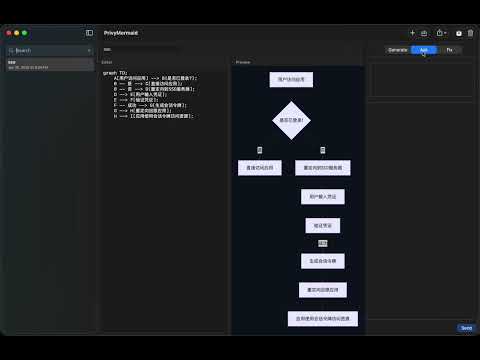
🔒 PrivyMermaid - Private Diagram Editor with Local AI PrivyMermaid is a local-first diagram editor for Mermaid, D2, Graphviz, and PlantUML. Generate diagrams from a description, edit in the editor, and use a local LLM provider (Ollama, LM Studio, or OpenAI-compatible) to ask, fix, or refactor—your diagrams and prompts never leave your machine. ━━━━━━━━━━━━━━━━━━━━━━━━━━━━━━━━━ ✨ KEY FEATURES 📐 Multi-Format Editor & Live Preview • Mermaid, D2, Graphviz, and PlantUML in one editor — pick the language per diagram • Edit diagram source in a resizable split-pane layout • Instant SVG preview with 10 diagram themes (Default, Dark, Forest, Neutral, Base, Ocean, Sunset, Violet, Mint, Midnight) • Independent preview background colors, zoom (50–200%), and a System/Day/Night app appearance mode • Validate diagrams before export • Export to SVG, PNG (configurable resolution up to 8192px), or the diagram's raw source 🤖 Local AI: Generate, Ask & Fix • Generate: describe what you want in natural language; get Mermaid code (flowchart, sequence, state, etc.) • Ask: questions about your diagram (local provider chat with diagram context) • Fix Diagram: paste broken Mermaid + error message, get corrected code • Refactor: improve readability while preserving meaning • Editable prompt templates in Settings → Prompt… 📁 Local-First & Organized • Multiple diagrams stored in chrome.storage.local • Search, open, delete, and organize diagrams into collapsible, reorderable groups • Opening the extension focuses your existing PrivyMermaid tab instead of piling up duplicates • No account, no cloud—everything stays on your device 🌍 Available in 10 Languages • The interface follows your browser language: English, Spanish, French, German, Brazilian Portuguese, Japanese, Korean, Simplified Chinese, Traditional Chinese, and Italian • Any other language falls back to English 🔒 Privacy First • All AI runs locally via your selected provider—no data sent to external servers • Mermaid, D2, Graphviz, and PlantUML rendering bundled for fully offline diagram rendering • Optional: use local AI only when you need Generate/Ask/Fix ━━━━━━━━━━━━━━━━━━━━━━━━━━━━━━━━━ 🚀 HOW IT WORKS 1. Install Ollama, LM Studio, or another local OpenAI-compatible provider (optional—for Generate/Ask/Fix features) 2. Open PrivyMermaid from the extension icon or Command+Shift+M (Ctrl+Shift+M) 3. Pick a diagram language (Mermaid, D2, Graphviz, or PlantUML), then either type/paste source for live preview, or use Generate: describe your diagram → Generate → Apply (Mermaid) 4. If a Mermaid render fails, use Fix tab → Fix Diagram to get corrected code from local AI 5. Export as SVG, PNG, or the diagram's source file ━━━━━━━━━━━━━━━━━━━━━━━━━━━━━━━━━ 🛠️ REQUIREMENTS • Chrome (Manifest V3) • Local AI provider (optional): Ollama at http://localhost:11434, LM Studio at http://localhost:1234/v1, or another OpenAI-compatible localhost endpoint ━━━━━━━━━━━━━━━━━━━━━━━━━━━━━━━━━ 💡 USE CASES • Generate Mermaid diagrams from a short description (flowchart, sequence, state, etc.) • Edit and preview Mermaid, D2, Graphviz, or PlantUML diagrams without leaving the browser • Fix broken Mermaid syntax with local AI • Refactor diagrams for readability • Organize diagrams by project or topic using groups • Export diagrams for docs or presentations (SVG, high-res PNG, or source) • Fully offline diagram editing (no CDN) ━━━━━━━━━━━━━━━━━━━━━━━━━━━━━━━━━ 🔐 PRIVACY COMMITMENT • No telemetry or analytics • No cloud services required for editing or preview • AI (Generate/Ask/Fix) runs only on your machine via your selected local provider • Your diagrams and prompts never leave your device ━━━━━━━━━━━━━━━━━━━━━━━━━━━━━━━━━ Perfect for developers and writers who value privacy and want a fast, local Mermaid/D2/Graphviz/PlantUML editor with optional AI help.
0 out of 5No ratings
Details
- Version0.4.7
- UpdatedAugust 28, 2026
- Offered byGuoyu Wang
- Size11.42MiB
- Languages10 languages
- Developer
Email
support@kenelite.com - Non-traderThis developer has not identified itself as a trader. For consumers in the European Union, please note that consumer rights do not apply to contracts between you and this developer.
Privacy

This developer declares that your data is
- Not being sold to third parties, outside of the approved use cases
- Not being used or transferred for purposes that are unrelated to the item's core functionality
- Not being used or transferred to determine creditworthiness or for lending purposes
Support
For help with questions, suggestions, or problems, please open this page on your desktop browser