


Overview
Analyze Turo markets with revenue, utilization, market value, opportunity scoring, vehicle comparisons, and ROI/profit modeling.
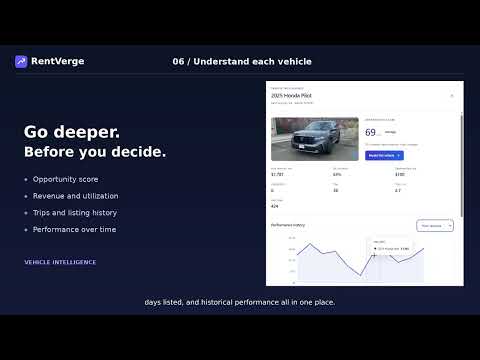
**RentVerge – Research Turo Markets. Compare Vehicles. Model Your Profit.** Stop jumping between Turo listings and spreadsheets. RentVerge turns vehicle search results into an organized market research workspace, helping current and aspiring Turo hosts compare rental opportunities and understand the numbers before investing. Whether you're researching your first rental vehicle or expanding an existing fleet, RentVerge brings market analysis, vehicle comparisons, revenue estimates, and financial projections together in one Chrome extension. **EXPLORE YOUR MARKET** Scan Turo search results and analyze multiple vehicles in one workspace. Discover estimated monthly host revenue, utilization, daily rental rates, trip history, and same-model competition. Filter and sort vehicles to narrow your search and identify opportunities worth investigating further. **COMPARE VEHICLES SIDE BY SIDE** Shortlist vehicles and compare their opportunity scores, estimated revenue, utilization, daily rates, market prices, and financial assumptions. Evaluate different vehicles using consistent metrics instead of switching between individual listings. **PROFIT LAB: UNDERSTAND THE NUMBERS** Explore potential profitability using adjustable financial assumptions: • Vehicle purchase price and down payment • Financing rates and loan terms • Estimated rental income and trip volume • Insurance, maintenance, and parking • Cleaning and other operating expenses • Depreciation and resale estimates Review estimated monthly cash flow, annual cash profit, and projected returns under different scenarios. **ANALYZE VEHICLE PERFORMANCE** Examine available historical performance and compare revenue, utilization, and daily-rate trends. Explore vehicle-level insights, trip history, estimated market value, and competition to support your research. **RESEARCH MORE EFFICIENTLY** • Vehicle opportunity scoring • Multiple scan sizes • Sortable market research tables • Vehicle comparisons • Custom financial assumptions • Market value estimates • Performance charts • CSV exports • Scan history **GET STARTED** 1. Install RentVerge. 2. Open Turo and search your target market. 3. Run a vehicle scan. 4. Explore market intelligence and compare vehicles. 5. Open Profit Lab to model potential cash flow. Start with the available free features and explore the paid plans for additional research capabilities. Visit https://rentverge.com/ to learn more. **IMPORTANT INFORMATION** Revenue, utilization, market values, scores, and profit projections are estimates derived from available data and user-defined assumptions. They are not guarantees of future earnings or investment performance. RentVerge is an independent research tool and is not affiliated with or endorsed by Turo.
0 out of 5No ratings
Details
- Version0.13.13
- UpdatedSeptember 27, 2026
- FeaturesOffers in-app purchases
- Size125KiB
- LanguagesEnglish (United States)
- DeveloperWebsite
Email
support@merchsignal.com - Non-traderThis developer has not identified itself as a trader. For consumers in the European Union, please note that consumer rights do not apply to contracts between you and this developer.
Privacy

RentVerge - Turo Market Analyzer has disclosed the following information regarding the collection and usage of your data. More detailed information can be found in the developer's privacy policy.
RentVerge - Turo Market Analyzer handles the following:
This developer declares that your data is
- Not being sold to third parties, outside of the approved use cases
- Not being used or transferred for purposes that are unrelated to the item's core functionality
- Not being used or transferred to determine creditworthiness or for lending purposes
Support
For help with questions, suggestions, or problems, visit the developer's support site