

Eden Recipes: Save & Cook

Overview
Read, save, and compare recipes. Cook step by step and make grocery lists.
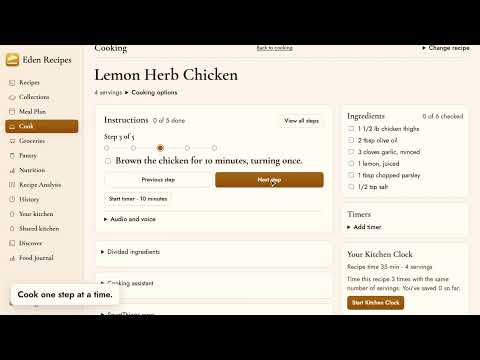
Save recipes from supported websites to your Recipe Box. Read the ingredients and directions beside the original page, add a note about what you changed, and open your copy the next time you cook. Recipes and collections - Type a recipe, paste its text, or scan a photo of a printed page. Review the ingredients and measurements before saving. - Import recipes from a supported file, or capture an available caption or transcript from a supported social post. On compatible devices, you can also translate recipes, read handwriting from a photo, or transcribe a supported audio clip up to 90 seconds long. - Organize recipes into collections. Add tags, ratings, and favorites, or link a dressing to the salad you serve it with. Filter by ingredient, publisher, time, calories, or protein. Print the filtered recipes as a recipe book. - Reopen the original recipe page to check for changes. Choose which updates to apply to your saved copy. Meal planning - Plan by day, week, or month. Find dinners by pantry ingredients, rating, or cooking time. Once you’ve timed the same recipe three times for the same number of servings, the planner can use your recorded times. - Set prep reminders, schedule leftovers or a meal from a frozen batch, reuse a favorite week, or export the week to your calendar. - If two recipes each call for a measured amount of chopped onion in the same unit, Prep Once can total the amounts and print a label showing each recipe’s share. Print a weekly meal plan with its grocery list and optional nutrition targets. Cooking - Follow one step at a time. Check off ingredients, highlight a direction, and run multiple timers. Where your browser supports it, keep the screen awake, hear a step aloud, or move to the next step by voice. - Convert supported measurements between U.S. and metric units. Split a measured ingredient between steps and save substitution notes. Kitchen Clock tracks hands-on time separately from waiting time. - On compatible devices, the cooking assistant can explain a step or suggest a substitute. Connect a supported oven to see its reported status and review a target temperature before sending it. Groceries and pantry - Build lists from recipes or planned meals. Deduct matching pantry amounts from what you need to buy. Group items by store or aisle, enter prices, and track a budget. - Print or export a list. If your Shared kitchen server has grocery ordering set up, create a shopping link for selected items. You review the cart and check out with the retailer. - Add checked items to your pantry. Record quantities, storage locations, and expiry dates to see what needs using soon. Nutrition, comparisons, and history - Keep track of what you eat, set daily goals, and review seven days of calories, protein, carbs, and fat. Estimate those values per serving using ingredient labels and weights. Look up foods by name or packaged products by barcode. - Import daily nutrition totals from a supported health export, download entries as CSV, or export a file for the phone companion. Phone sync requires the companion, a reachable Shared kitchen server, and permission on the phone. - Compare up to three saved recipes. See which ingredients differ, compare directions and times, and review available nutrition, including fiber, sugar, and sodium when listed. Revisit recipes from your viewing history or cooking journal. Your kitchen and data Your Recipe Box is stored in your browser. Choose Olive Day, Golden Night, or your system theme. Back up recipes, photos, and plans, or export recipes as JSON, CSV, Markdown, or HTML. With browser sync enabled, you can send your theme, text size, and unit preferences to another device and apply them there. On a Shared kitchen server, the organizer can invite people to view or edit shared recipes, meals, and groceries. Browse public recipes or join a Shared kitchen to publish on its server. A coach can invite you to share your separate Food Journal. You choose when to start or stop sharing. Eden Recipes Plus If you’re eligible, confirm your email to try Plus for seven days. No card needed. Save as many recipes as you like, change the number of servings, and download your grocery list. The trial ends on its own. You can still read and export the recipes you saved. If you’d like to keep Plus, choose a monthly or yearly plan. Your plan renews until you cancel.
0 out of 5No ratings
Details
- Version2.0.4
- UpdatedNovember 23, 2026
- Offered byEden Apps
- Size6.79MiB
- LanguagesEnglish (United States)
- Developer
Email
extensions@edenapps.app - Non-traderThis developer has not identified itself as a trader. For consumers in the European Union, please note that consumer rights do not apply to contracts between you and this developer.
Privacy

Eden Recipes: Save & Cook has disclosed the following information regarding the collection and usage of your data. More detailed information can be found in the developer's privacy policy.
Eden Recipes: Save & Cook handles the following:
This developer declares that your data is
- Not being sold to third parties, outside of the approved use cases
- Not being used or transferred for purposes that are unrelated to the item's core functionality
- Not being used or transferred to determine creditworthiness or for lending purposes
Support
For help with questions, suggestions, or problems, visit the developer's support site