

SubExtractor – Video Transcripts & Live Captions

Overview
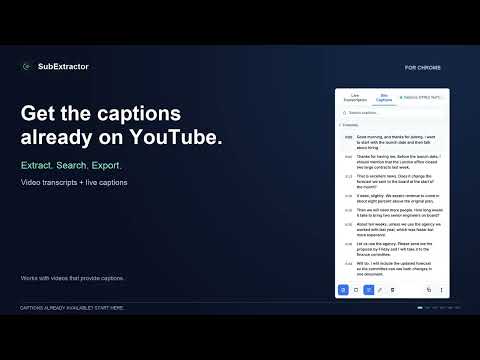
Free video transcripts: extract YouTube subtitles or transcribe tab audio on your device. Live captions, translation. No sign-up.
SubExtractor — Private transcripts from any video 100% free. No account. No subscription. No analytics. No transcript server. Turn videos into searchable, editable transcripts, translated captions, and spoken captions — all processed on your device. SubExtractor extracts captions a video already has or transcribes the audio playing in a Chrome tab with on-device speech recognition. Read, search, edit, translate, listen to, copy, and download transcripts without sending your audio anywhere. FREE, WITH NO USAGE LIMITS Many transcription tools cap how much you can use without paying, by minutes or by transcripts per month, and sell a subscription for more. SubExtractor has no paid plan. • No minutes quota and no trial that runs out • No account or sign-up • No subscription, no in-app purchases, no ads It can be free because transcription runs on your device: there are no transcription servers to pay for. WHAT YOU CAN DO 📝 Extract existing captions instantly Pull the subtitle track directly from the video player instead of transcribing the audio again. Supported sites include YouTube, JW.org, TED, Vimeo, and more, with general caption detection for many other sites. 🎙️ Live transcription Transcribe the audio playing in a Chrome tab as it plays. Follow the transcript in the side panel while you watch. 💬 Live captions over the video Show captions directly on the page in a box you can drag wherever you like. 🌍 Translate captions and transcripts Translate live captions or a finished transcript with Chrome's built-in on-device Translator. Show the original, the translation, or both. On YouTube, you can also show dual subtitles over the video. 🔊 Read captions aloud Listen to Live Captions in your selected caption language. Choose a female or male voice, adjust the speaking pace, and automatically lower or mute the video's original audio while captions are being read. The voice downloads once (about 80 MB) and runs entirely on your device. 🔎 Search and edit Search for any word or phrase, jump between matches, and edit transcript text directly in the side panel. ⏱️ Timestamps that follow the video On extracted captions, click a line to jump to that moment, or turn on Follow to keep the current line highlighted as the video plays. 🗣️ Optional speaker labels Label different voices in a live transcript as Speaker 1, Speaker 2, and so on. Labels are generated on your device and identify voices, not named people. ✨ Clean up transcripts Improve punctuation, capitalization, and readability with Chrome's built-in on-device AI. 🧾 Summarize long videos Get a short overview and key points. Where timestamps are available, key points link back to the relevant moment in the video. 📋 Copy and export Copy the transcript or download it as TXT, SRT, VTT, or JSON, with timestamps. LIVE TRANSCRIPTION LANGUAGES Arabic, English, German, Japanese, Mandarin, Spanish, Tagalog, and Vietnamese. Choose the spoken language in Settings and download its language pack once (about 50–300 MB depending on the pack). There is no automatic language detection. Caption extraction and translation are not limited to these languages. They work with whatever captions the video provides and the languages supported by Chrome's on-device Translator. NEW IN 5.2 • Speaker labels follow the conversation: a caption two voices share is shown as one row per speaker • Speaker labels are included in SRT and VTT subtitle exports • New setting to record a transcript without showing captions on the page • Read Live Captions aloud in your selected caption language • Choose a female or male voice • Adjust the voice speed to your preferred pace • Automatically lower the video's original audio while captions are spoken, or mute it completely • Voice models download once (about 80 MB) and run locally on your device WORKS BEYOND SUPPORTED CAPTION SITES Caption extraction depends on how each website exposes its subtitles, so support varies by site. Live transcription is broader: if a Chrome tab can play the audio, SubExtractor can usually transcribe it even when the site has no captions. PRIVATE BY DESIGN • Audio and transcripts stay on your device • No account or subscription • No analytics or tracking • No audio uploaded for transcription • Speech and voice models are downloaded once and stored locally • Transcription and caption speech run on your device USEFUL FOR Students, researchers, journalists, language learners, accessibility needs, and anyone who would rather read, listen to, search, or study a video than watch it again. REQUIREMENTS • Chrome 116 or later on desktop • Caption extraction and live transcription run locally and work without Chrome's AI features • Translation, clean-up, and summaries use Chrome's built-in on-device AI, which requires a supported desktop device and a recent version of Chrome. Chrome may download its own models the first time you use them • Read Captions Aloud requires a one-time voice download of about 80 MB • The interface is available in English and Spanish CREDITS Speech recognition by Moonshine (MIT License). Speaker labels use the pyannote community-1 models (CC BY 4.0).
4.1 out of 58 ratings
Details
- Version5.3.0
- UpdatedOctober 8, 2026
- Size10.38MiB
- Languages11 languages
- DeveloperWebsite
Email
tapshiftdev@gmail.com - Non-traderThis developer has not identified itself as a trader. For consumers in the European Union, please note that consumer rights do not apply to contracts between you and this developer.
Privacy

This developer declares that your data is
- Not being sold to third parties, outside of the approved use cases
- Not being used or transferred for purposes that are unrelated to the item's core functionality
- Not being used or transferred to determine creditworthiness or for lending purposes
Support
For help with questions, suggestions, or problems, visit the developer's support site