

Waku — Learn Chinese from YouTube, Bilibili, Netflix & more

Overview
Pinyin over every line, a card for every word, and flashcards while you watch Chinese on YouTube, Bilibili, Netflix, iQIYI and more.
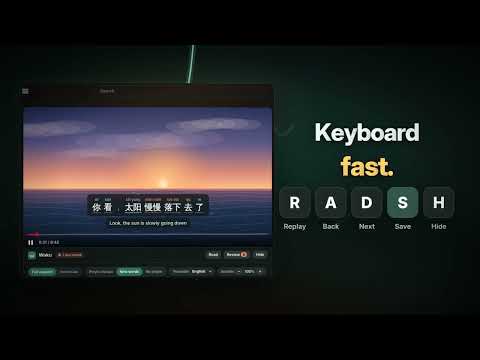
Pinyin over every line, a card for every word, and flashcards while you watch Chinese on YouTube, Bilibili, Netflix, iQIYI and more. Waku turns the videos you already watch into Chinese lessons — on YouTube, and on Bilibili, Netflix, iQIYI and more when you switch them on. POINT AT A WORD Its meaning appears right away, in your own language, not just English. Pinyin sits above every line with the tones colour-coded, and your translation sits below. CLICK TO DECIDE Clicking a word pauses the video and opens its card: pronunciation, the characters it is built from, where you have met it before, and two buttons — I know this, or Save word. REVIEW WHAT YOU SAVED Saved words become flashcards, each shown inside the sentence you met it in, with a link back to that exact moment in the video. FIND VIDEOS YOU CAN LEARN FROM On YouTube, videos with Chinese subtitles glow and carry a 字 中文 tag, so you never open a dead end. The toolbar button also suggests things to watch. WORKS WHERE YOU WATCH YouTube is always on. Other Chinese video sites can each be switched on from the Waku button in your toolbar — Chrome asks you to allow that one site, nothing more. The screenshots show them all. NEW: WAKU ON YOUR PHONE Review your saved words on your phone, with the same cards, sound and links. It stays in sync with your computer, both ways: save a word while watching and it’s on your phone in seconds; review on the bus and your progress is back on your computer. Open Review → Phone and scan the QR code. Your words are encrypted on your devices before they sync — no account, no email. ALSO A side transcript you can read and jump around in, a reading view for after you watch, export to Anki, a Progress page that shows every day you have learned, and themes that unlock as your streak grows. WAKU SPEAKS ARABIC TOO The whole interface, right to left, if that is the language you think in. No account, no sign-up. Your words stay on your computer. Waku is an independent project and is not affiliated with any of the video sites it works on.
5 out of 56 ratings
Details
- Version1.0.12
- UpdatedOctober 19, 2026
- Size21.5MiB
- LanguagesEnglish (United States)
- DeveloperWebsite
Email
allaweanas5@gmail.com - Non-traderThis developer has not identified itself as a trader. For consumers in the European Union, please note that consumer rights do not apply to contracts between you and this developer.
Privacy

Waku — Learn Chinese from YouTube, Bilibili, Netflix & more has disclosed the following information regarding the collection and usage of your data. More detailed information can be found in the developer's privacy policy.
Waku — Learn Chinese from YouTube, Bilibili, Netflix & more handles the following:
This developer declares that your data is
- Not being sold to third parties, outside of the approved use cases
- Not being used or transferred for purposes that are unrelated to the item's core functionality
- Not being used or transferred to determine creditworthiness or for lending purposes