

Fewer Tabs – Duplicate Tab Closer & Tab Manager

Overview
Close duplicate tabs automatically or in one click, find old tabs you haven't viewed in days, and go back to the tab you were on.
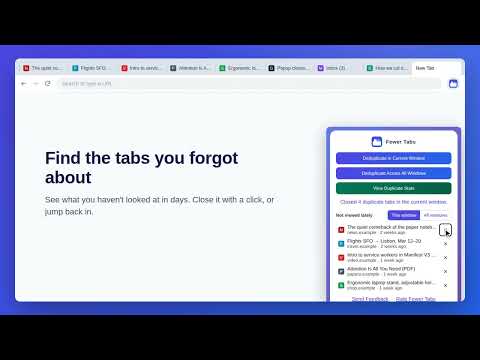
Too many tabs open? Fewer Tabs is a simple tab manager that removes duplicate tabs, automatically as they open or all at once with one click, and finds the old tabs you haven't looked at in days so you can close them. Less tab clutter, and you get back to the tabs you're actually using. CLOSE DUPLICATE TABS IN ONE CLICK • Close every extra copy of a page, in the current window or across all your windows. • Pinned tabs are never closed, and the tab you're looking at is the copy that's kept. • Pages that differ only by an in-page anchor (#section) count as the same page. Sites that use the address after # for different pages, like Gmail, are handled correctly. DUPLICATES CLOSE AS THEY OPEN • Open a page that's already open in the window, and Fewer Tabs takes you to the copy you already have, so you never end up with two. • It only reacts to a tab opening a page. Browsing inside a tab you already have never triggers it. • Choose which copy to keep, or turn auto-close off, in Settings. FIND THE TABS YOU FORGOT ABOUT • The popup lists the tabs you haven't looked at for the longest, in this window or all windows, with how long it's been. • Close each one with a click, or click it to jump back to it. • Pinned tabs and tabs playing audio are left out. CLEAR A WHOLE SITE AT ONCE • The By site view lists every site with more than one tab open, most tabs first. • Close all of a site's tabs, or put them all to sleep, in one click. Pinned tabs and the tab you're on are never closed. FREE MEMORY WITHOUT LOSING TABS • Put a tab to sleep from the list, or every tab you haven't viewed in an hour, a day or a week, with one click. • A tab that's asleep stays in the tab bar but uses almost no memory. It reloads when you click it. JUMP BACK TO THE TAB YOU WERE ON • Go back through the tabs you visited in a window, and forward again, like a browser's back and forward buttons but for tabs. • Use the Back and Forward buttons in the popup, or the keys: Alt+Shift+← and Alt+Shift+→ (Ctrl+Shift+, and Ctrl+Shift+. on a Mac). You can change them. • Each window keeps its own history, so going back never pulls up another window. SEE WHICH PAGES YOU KEEP REOPENING • The stats page shows every page open more than once, with counts for the current window and for all windows. SIMPLE AND PRIVATE • Only two permissions: tabs (to see and close tabs) and storage (to remember your settings). • No account, no ads, no tracking. Your tabs are never sent anywhere. Formerly "Duplicate Tab Closer".
4 out of 52 ratings
Details
- Version1.5.1
- UpdatedNovember 22, 2026
- Size40.84KiB
- LanguagesEnglish (United States)
- DeveloperWebsite
Email
benavram515@gmail.com - Non-traderThis developer has not identified itself as a trader. For consumers in the European Union, please note that consumer rights do not apply to contracts between you and this developer.
Privacy

This developer declares that your data is
- Not being sold to third parties, outside of the approved use cases
- Not being used or transferred for purposes that are unrelated to the item's core functionality
- Not being used or transferred to determine creditworthiness or for lending purposes