

fetchMe
7 个评分
)
概述
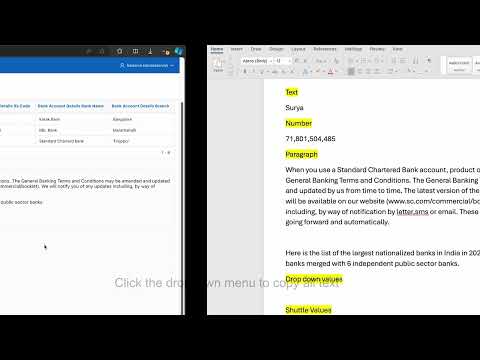
This enables you to highlight the web element and copy the visible text to clipboard by clicking on it. Press 'Escape' to exit
‘fetchMe’ a simple open-source tool. It is used to fetch the visible text on the web element and a page ruler which can around web page for easier horizontal and vertical alignments How to use? 🤔 1. Install 'fetchMe' in your browser extension store. 2. Open the web page from which you want to copy text or a list. 3. Select the 'fetchMe' from your extension list. A red cursor will be displayed when you hover over web elements. 4. (default, configurable) Just click on the desired element to copy the text or list. The selected text or list will be copied to your clipboard. You can then paste it wherever needed. 5. (Optional) You can also use the Inspect Console to verify what element has been copied to the clipboard. 6. Press `X` to show page ruler which can around web page for easier horizontal and vertical measurement. 7. Press `L` to hide page ruler and show again red cursor to copy the lists 8. Press the 'Escape' button whenever to exit the ‘fetchMe’ tool. Features 💭 1. Copy to clipboard the text or list in a single click. 2. The ‘fetchMe’ is dynamically built, and functions based on direct elements or their parent/child relationships. 3. It can copy all types of content: text, numbers, symbols, list values, and paragraphs. 4. No additional pop-ups to avoid extra clicks by the user. Simplified for user selection. 5. Able to copy text from web pages that have CTRL+C restrictions. 6. Able to copy the tooltips in the title of span elements 7. User able to switch to page ruler to measure the web page items 8. No additional permissions are asked from users. We don't collect any data from users. Snippets 🎓 ‘fetchMe’ supports as of now Manifest Json, JavaScript functions, modern Clipboard API Source code - https://github.com/kps1994/fetchMe Why ‘fetchMe’? 🤔 Yes, I know you can copy text directly from a web page without any tool, but the intention behind creating ‘fetchMe’ is not only to get the text or tooltip. Also able to check the web page items alignment. Whenever you need to copy text continuously, this tool will surely help. You don’t even need to use CTRL+C to copy; with a single click, you can complete the process. What if it doesn't work? 😢 Please restart your browser that should fix most of the problem. Feel free to raise a bug on my GitHub. Is it free? 🧐 100% it's free and it will always be free. So, what I get from this? 🙋 Good question. Happiness when you installed it and provide a star rating if you like this. What is the RoadMap? 🛣️ Well, it's huge that cannot be described here, but most of the features are going to save your time a lot. Thanks for reading this much, now just install and explore 'fetchMe', you might like it 🙂
5 星(5 星制)7 个评分
详情
- 版本1.2
- 上次更新日期2024年10月8日
- 提供方Balasiva Kamalaselvan
- 大小20.25KiB
- 语言English
- 开发者Balasiva Kamalaselvan
3/526, M SAP Nagar, K.N Puram(Po) Palladam(Tk), Tiruppur(Dt), Tamil Nadu 641662 IN邮箱
BALASIVA1994@GMAIL.COM - 非交易者该开发者尚未将自己标识为交易者。欧盟地区消费者须知:消费者权利可能不适用于您与该开发者达成的合约。
隐私权
该开发者已声明,您的数据:
- 不会因未获批准的用途出售给第三方
- 不会为实现与产品核心功能无关的目的而使用或转移
- 不会为确定信用度或放贷目的而使用或转移