

Meters to Yards for Google Maps
평점 15개
)
개요
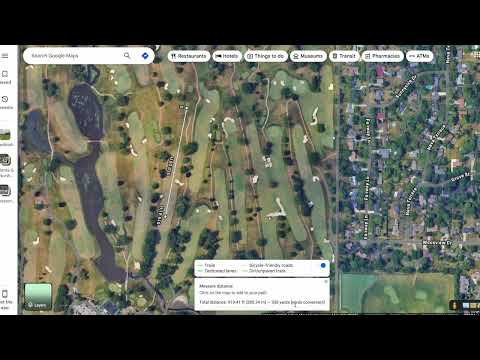
Convert Google Maps meters to yards
The Google Maps "Measure distance" tool is great, and this extension makes it even better. Made especially for golfers that don't rely on meters, you'll now be able to see distances in yards. How to Use the Extension: 1. Open Google Maps. 2. Right-click anywhere on the map and select “Measure distance.” 3. Click on the map at least twice to plot your points. 4. Continue adding points along the golf hole — the white distance box at the bottom will automatically display the converted distance in yards. Note: The extension only converts line distances (not area). It won’t display conversions for closed loops (when the first and last point overlap). Distances equal to or greater than 1 km won’t be converted. Need help? Watch the tutorial here: https://youtu.be/wa0DmiOIH60 If you're having problems with the extension, please email me at meterstoyards@gmail.com.
5점 만점에 4.5점평점 15개
세부정보
- 버전0.58
- 업데이트됨2026년 1월 15일
- 제공James G
- 크기1.09MiB
- 언어English (United States)
- 개발자James Gottschalk
757 E 20th Ave MB307 Suite 370 Denver, CO 80205 US이메일
adsbxaddon@gmail.com - 비판매자판매자로 식별되지 않은 개발자입니다. 유럽 연합에 거주하는 소비자의 경우, 이 개발자와 체결한 계약에 대해서는 소비자 권리가 적용되지 않을 수 있음을 유의해야 합니다.
개인정보 보호
Meters to Yards for Google Maps에서 데이터 수집 및 사용과 관련하여 다음 정보를 공개했습니다. 더 자세한 정보는 개발자의 privacy policy을 참고하세요.
Meters to Yards for Google Maps 항목은 다음을 처리합니다.
개발자가 사용자 데이터에 관해 다음과 같이 선언했습니다
- 승인된 사용 사례를 제외하고 서드 파티에 판매하지 않음
- 항목의 핵심 기능과 관련 없는 목적으로 사용하거나 전송하지 않음
- 신용도 판단 또는 대출 목적으로 사용하거나 전송하지 않음
지원
질문, 제안 또는 문제와 관련하여 도움이 필요하시면 개발자의 지원 사이트를 방문하세요.