

Feed Bob Everywhere

Overview
Inject your team's context into any AI chat + capture text from anywhere
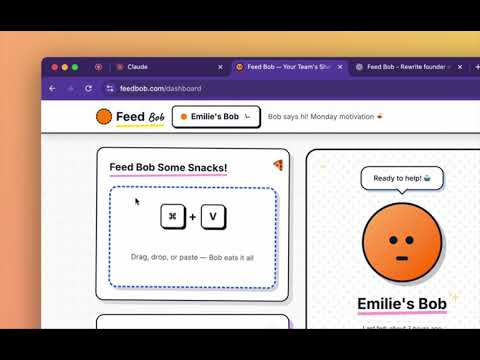
Feed Bob Everywhere - Your Team's AI Context + Capture Text Anywhere Transform how you work with AI. Feed Bob injects your team's context into ChatGPT, Claude, and Gemini — and lets you capture knowledge from anywhere on the web. 🚀 FEATURES: Context Injection: - One-click context injection into any AI chat - Works on ChatGPT, Claude.ai, and Google Gemini - Keyboard shortcut (⌘⇧Y / Ctrl⇧Y) - Team collaboration - everyone shares the same context Feed to Bob (NEW!): - Capture text from ANY website with ⌘⇧K / Ctrl⇧K - Right-click selected text → "Feed to Bob 🦆" - Builds your team's knowledge base automatically - All captures sync to your team on feedbob.com Smart & Simple: - Auto-sync from feedbob.com - Beautiful, minimal design - No manual copy-pasting needed 💡 HOW IT WORKS: For Context Injection: 1. Create your team on feedbob.com 2. Upload your codebase, docs, or PDFs 3. Install this extension 4. Press ⌘⇧Y on ChatGPT/Claude/Gemini 5. Your context is instantly injected! For Capturing Knowledge: 1. Find interesting text on any website 2. Select it and press ⌘⇧K (or right-click → "Feed to Bob") 3. It's saved to your team's Bob 4.Use it in AI chats instantly 🎯 PERFECT FOR: - Developers building products - Teams collaborating on projects - Researchers gathering insights - Anyone building a knowledge base - Teams tired of losing context ⚡ KEYBOARD SHORTCUTS: ⌘⇧Y (Mac) / Ctrl⇧Y (Windows): Inject context into AI chat ⌘⇧K (Mac) / Ctrl⇧K (Windows): Feed selected text to Bob 🔒 PRIVACY & PHILOSOPHY: Intentional Intelligence, Not Surveillance Feed Bob believes in "intentional memory" — you choose what to feed Bob. No ambient tracking, no automatic logging. You're in control. Your team's context stays secure. We only inject what you explicitly share. 🦆 Get started at feedbob.com
0 out of 5No ratings
Details
- Version1.2.0
- UpdatedNovember 9, 2025
- Offered byEmiliehemsett
- Size65.84KiB
- LanguagesEnglish
- Developer
Email
emiliehemsett@gmail.com - Non-traderThis developer has not identified itself as a trader. For consumers in the European Union, please note that consumer rights do not apply to contracts between you and this developer.
Privacy

Feed Bob Everywhere has disclosed the following information regarding the collection and usage of your data. More detailed information can be found in the developer's privacy policy.
Feed Bob Everywhere handles the following:
This developer declares that your data is
- Not being sold to third parties, outside of the approved use cases
- Not being used or transferred for purposes that are unrelated to the item's core functionality
- Not being used or transferred to determine creditworthiness or for lending purposes