

Liner — Lyrics, Meaning & Translation
3 ratings
)
Overview
Synced lyrics for YouTube, Spotify and more. Translate songs, explore meanings, save favourite lines and practise verses.
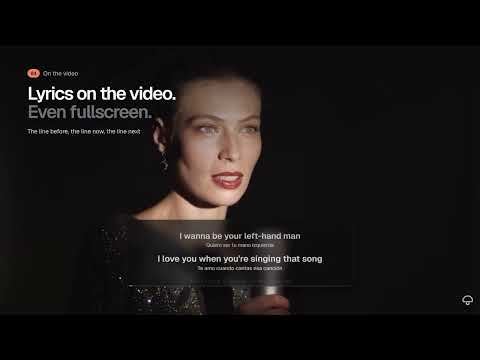
Liner shows synced lyrics, translations and song meanings beside the music playing in your browser, in a side panel or right on the video. Follow every line Lyrics follow playback when timed lyrics are available. Plain lyrics are shown when a timed version cannot be found. Lyrics on the video On YouTube, the lyrics roll past over the player, fullscreen included: the playing line and its translation in the middle, with the lines before and after so you never lose your place. Lined up for you When a music video runs well over the song's length, often because of an intro, Liner asks as the first line comes due whether the singing has started. One tap starts the lyrics later, and it remembers your answer for that video. You can nudge the timing yourself at any time. Find the right song Liner cleans up decorated video titles, ignores ads, and checks several lyrics sources. Pick a different version by hand and Liner remembers it for that video. Understand the words Tap ⋯ on any line to see its translation, meaning and pronunciation in one place. When a song is in another language, Liner offers to translate it in one tap. Read the original lyrics alongside a translation in over 60 languages, or the translation only. Explore song annotations where they exist; dots on the progress bar show where they are. Optional romanisation helps you follow non-Latin scripts. Learn the words In a line's panel, tap any word to see its reading and translation, save it to your words, and practise your saved lines as fill-in-the-blank. Learn that verse Tick the lines you're learning, then loop the passage and slow it down (YouTube and YouTube Music). Keep and share the lines you love Save lines with their song and moment, search them later, and jump back to saved moments in videos. Turn up to four lines into an image card in the cover's colours. Try it first A built-in demo song shows how Liner works before you play anything. Keyboard shortcuts Save the current line, loop it, and shift the timing without leaving the video. A compact lyric window Pop the lyrics into a separate, resizable window where they roll from line to line, with playback controls. It is not an always-on-top overlay. Your music, your browser Liner has no server of its own and no ads or analytics. Saved lines, saved words, manual matches and the lyrics of recently played songs (searchable, and can be turned off) stay on this device. Settings and favourite songs may sync through your browser profile. Lyrics and translation requests go directly to the third-party providers named in the privacy policy. Lyrics, timing, annotations, translations and romanisation depend on provider availability. Liner is not affiliated with any music service or lyrics provider. Content belongs to its respective rights holders.
5 out of 53 ratings
Details
- Version1.3.3
- UpdatedNovember 4, 2026
- Size711KiB
- LanguagesEnglish (United Kingdom)
- Developer
Email
maxxipowell39@gmail.com - Non-traderThis developer has not identified itself as a trader. For consumers in the European Union, please note that consumer rights do not apply to contracts between you and this developer.
Privacy

This developer declares that your data is
- Not being sold to third parties, outside of the approved use cases
- Not being used or transferred for purposes that are unrelated to the item's core functionality
- Not being used or transferred to determine creditworthiness or for lending purposes