

Fiverr Notification Icon in Title
65 ratings
)
Overview
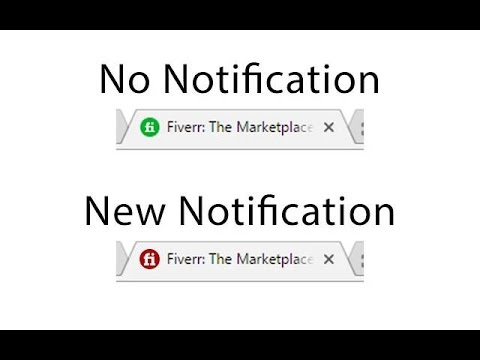
Turns the Fiverr tab icon red and plays an optional chime when a new message or notification arrives.
Never miss a Fiverr message again. This extension turns the Fiverr tab icon red the moment a new message or notification arrives. Keep working in your other tabs and you'll still catch it out of the corner of your eye — no need to check Fiverr over and over. What's new: - Sound alert (optional). Get a short chime when a new message or notification comes in. Turn it on or off and set the volume from the toolbar — just click the extension icon. - Works with the latest Fiverr. Notification detection was rebuilt for Fiverr's redesigned header, so the red icon is reliable again. - Lighter and up to date. Rebuilt on Manifest V3 with no third-party libraries. How to use it: 1. Install it and open Fiverr (stay logged in). 2. Click the extension icon in your toolbar to toggle the sound and set volume. 3. Keep Fiverr open in a tab and get back to work — the icon turns red, and chimes if you've enabled sound, whenever something new lands. Note: browsers only allow sound after you've interacted with the page, so the first chime after a page reload plays on your next click on Fiverr. Privacy: the extension only reads the Fiverr page to spot new notifications. It doesn't collect or transmit your messages or any personal data. Your sound on/off and volume settings are saved through Chrome's own storage. Questions or issues? Email onepoordeveloper@gmail.com. YouTube: https://www.youtube.com/watch?v=ZWcGFBoebO4 GitHub: https://github.com/onepoordeveloper/fiverr-notification-alert-in-title
4.6 out of 565 ratings
Details
- Version1.6.0
- UpdatedJune 19, 2026
- Offered byAhmad Hassan
- Size37.04KiB
- LanguagesEnglish (United States)
- Developer
Email
onepoordeveloper@gmail.com - Non-traderThis developer has not identified itself as a trader. For consumers in the European Union, please note that consumer rights do not apply to contracts between you and this developer.
Privacy

This developer declares that your data is
- Not being sold to third parties, outside of the approved use cases
- Not being used or transferred for purposes that are unrelated to the item's core functionality
- Not being used or transferred to determine creditworthiness or for lending purposes
Support
For help with questions, suggestions, or problems, please open this page on your desktop browser