

Native Translate – AI Page Translator

Overview
Translate web pages in place with AI as you read. Bilingual mode, right-click translation, 60+ languages. No API keys, no sign-up.
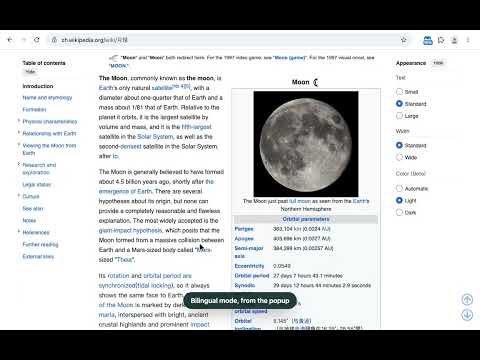
Native Translate turns a foreign-language page into one that reads like it was written in your language — right where it is. • In place, not on top. Translations are written into the page's own text. Links, buttons, menus and web apps keep working. One click shows the original again. • Streams as you read. Text on screen is translated first, sentence by sentence. Long articles fill in while you read. • Reads naturally. The article body gets a second, context-aware pass with a glossary, so long reads stay consistent. • Right-click to translate. Translate the whole page, or select any text and read its translation in a small card next to it. • Bilingual mode shows the original under each paragraph — great for learners and for checking a detail. • Type in your language, write in theirs. Press Alt+Shift+I in any text field, preview the translation and insert it. Search boxes search in the site's language. • Per-site rules: Always, Ask or Never. Keyboard shortcut Alt+Shift+T. • Fix any site yourself. "Fix something on this page" lets you mark parts that should stay as they are, be kept together, or be translated first. No setup • No API keys and no model to choose. We pick the right model for each piece of text and switch when a provider slows down. • Try it right away: 20 free pages as a guest, no account needed. Plans (sold by Native Translate; payments handled by Stripe) • Guest: 20 pages in total, no account. • Free: 10 pages a day with email sign-in (no password). When they run out, Chrome's built-in on-device translator can take over where the language pack is available. • Pro: $7.99/month or $59.99/year, 14-day free trial. 1,000 pages a month (300 of them with premium refinement), then lighter models up to 3,000. A page is a page you translate, counted once a day however far you read; very long pages count one more page per 20,000 characters. Pages from the cache or translated on your device are free. Your remaining allowance is always shown in the popup. Private by design • We receive only the text you choose to translate, never URLs, cookies, passwords or form values. • No page text in our logs. • A shared cache only serves text that several people have read, encrypted at rest. Banking, health, government and webmail sites are off by default. • Local-only mode uses Chrome's built-in translator and keeps everything on your device. Works from any source language into more than 60 target languages, with your browser's language as the default. Chinese, Japanese and Korean into English are the most tested pairs. Questions or a site that doesn't look right? Use "Report broken site" in the popup or write to hello@nativetranslate.app.
0 out of 5No ratings
Details
- Version1.1.0
- UpdatedOctober 27, 2026
- FeaturesOffers in-app purchases
- Offered byLonglight Labs
- Size167KiB
- LanguagesEnglish
- Developer124 City Road London EC1V 2NX GB
Email
hello@nativetranslate.app - Non-traderThis developer has not identified itself as a trader. For consumers in the European Union, please note that consumer rights do not apply to contracts between you and this developer.
Privacy

Native Translate – AI Page Translator has disclosed the following information regarding the collection and usage of your data. More detailed information can be found in the developer's privacy policy.
Native Translate – AI Page Translator handles the following:
This developer declares that your data is
- Not being sold to third parties, outside of the approved use cases
- Not being used or transferred for purposes that are unrelated to the item's core functionality
- Not being used or transferred to determine creditworthiness or for lending purposes
Support
For help with questions, suggestions, or problems, visit the developer's support site