


Overview
Bulk-select and invite people who interact with your Facebook Page content.
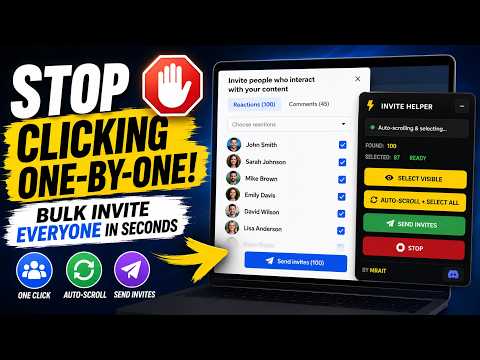
🔥 Stop clicking one by one. Invite everyone at once. FB Page Invite Helper adds smart bulk-select controls to the Facebook "Invite people who interact with your content" modal. Instead of manually clicking hundreds of checkboxes, use one button to select and invite all your engaged audience. ⚡ FEATURES • Select Visible — Instantly check all unchecked boxes currently on screen • Auto-Scroll + Select All — Automatically scrolls the list, waits for lazy-loaded rows, and selects every person • Comments Tab Support — Switch to the Comments tab and auto-select commenters too • Send Invites — One-click send with a safety confirmation prompt • Stop Anytime — Immediately halt the automation at any point • Live Stats — See found/clicked counts and send-button status in real time 🛡️ PRIVACY & SAFETY • Zero permissions required — no access to your data, tabs, or browsing history • No data collection — nothing is sent to any server, ever • Runs 100% locally in your browser • Confirmation prompt before sending invites to prevent accidental sends 🎯 HOW TO USE 1. Navigate to your Facebook Page https://business.facebook.com/latest/home 2. Open the "Invite people who interact with your content" modal 3. The ⚡ Invite Helper panel appears automatically in the top-right corner 4. Click "Auto-scroll + select all" to select everyone 5. Click "Send invites" when ready The floating panel is draggable and minimizable — move it anywhere you like. 💡 PERFECT FOR • Social media managers handling multiple Facebook Pages • Small business owners growing their Page audience • Marketing teams sending bulk page invites after viral posts • Anyone tired of clicking checkboxes one at a time Built by MRAIT — https://mrait.ca
2.4 out of 519 ratings
Details
- Version1.0.0
- UpdatedJuly 17, 2026
- Size433KiB
- LanguagesEnglish
- Developer
- Non-traderThis developer has not identified itself as a trader. For consumers in the European Union, please note that consumer rights do not apply to contracts between you and this developer.
Privacy

This developer declares that your data is
- Not being sold to third parties, outside of the approved use cases
- Not being used or transferred for purposes that are unrelated to the item's core functionality
- Not being used or transferred to determine creditworthiness or for lending purposes
Support
For help with questions, suggestions, or problems, please open this page on your desktop browser