

FB Comment Exporter - Estrai Commenti Facebook
13 valutazioni
)
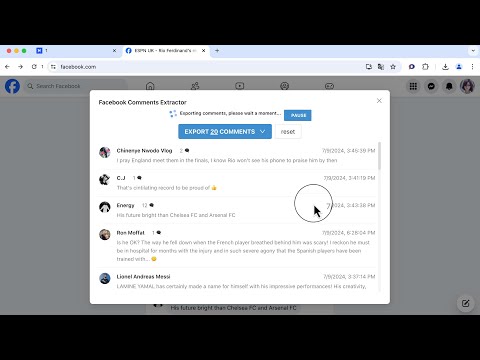
Panoramica
Raschia, estrai commenti inclusi Commenti Nidificati da Facebook ed esporta in CSV/Excel con un solo clic
With Comment Exporter, you can extract comments from Facebook Post Page and export them to CSV, Excel, JSON or Google Sheet. If there are replies to the comment, you can export nested comments. Comment Exporter provides user-friendly interface and simplifies the process of extracting comments, requiring no coding expertise. # Features ✓ EXPORT COMMENTS from Facebook Post Page ✓ Export Nesting Comments ✓ Copy to Clipboard (Paste to Google Sheet) ✓ Export as Excel, CSV, and JSON # Supported fields: - User Id - Username - Comment Id - Comment Text - Comment attachment (photo、video) - Reply Count - Reply Count Total - Reactions Count - Comment Depth - Created Date - Permalink URL (Link to the comment) - Profile URL - etc. With the Pro version and Check 'Includes Nesting Comments', you can get additional fields for Replied Comment such as: Parent Comment Id and Parent Comment Author. # How to get started? 1. Visit the Facebook post page, click on the download icon next to the number of comments. 2. Click Fetch button, then just wait to scrape complete. 3. Once extraction is done, click 'Export'. If it keeps failing, please send us the corresponding link, and we will do some troubleshooting and compatibility. For perfect use, it is recommended to set the Facebook language to English. In the popup, we offer these extra features: Relevant-Ext: Brief recommendations and introductions to related extensions. # Data Privacy Your data's security is our top priority. Rest assured, all data remains on your device, ensuring 100% privacy and trustworthiness. # About Pro Comment Exporter is a paid extension, you can get basic functionality and upgrade to get more functionality.
1,9 su 513 valutazioni
Dettagli
- Versione1.2.0
- Ultimo aggiornamento:18 maggio 2025
- Elemento offerto dafranklynschoutenm
- Dimensioni1.62MiB
- Lingue55 lingue
- Sviluppatore
Email
franklynschoutenm5p@gmail.com - Non commercianteQuesto sviluppatore non si è identificato come commerciante. Per quanto riguarda i consumatori nell'Unione Europea, tieni presente che i diritti del consumatore non sono applicabili ai contratti stipulati tra te e questo sviluppatore.
Privacy

FB Comment Exporter - Estrai Commenti Facebook ha comunicato le seguenti informazioni relative alla raccolta e all'utilizzo dei tuoi dati. Per informazioni più dettagliate, consulta le privacy policy dello sviluppatore.
FB Comment Exporter - Estrai Commenti Facebook gestisce quanto segue:
Questo sviluppatore dichiara che i tuoi dati:
- Non vengono venduti a terze parti, se non per i casi d'uso approvati.
- Non vengono usati o trasferiti per finalità non correlate alle funzionalità principali dell'elemento.
- Non vengono usati o trasferiti per stabilire l'affidabilità creditizia o per finalità di prestito.
Assistenza
Per ricevere assistenza in merito a domande, suggerimenti o problemi, apri questa pagina nel browser desktop