

favowe — save link

Overview
Save pages to favowe — the web app for bookmarks, PDFs, images, markdown and HTML that runs. One click, or all open tabs.
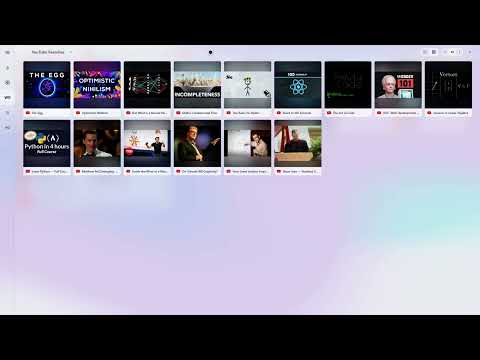
favowe is a web app for bookmarks. It runs at favowe.com in any modern browser — this extension is its companion, not the product itself. WHAT FAVOWE IS A visual bookmark manager. Instead of burying links in nested folders you never open again, you lay your collection out on boards you can see: collections, bookmark bars, drag and group things like sticky notes on a whiteboard. Folders are optional — the overview is the point. favowe holds files too, not just links. PDFs, images, markdown notes and HTML documents that actually run in the browser — the summaries, charts and small interactive pages an AI agent makes for you sit in the same collection as the links they belong to. Search covers all of it: titles, tags, notes, the full text of saved pages and PDFs, even the spoken words of YouTube videos. WHAT THIS EXTENSION DOES • Save in one click. Click the toolbar icon, press Alt+Shift+F, or right-click anywhere on the page. • Save every open tab at once. Pick a target, and the whole window lands in favowe — with the option to create a fresh collection for it. • See what you already have. The toolbar icon shows a checkmark when the page is already in your library, even if you saved it under a slightly different address. You can turn this off in the extension's settings. • Find it again. "Find this page" opens favowe's search, filtered to the page you are looking at. • Optional page text capture (off by default). Turn it on and the visible text of a page is saved with the bookmark, so you can search your library by what a page actually said — not just its title. WHAT IT DOES NOT DO • No tracking, no analytics, no ads. • No broad site access. The extension reads a page only when you explicitly act on it — a click, a shortcut, or a right-click. • Nothing runs in the background, and nothing at all runs in private windows. REQUIRES A FAVOWE ACCOUNT The extension saves into your own favowe library, so you need an account at favowe.com. The free plan includes 300 active links, 100 MB for documents, full-text search, this extension, import and export, AI agent access, and a 30-day trash. OPTIONAL PAGE TEXT CAPTURE Optional page text capture (off by default). If you turn on "Also capture the page text" in the extension settings, the visible text of a page is captured when you click save and stored in your private favowe account, so you can find pages by their content. On YouTube, the video's transcript is saved too when available (loaded through the page's own transcript panel, which stays hidden). Only on your explicit save click — never in the background, never in incognito windows, and never on banking or webmail sites (built-in exclusion list). Form input is never read. You can exclude any site, turn capture off per save, and remove a page's captured text anytime. Captured text, like everything in your library, can be read by AI agents you choose to connect to your account. Privacy policy: https://favowe.com/privacy/ Imprint / legal notice: https://favowe.com/imprint/
0 out of 5No ratings
Details
- Version1.1.0
- UpdatedSeptember 5, 2026
- Offered byfavowe
- Size183KiB
- Languages6 languages
- DeveloperAhmet Altuntas
Bismarckstraße 26 Schwaikheim 71409 DEEmail
support@favowe.comPhone
+90 541 158 28 69 - TraderThis developer has identified itself as a trader per the definition from the European Union and committed to only offer products or services that comply with EU laws.
Privacy

favowe — save link has disclosed the following information regarding the collection and usage of your data. More detailed information can be found in the developer's privacy policy.
favowe — save link handles the following:
This developer declares that your data is
- Not being sold to third parties, outside of the approved use cases
- Not being used or transferred for purposes that are unrelated to the item's core functionality
- Not being used or transferred to determine creditworthiness or for lending purposes
Support
For help with questions, suggestions, or problems, visit the developer's support site