Item logo image for Fast Ticker Info

Fast Ticker Info

Item media 2 (screenshot) for Fast Ticker Info
Item video thumbnail
Item media 2 (screenshot) for Fast Ticker Info
Item video thumbnail
Item media 2 (screenshot) for Fast Ticker Info

Overview

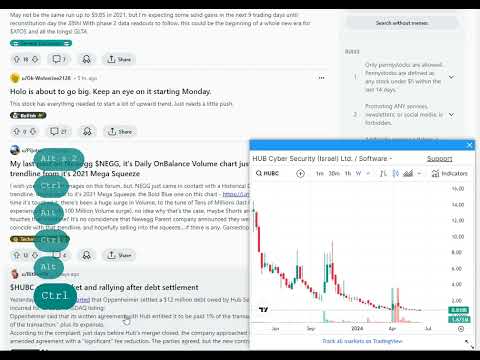
Display a ticker chart by clicking with CTRL+ALT+Click a stock ticker symbol like $APPL or APPL

Display a ticker chart by clicking with CTRL+ALT+Click or Option⌥ + Cmd⌘ + Click a stock ticker symbol like $APPL or APPL

Details

  • Version
    0.3
  • Updated
    February 4, 2025
  • Features
    Offers in-app purchases
  • Offered by
    Serhii
  • Size
    11.12KiB
  • Languages
    English (United States)
  • Developer
    Email
    fastticketinfo@gmail.com
  • Non-trader
    This developer has not identified itself as a trader. For consumers in the European Union, please note that consumer rights do not apply to contracts between you and this developer.

Privacy

The developer has disclosed that it will not collect or use your data.

This developer declares that your data is

  • Not being sold to third parties, outside of the approved use cases
  • Not being used or transferred for purposes that are unrelated to the item's core functionality
  • Not being used or transferred to determine creditworthiness or for lending purposes

Support

For help with questions, suggestions, or problems, visit the developer's support site

Related

Chartink to watchlist

0.0

Add stocks from Chartink to Zerodha Kite & Angel One watchlist from the extension.

Recent Tabs

3.6

Cycle through your most recently used tabs (MRU) like Alt+Tab, but, with the shortcut keys Ctrl+Q or Ctrl+`(~) or assign your own!

Close All Unpinned Tabs

4.7

Close all unpinned tabs with a short cut "Alt + Shift + O"

Pin/Unpin Tab Shortcut Ctrl/Command + Shift + P

3.7

Pin or unpin the current tab with Ctrl+Shift+P (Windows) or Command+Shift+P (macOS).

TabPin

0.0

Creates a keyboard shortcut (Alt + Shift + P) to toggle the pinned state of the currently selected tab

銘柄マーカー

4.3

ページ内から銘柄を見つけ出し、株価チャート等を表示させます。株式トレーダー向け。

股票悬浮球

5.0

股票悬浮球为股票实时查看工具,方便你工作之余查看股票波动,进行操作判断!

Tickertape exporter

2.0

Export tickertape screener table to a csv file

Stock Hover

3.7

View candlestick charts without leaving Twitter.

ChartView Pro (for screener.in)

5.0

Enhances Screener.in with interactive charts, smart value highlighting, and TradingView integration for financial analysis

Chartink ➝ TradingView

5.0

Adds a button on Chartink to copy stocks in TradingView format.

Chartink To TradingView

4.3

Redirects Chartink Symbol Links to TradingView Chart

Chartink to watchlist

0.0

Add stocks from Chartink to Zerodha Kite & Angel One watchlist from the extension.

Recent Tabs

3.6

Cycle through your most recently used tabs (MRU) like Alt+Tab, but, with the shortcut keys Ctrl+Q or Ctrl+`(~) or assign your own!

Close All Unpinned Tabs

4.7

Close all unpinned tabs with a short cut "Alt + Shift + O"

Pin/Unpin Tab Shortcut Ctrl/Command + Shift + P

3.7

Pin or unpin the current tab with Ctrl+Shift+P (Windows) or Command+Shift+P (macOS).

TabPin

0.0

Creates a keyboard shortcut (Alt + Shift + P) to toggle the pinned state of the currently selected tab

銘柄マーカー

4.3

ページ内から銘柄を見つけ出し、株価チャート等を表示させます。株式トレーダー向け。

股票悬浮球

5.0

股票悬浮球为股票实时查看工具,方便你工作之余查看股票波动,进行操作判断!

Tickertape exporter

2.0

Export tickertape screener table to a csv file

Google apps