


Overview
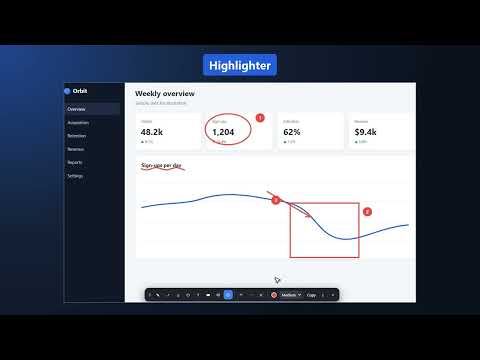
Annotate the visible tab instantly. Your screenshots never leave your browser.
Fast Markup freezes the visible browser tab so you can mark up what you see and share a clear PNG. WHAT YOU CAN DO - Draw with a pen, arrows, rectangles, ellipses, text, a highlighter, an eraser, and numbered callouts. - Undo or redo edits, and choose a color and stroke width. - Copy the annotated image to your clipboard or download it as a PNG. - Crop the saved image to just the area you marked up (optional). - Capture the entire page: turn on "Capture entire page" in the popup to mark up a whole scrolling page in one image. The default is the visible area. - Save to a folder: choose a local workspace folder once, then save each review there with one click. Each review is a new subfolder with the annotated PNG, a markdown list of your numbered notes, and a JSON file with your annotations. Handy for bug reports, design feedback, and handing work to teammates or AI tools. NEW FEATURES: - Line tool. "WHAT YOU CAN DO" lists arrows and rectangles but not a plain Line tool. Add: "Draw straight lines. Hold Shift to lock them to 15° angles." - Drawing shortcuts. The repo's upload notes say to review the listing against "Line, Crop, and drawing shortcuts". I didn't re-verify the shortcut list, so check the key bindings in the source before you write anything about them. HOW IT WORKS Click the extension and choose Start annotating, or press the suggested shortcut Alt+C. You can change it any time in Chrome's extension shortcut settings (Freeze and mark the visible tab). Press Escape to close the overlay and return to the live page. PRIVACY Fast Markup processes the screenshot and your annotations in your browser. The Free version has no account, screenshot upload, analytics, or cloud storage. If you choose a workspace folder, files are written only to that folder on your computer. By default the saved files include the page title and address (without any query string), and you can switch that off in the popup. Preferences and a recent capture error are stored locally. GOOD TO KNOW - Browser-protected pages such as chrome:// pages cannot be annotated. - Entire-page capture takes a few seconds on long pages, cuts very long pages at about 16,000 pixels, and captures only the visible area for apps that scroll inside a panel. - Chrome may reserve a suggested shortcut, so you can choose your own keys.
0 out of 5No ratings
Details
- Version1.1.1
- UpdatedOctober 17, 2026
- Size196KiB
- LanguagesEnglish
- DeveloperWebsite
Email
archgyan@gmail.com - Non-traderThis developer has not identified itself as a trader. For consumers in the European Union, please note that consumer rights do not apply to contracts between you and this developer.
Privacy

Fast Markup: Freeze & Mark has disclosed the following information regarding the collection and usage of your data. More detailed information can be found in the developer's privacy policy.
Fast Markup: Freeze & Mark handles the following:
This developer declares that your data is
- Not being sold to third parties, outside of the approved use cases
- Not being used or transferred for purposes that are unrelated to the item's core functionality
- Not being used or transferred to determine creditworthiness or for lending purposes
Support
For help with questions, suggestions, or problems, please open this page on your desktop browser