


Overview
Fancy text generator: style selected text in bold, italic, cursive and 84 more fonts in place on any site, or copy and paste them.
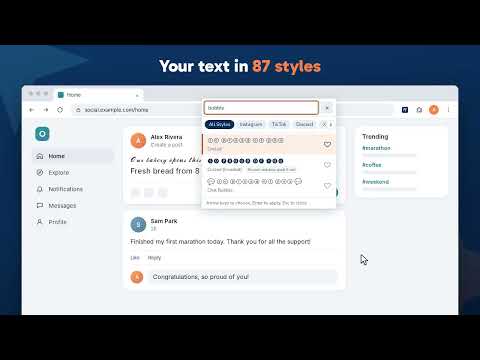
Fancy Fonts is a fancy text generator that works where you write. It styles the text you select with Unicode characters that look like bold, italic, cursive and other letters, in place, on any site. Select text in a post, a comment, a bio or a message, right-click, and pick a style: the text changes where it is, and Ctrl+Z undoes it. Or type in the popup and copy and paste the font you want. It has the styles of convertcase.net and gives the same results. Style text in place • Right-click a selection and pick one of your favorite styles, each shown in its own style in the menu • Open the style picker (Alt+Shift+Y) to see your selected text in every style, filter by name or by words such as "cursive" or "gothic", and apply one with a click or Enter • Shortcuts for Bold (Alt+Shift+O), Italic (Alt+Shift+I) and Remove styling (Alt+Shift+P), and eight more you can bind to your favorite styles • Works in text boxes, rich editors, frames and Google Docs, with one-step undo • Copy after styling: the styled text is also copied to the clipboard Every style 87 styles in the site's collections for social apps, names, and Cute, Aesthetic, Gothic and Cursed looks: Script, Bold (Serif), Italic (Serif), Fraktur, Double-Struck, Bubble, Small Caps, Full Width, Upside Down, Strikethrough, Underline, and frames such as Sparkle and Throne. Careful with what styled text breaks • Remove styling turns styled text back into plain letters, and says which styles it found • #hashtags, @mentions and links stay plain when you style a sentence, so they still link (you can turn this off) • Each style says when some devices may draw it as boxes, and when screen readers read it letter by letter rather than as words The popup • Fonts: type or paste, see every style, copy one, and pin your favorites; with a platform chosen, each style shows its length against that platform's limit, counted the way the platform counts it • Create: build a style from letters, a frame such as ꧁༺ ༻꧂, a line and the spacing, or shuffle for a new one, and save the ones you like • Effects: zalgo text with an intensity and marks above, through and below, Remove Zalgo, and Plain Text • Symbols: hearts, stars, arrows, frames, kaomoji and invisible characters, with search Toolbar for posts and comments Turn it on in Settings, site by site, for a small bar over text you select in posts and comments on six social sites: bold, italic, underline, strikethrough, more styles and remove styling. Each site's switch asks for access to that site only, when you turn it on. Also from us The Convert Case extension changes selected text to UPPER CASE, lower case, Title Case, camelCase and more, in place on any site. Privacy Fancy Fonts asks for no access to your sites when you install it. It runs on a page only when you use it there: a right-click on its menu, a shortcut or the popup. Everything happens on your device: nothing you select or type is collected, sent or stored anywhere else, and there are no ads, accounts or trackers. Every style is included, with nothing to unlock. Languages English, British English, Deutsch, Ελληνικά, Español, Filipino, Français, हिन्दी, Magyar, Italiano, Polski, Português (Brasil), Slovenščina, Türkçe, Українська. It follows your browser's language, and you can choose another in Settings. Changelog • 1.1.0 - A line in the popup and Settings about the Convert Case extension, for changing text between upper and lower case and more, while it is not installed. Convert Case no longer offers Fancy Fonts in its menu once Fancy Fonts is installed. After 20 uses over at least three days, a "Rate Fancy Fonts" link in the right-click menu, the popup (taking turns with the Convert Case link) and Settings, which goes after one click • 1.0.0 - First release: styling in place from the right-click menu, shortcuts and the style picker; the popup with Fonts, Create, Effects and Symbols; the toolbar for social sites; 15 languages
0 out of 5No ratings
Details
- Version1.1.0
- UpdatedNovember 12, 2026
- Size344KiB
- Languages15 languages
- DeveloperConvert Case LtdWebsite
31-38 Queen Street Hull HU1 1UU GBEmail
hello@convertcase.netPhone
+44 7951 864386 - TraderThis developer has identified itself as a trader per the definition from the European Union and committed to only offer products or services that comply with EU laws.
- D-U-N-S224432444
Privacy

This developer declares that your data is
- Not being sold to third parties, outside of the approved use cases
- Not being used or transferred for purposes that are unrelated to the item's core functionality
- Not being used or transferred to determine creditworthiness or for lending purposes
Support
For help with questions, suggestions, or problems, please open this page on your desktop browser