

Falcontext – AI-Free Writing Analysis & Word Counts

Overview
Word count tracker for Google Docs and more: goals, streaks, sprints, a map of your book and self-editing checks. Private, no AI.
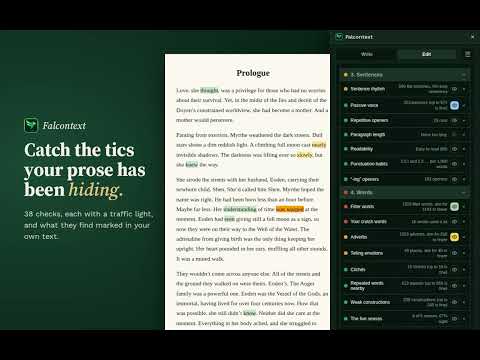
Your writing is never sent anywhere, and no AI is used on your writing in any way. • Private: Falcontext counts and checks your draft right in your browser. It keeps numbers, your settings and short codes, never your text. Sync between your devices goes through your browser's own sync, or your own Google Drive if you turn that on. • No AI: every check is a rule or a word list written by people. Nothing changes your text unless you click Fix on a finding, and Undo takes it back. Your manuscript never trains anything. • Instant: nothing to upload and no AI to wait for. A whole novel is analysed in seconds. Finish your book. Falcontext is the manuscript progress tracker and writing goal tracker built for writers: authors, bloggers and NaNoWriMo writers. It lives in a sidebar next to your draft and gives you live word counts, daily goals, streaks, and estimated finish dates. Write it, shape it, polish it. The Write tab is for drafting: sprints, focus mode and slips caught as you type. Bird's Eye shapes the book: your chapters and scenes on one grid, and who appears where. The Edit tab polishes it: checks in five passes, from structure down to proofing, with one-click fixes. Together they find more than 90 different things in a book. It works in Google Docs, Atticus, Ellipsus, WordPress and many other browser-based editors. Stop guessing how your writing session is going. Know. NEW IN 6.0 • Structure: mark the chapter or scene that is each beat of three acts, Save the Cat, the Hero's Journey or the Story Circle, and see how far each is from where the structure puts it. • Notes to self: every [[note]], TK and open comment you left to come back to, in one list by chapter. • Your book's world (Pro): the places it names, a glossary of its own words, your plan against what you wrote, and the Field Guide, everything Falcontext has worked out about your book in one document. • Characters: sheets with looks, other names and family, and checks for continuity slips and head hopping (Pro). • Words that came in at once (a paste, an import) are asked about before they count as today's writing. • A daily goal in words or minutes, whichever comes first (Pro). TRACK YOUR WRITING • Live word counter that updates as you type • Daily word count goal with a visual progress bar • Total manuscript goal, so you always know how close "The End" is • Writing streak that counts only days you actually wrote, with a streak freeze if you miss one day • Estimated completion date based on your real pace • Personal records: best writing day, best editing day, most words revised and removed in a day, longest streaks, and best sprint • Achievements to unlock as you go • Share cards: turn your progress, streak, or a milestone into an image to post • 7-day trend graph of your word count growth (Pro) MANUSCRIPTS (Pro) Writing one Google Doc per chapter? Group your documents into a manuscript and see total progress, streaks, and pace for the whole book in one place, each manuscript with its own goals and reminders. WRITING TOOLS • Prose Analysis: self-editing checks that run entirely in your browser, each with a traffic light (green, orange, red), and what they find marked in your text. Many look for several things at once: Dialogue punctuation alone finds eight kinds of slip. Run them on a scene, a chapter, the whole book, or just today's changes. These are free with their details: adverbs, passive voice, tense and point-of-view slips, dialogue tags, filter words ("felt," "saw," "noticed"), doubled words and paragraphs, spacing slips, and unfinished sentences. Pro adds the rest, including clichés, repeated words, sentence rhythm, crutch words, continuity slips, homophones and sound-alikes, Flesch readability, dialogue vs. narrative balance, and pacing per chapter. On the free plan the rest still show green, orange or red, so you can see where there's something to look at. Not a mistake? Ignore that one finding and keep the rest of the check. • Word Sprints: set a timer and see how many words you write before it ends. Great for sprints and challenges. (Free; starting Focus Mode automatically with a sprint is Pro) • Writing Reminders: up to 3 daily nudges that fire only if you haven't hit your goal, and tell you how many words are left. (Free) • Bird's Eye: see your book's structure at a glance. Falcontext finds where every chapter and scene starts, whether from your headings, "Chapter 3" lines, or scene breaks like ***. It shows chapter and scene lengths against a target and your average, what each chapter is about, and a character tracker shows who appears where and who has been off the page too long. Free: track one character. Pro: unlimited characters, each part's point-of-view character, who shares scenes with whom, character sheets (looks, other names, family) and CSV export. • Synonym Checker: quick lookups in a built-in thesaurus that works offline, with a content filter to keep results clean. (1 free lookup a day; unlimited with Pro) • Focus Mode: fullscreens your document, hides the dashboard, and leaves a small progress badge. Press Esc to return. (Pro) TRACK YOUR EDITING Revising is progress too. The Edit tab lays out your chapters and scenes against five editing passes, from structure down to proofing. Tick each one as you finish it, or let a scene tick itself when every check is green, and Falcontext shows how much of the book you've edited. Scenes you worked on today and last time are marked, and a ticked scene that changes a lot is flagged for another look. Editing has its own streak, records, and finish-date estimate, separate from your drafting stats. PROGRESS THAT FOLLOWS YOUR DOCUMENT Falcontext tracks per document, not per tab. Close the tab, reopen the doc tomorrow, or open it in a new window, and your goals, history, and streaks are still there. Wrote a few hundred words on your phone? They count toward your progress the next time you open the document in Chrome. Your settings, manuscripts, and history follow you to your other computers through your browser's sync, and with Google Drive sync to other browsers, Falcontext Perch (the web app) and the desktop app. YOUR DATA, YOUR WAY Export your history as CSV, or back up and restore everything as JSON. Choose from 5 color themes: Forest, Parchment, Midnight, Plum, and Slate. Use a persistent sidebar or a toolbar popup. PRIVACY Your manuscript stays in your browser. Falcontext never uploads, stores, or shares your writing, and all analysis runs locally on your device. No Falcontext account or sign-up is needed. For Google Docs, Falcontext can only open the documents you choose. The first time you use it on a document, Google's own file picker asks you to confirm that one document. Falcontext never sees the rest of your Google Drive. When you click Fix, Google Docs is asked to make just that change in your document, straight from your browser. Besides that, Falcontext sends out only your license key, if you have one, to Lemon Squeezy and falcontext.com so it can be verified (nothing is kept); your numbers and settings, through your browser's sync or your own Google Drive; and, only if you join the November challenge, two numbers a day to falcontext.com, never your text. PRICING Free, with no ads: word count tracking, goals, streaks, estimated completion, the Write and Edit tabs, personal records, the writing badges, share cards, Word Sprints, Writing Reminders, themes, data export, a traffic light on every prose check and how much it found, and the free ones in full, plus Bird's Eye with one character and the Synonym Checker. Falcontext Pro: $1.99/month or $19.99/year. Adds every prose check in full across your whole book, manuscripts, your whole cast with point of view, head hopping and continuity slips, places, a glossary, your plan and the Field Guide, a daily goal in minutes, pacing insights, Focus Mode, the trend graph, unlimited synonyms and a layout you can arrange. Whether you're drafting your first novel or polishing your tenth, Falcontext turns "how's it going?" into a real answer.
5 out of 52 ratings
Details
- Version6.0.0
- UpdatedOctober 16, 2026
- FeaturesOffers in-app purchases
- Size1.91MiB
- LanguagesEnglish
- DeveloperMatthijs Gerardus Cornelus de ValkWebsite
Zevendreef 3111 Wijchen 6605 VE NLEmail
hello@mattfalcon.comPhone
+1 251-429-6787 - TraderThis developer has identified itself as a trader per the definition from the European Union and committed to only offer products or services that comply with EU laws.
Privacy

This developer declares that your data is
- Not being sold to third parties, outside of the approved use cases
- Not being used or transferred for purposes that are unrelated to the item's core functionality
- Not being used or transferred to determine creditworthiness or for lending purposes
Support
For help with questions, suggestions, or problems, visit the developer's support site