

HookSlayer — LinkedIn Authority Analysis
1 rating
)
Overview
Analyze your LinkedIn profile, get an authority score, and generate content ideas in your own voice.
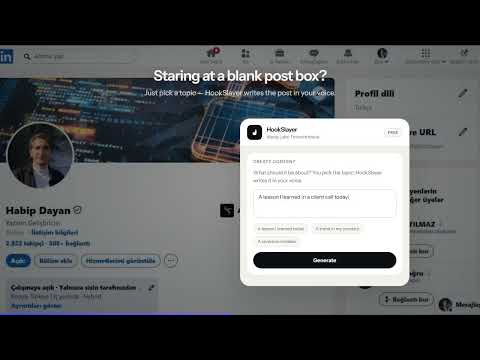
HookSlayer is an assistant that works alongside you to grow your personal brand on LinkedIn. • Profile analysis (free): On your own profile — a 0–100 authority score, your sector, strengths, gaps, and a concrete fix for every gap. It turns the gaps into a checkable to-do list and tracks your score over time ("68 → 72 ▲"). • Memory: Once you analyze a profile it's remembered — reopen it and it loads instantly; browse your history from the "My analyses" screen. • Content creation: You pick the topic, and HookSlayer drafts a full LinkedIn post in your voice — right from the "Write with HookSlayer" button inside the post composer. • Feed help: A button added to each feed post generates a fitting comment or a quote-repost for that post. • Company analysis (Pro): On a company page, analyze that company's LinkedIn presence. Sign in: You sign in with Google so your analyses and settings stay with you across devices. How to use: 1. Open LinkedIn, click the HookSlayer button at the bottom-right and sign in with Google. 2. Go to your own profile and hit "Analyze". 3. When writing a post, use "Write with HookSlayer" — type the topic and let HookSlayer do the rest. Privacy: Profile content is processed only when you click "Analyze" / "Generate". From your Google account only your name, email and profile photo are used (to identify your account). Your settings live only in your own browser. Payment & support: The in-app Premium / Pro and credit buttons take you to WhatsApp to get in touch. • Company analysis (Pro): On a company page, analyze that company's LinkedIn presence. Sign in: You sign in with Google so your analyses and settings stay with you across devices. How to use: 1. Open LinkedIn, click the HookSlayer button at the bottom-right and sign in with Google. 2. Go to your own profile and hit "Analyze". 3. When writing a post, use "Write with HookSlayer" — type the topic and let HookSlayer do the rest. Privacy: Profile content is processed only when you click "Analyze" / "Generate". From your Google account only your name, email and profile photo are used (to identify your account). Your settings live only in your own browser. Payment & support: The in-app Premium / Pro and credit buttons take you to WhatsApp to get in touch.
5 out of 51 rating
Details
- Version0.3.0
- UpdatedOctober 22, 2026
- FeaturesOffers in-app purchases
- Offered byWeras Labs
- Size255KiB
- Languages5 languages
- Developer
Email
hello@weraslabs.com - Non-traderThis developer has not identified itself as a trader. For consumers in the European Union, please note that consumer rights do not apply to contracts between you and this developer.
Privacy

HookSlayer — LinkedIn Authority Analysis has disclosed the following information regarding the collection and usage of your data. More detailed information can be found in the developer's privacy policy.
HookSlayer — LinkedIn Authority Analysis handles the following:
This developer declares that your data is
- Not being sold to third parties, outside of the approved use cases
- Not being used or transferred for purposes that are unrelated to the item's core functionality
- Not being used or transferred to determine creditworthiness or for lending purposes
Support
For help with questions, suggestions, or problems, visit the developer's support site