


Overview
Scrape Facebook Page search results by category and export clean CSV or TXT lists. Free up to 100 pages, Pro unlimited.
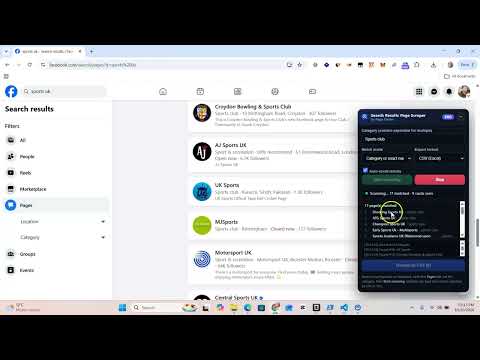
Search Results Page Scraper turns Facebook's Page search into a clean, exportable list. Instead of copy-pasting page after page, run a search, open the Pages tab, type the category you want (for example "Carpenter"), and let the extension auto-scroll the results. It keeps only the pages whose category matches, shows them live, and exports them as a spreadsheet-ready CSV or a plain TXT list of URLs. WHAT IT DOES • Scans Facebook Page search results and filters them by one or more categories • Match by exact category, or by category OR exact page name • Auto-scrolls so you don't have to • Live, de-duplicated list of every matched page (name + category + URL) • Export to CSV (Name, Category, URL) or TXT (one URL per line) • Export progress indicator so you always know when the file is ready • Works on Facebook's desktop search Pages tab PLANS • Free — create an account and export up to 50 pages. • Pro — $9.99/month for unlimited exports, billed securely through Stripe. Manage or cancel anytime from the extension. HOW TO USE 1. Install the extension and create a free account from the toolbar popup. 2. On Facebook, search a keyword and switch to the Pages tab. 3. Open the floating panel, type a category (comma-separate for several), and press Start scanning. 4. Press Download and pick CSV or TXT. PRIVACY The extension only reads the public Facebook Page search results you are already viewing. It does not collect your Facebook password, messages, or browsing history. See the privacy policy for full details. Note: this is an independent tool and is not affiliated with, endorsed by, or sponsored by Meta Platforms, Inc. Facebook is a trademark of Meta Platforms, Inc.
0 out of 5No ratings
Details
- Version2.1.2
- UpdatedNovember 4, 2026
- FeaturesOffers in-app purchases
- Size74.17KiB
- LanguagesEnglish (United States)
- Developer
- Non-traderThis developer has not identified itself as a trader. For consumers in the European Union, please note that consumer rights do not apply to contracts between you and this developer.
Privacy

Facebook Search Results Page Scraper has disclosed the following information regarding the collection and usage of your data. More detailed information can be found in the developer's privacy policy.
Facebook Search Results Page Scraper handles the following:
This developer declares that your data is
- Not being sold to third parties, outside of the approved use cases
- Not being used or transferred for purposes that are unrelated to the item's core functionality
- Not being used or transferred to determine creditworthiness or for lending purposes
Support
For help with questions, suggestions, or problems, please open this page on your desktop browser