


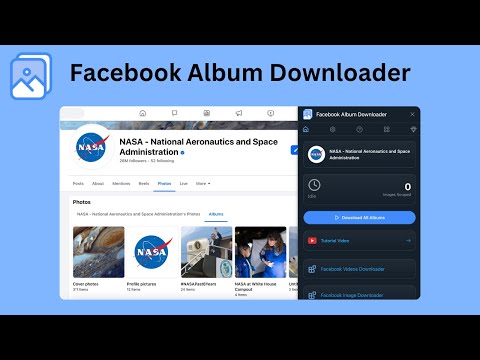
Übersicht
Speichern Sie alle Facebook-Alben oder einzelne Alben mit einem Klick. Schneller FB-Foto- und Album-Downloader.
📸 Facebook Album Downloader – Save Every Album in One Click Download all your Facebook photo albums at once, perfectly sorted into folders using each album’s original name. Every photo is saved in high resolution, fully organized, and downloaded automatically — no manual clicking required. Whether you’re saving a single album or your entire Facebook library, everything is handled with one click. 🚀 Why Use Facebook Album Downloader? Facebook makes it hard to save albums, forcing you to open each photo manually. This extension fixes that. With Facebook Album Downloader, you can: • Download all albums automatically • Download any single album instantly • Get full-quality images • Save hours of manual work No setup. No scripts. No technical steps. Just instant, organized downloads. 🧠 Key Features 1️⃣ 📁 One-Click Download for All Albums Grab your entire Facebook album collection in a single action: • Every album saved automatically • Each album becomes its own folder • All photos neatly sorted inside No scrolling or selecting — the extension handles everything. 2️⃣ 🎯 Download Any Single Album Instantly Want just one album? Open it → click once → done. Fast, clean, and perfectly organized. 3️⃣ 📷 High-Resolution Image Saving Your photos are downloaded in the highest quality available, preserving every detail. 4️⃣ 🤖 Fully Automated Scraping Start the process and let the extension do the rest: • No extra clicks • No manual photo opening • No page navigation required It works quietly in the background while you browse. 💡 Perfect For • 🧳 Backing up your full Facebook photo history • 👨👩👧 Saving family albums before they disappear • 📸 Photographers archiving client albums • 🧑💼 Social media managers organizing visual assets • 🧓 Family historians collecting old events • 👨🏫 Teachers and researchers gathering visual material 🌟 Benefits at a Glance • 🖱 One-click download for all albums • 📁 Folder auto-organization using album names • 📷 High-resolution photo saving • ⚡ Handles large albums with ease • 🔒 100% local and private—nothing ever leaves your device • 👶 Beginner-friendly and extremely fast 🧰 How to Use It 1. Install Facebook Album Downloader from the Chrome Web Store 2. Open any Facebook album — or your full album list 3. Hit “Start Download” 4. Watch your folders appear perfectly sorted on your device 🔐 Privacy First • No account data collected • No external servers • Everything runs locally inside your browser 📣 Save Your Memories Before They’re Gone Preserve years of Facebook albums in a few seconds. Back up everything — cleanly, safely, and automatically. ⚠ Legal Notice: This extension is independently developed and not affiliated with Meta Platforms, Inc. or Facebook. Use responsibly and follow Facebook’s terms of service.
3,2 von 512 Bewertungen
Details
- Version2.2.0
- Aktualisiert23. Mai 2026
- Größe138KiB
- Sprachen8 Sprachen
- EntwicklerWebsite
E-Mail
support@microplugin.co - Kein HändlerDieser Entwickler hat sich nicht als Händler deklariert. Für Verbraucher in der Europäischen Union gelten die Verbraucherrechte nicht für Verträge, die zwischen dir und diesem Entwickler geschlossen werden.
Datenschutz

Facebook Album Downloader hat folgende Informationen hinsichtlich der Erhebung und Nutzung deiner Daten offengelegt. Weitere Details findest du im privacy policy des Entwicklers.
Facebook Album Downloader verarbeitet Folgendes:
Dieser Entwickler erklärt, dass deine Daten
- nicht an Dritte verkauft werden, außer in den genehmigten Anwendungsfällen
- nicht für Zwecke genutzt oder übertragen werden, die nichts mit der Hauptfunktionalität des Artikels zu tun haben
- nicht zur Ermittlung der Kreditwürdigkeit oder für Darlehenszwecke verwendet oder übertragen werden
Support
Wenn du Probleme, Fragen oder Vorschläge hast, rufe die Supportwebsite des Entwicklers auf