


Overview
WhatsApp Bulk Sender by EzDigital
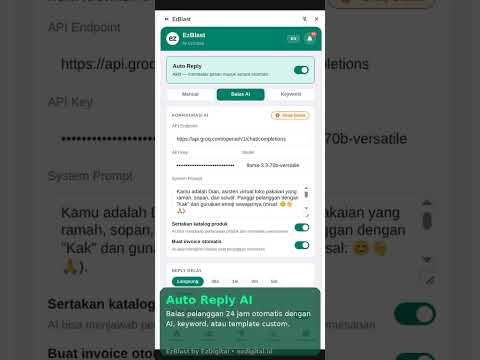
EzBlast is a powerful WhatsApp marketing extension that runs directly inside WhatsApp Web. No external apps, no phone scanning — just open WhatsApp Web and start blasting. 🚀 BLAST & MESSAGING • Send bulk WhatsApp messages to hundreds of contacts with a single click • Personalize messages with {{name}} variable • Attach images to your blast messages • Random message variation: {option1|option2|option3} • Anti-spam humanizer to avoid WhatsApp detection • Adjustable send delay between messages • Pause, resume, or stop blast at any time • Full blast history log 🤖 AUTO REPLY • Keyword-based auto reply — respond automatically when specific words are received • AI-powered auto reply using any OpenAI-compatible API (GPT, Groq, etc.) • Manual auto reply for all incoming messages • Link product cards to keyword triggers — send product image + details automatically • Reply delay settings (instant to custom seconds) • Human takeover detection — pauses auto reply when you reply manually • Diagnostic log for easy debugging 🛍️ PRODUCT CATALOG • Save unlimited products with variants, prices, and images • Discount price support with strikethrough display in WhatsApp • Send product cards (image + caption) directly to any contact • Order / cart system — build multi-product orders and send invoices • Payment link generation via Xendit, Midtrans, Duitku, iPaymu, or Stripe 📊 ANALYTICS & CONTACTS • Scan all WhatsApp chats to see reply rates • Filter contacts by replied / no-reply status • Import contacts from Excel (.xlsx) • Save & manage contacts with name, group, and tags • Contact blacklist for blast exclusions • Crawl contacts from Google Maps, Instagram & TikTok 📋 TEMPLATES & DRAFTS • Save message templates for quick reuse • Use templates directly in blast ☁️ EZSTORE CLOUD SYNC (optional) • Connect EzBlast to your own EzStore dashboard for a live online storefront • One-click "Sync Now" — push contacts, products, orders, templates & campaigns to the cloud • Silent background auto-sync every time you open or close the extension • Auto-detects the connected WhatsApp number and sets it as your store's order number • Import all your data back from EzStore when reinstalling or moving to a new device • Your customers get a 24/7 online store with WhatsApp checkout ⚙️ SETTINGS • Bilingual interface: English & Indonesian • Payment settings: manual bank transfer + 5 payment gateways • Tax configuration (inclusive or exclusive) • Order message prefix & suffix • Full data backup & restore (JSON) • Feedback & bug report form built-in
5 out of 51 rating
Details
- Version0.2.2
- UpdatedAugust 3, 2026
- Size623KiB
- LanguagesIndonesia
- DeveloperEzDigitalWebsite
Bumi Husada Indah BLok N/7A Makassar, Sulawesi Selatan 90231 IDEmail
ezdigital.cs@gmail.com - Non-traderThis developer has not identified itself as a trader. For consumers in the European Union, please note that consumer rights do not apply to contracts between you and this developer.
Privacy

EzBlast has disclosed the following information regarding the collection and usage of your data. More detailed information can be found in the developer's privacy policy.
EzBlast handles the following:
This developer declares that your data is
- Not being sold to third parties, outside of the approved use cases
- Not being used or transferred for purposes that are unrelated to the item's core functionality
- Not being used or transferred to determine creditworthiness or for lending purposes
Support
For help with questions, suggestions, or problems, visit the developer's support site