

ez3D

Overview
ez3D enhances 3D, VR SBS videos playback experience. Works on glassless 3D monitors, AR glasses or as anaglyph on 2D screens
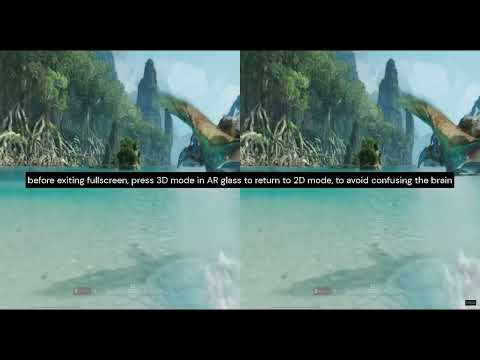
ez3D adds a fullscreen 3D control bar to side-by-side (SBS) 3D video, so you can pause, seek and adjust the picture without taking your AR glasses off. It also works on glasses-free 3D monitors, and on an ordinary 2D screen it can turn SBS video into anaglyph 3D for colour-filter glasses. HOW EZ3D WORKS - ez3D looks at the picture, not the title. During the first three seconds of playback it compares the left and right halves of six frames on your GPU to tell whether the video is side-by-side 3D. The toolbar icon's tooltip shows the result. - In fullscreen, ez3D draws the control bar once in each eye's half of the picture, so each eye sees a complete set of controls. - The popup's Fullscreen button opens any detected video in fullscreen with the controls. CONTROLS - Seek bar, play/pause and volume, duplicated for each eye - Horizontal and vertical stretch from ×1.0 to ×2.0 - Anaglyph 3D for five glasses types: red-cyan, green-magenta, amber-blue, red-green and red-blue - Projection correction for VR180 and 360° video (fisheye 180°, 220° and 360°, and equirectangular), with four lens models - Pan, and subtitles drawn once per eye - A keyboard shortcut for every control, and settings remembered per tab WHERE EZ3D WORKS YouTube, Vimeo, Dailymotion and any other site that plays video in an HTML5 video element, including players embedded in iframes and web-component (shadow DOM) players. For SBS video files on your computer, choose "Open local video player" in the popup and drop in a file. It plays with every control, and the file never leaves your computer. WHAT EZ3D CAN'T DO Netflix, Disney+, Prime Video and other DRM-protected services never expose their video frames to extensions, so ez3D cannot work on them. PRIVACY ez3D sends no data anywhere: no analytics, no telemetry, and no network requests. Its settings stay on your device. ez3D is free, with every feature included.
0 out of 5No ratings
Details
- Version1.0.1
- UpdatedNovember 8, 2026
- Offered byaaa.apps.2026
- Size746KiB
- LanguagesEnglish
- Developer
Email
aaa.apps.2026@gmail.com - Non-traderThis developer has not identified itself as a trader. For consumers in the European Union, please note that consumer rights do not apply to contracts between you and this developer.
Privacy

ez3D has disclosed the following information regarding the collection and usage of your data. More detailed information can be found in the developer's privacy policy.
ez3D handles the following:
This developer declares that your data is
- Not being sold to third parties, outside of the approved use cases
- Not being used or transferred for purposes that are unrelated to the item's core functionality
- Not being used or transferred to determine creditworthiness or for lending purposes
Support
For help with questions, suggestions, or problems, visit the developer's support site