

EZ Translate - Easy & Free AI Translator

概述
一款免费的AI翻译插件,使用大语言模型(如 Gemini)进行页面内、弹窗和截图翻译。
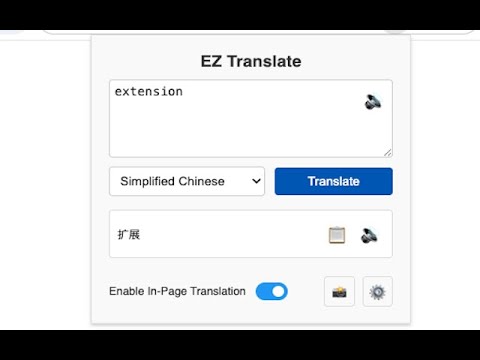
EZ Translate is a modern browser translation plugin that harnesses the power of Large Language Models (LLMs) to provide you with a more accurate, fluent, and context-aware web page translation experience. Unlike traditional machine translation, this plugin aims to understand the nuances of language through advanced AI technology, generating high-quality translations to help you easily overcome language barriers and efficiently access global information. Core Features: - Multi-provider Support: Supports configuring multiple Large Language Model providers (currently supports Google Gemini, Silicon Flow, OpenRouter, and Ollama), allowing you to freely choose the most suitable model. - Instant Hover Translation: Select text on any web page, and a translation icon will appear next to your mouse. Click it to see the translation result in place for a smooth and uninterrupted experience. - 🆕 Context Menu Translation: Right-click on selected text to access translation options directly from the context menu. Choose between your primary or secondary target language for instant translation in a centered popup window. - 📸 Screenshot Translation: Capture any area of the webpage and translate text within images using AI vision capabilities. Perfect for translating text in images, PDFs, or screenshots. - ⌨️ Keyboard Shortcuts: Use Ctrl+Shift+S (Windows/Linux) or Command+Shift+S (Mac) to quickly activate screenshot translation mode. - Quick Popup Translation: Click the browser toolbar icon to quickly enter or paste text for translation in a popup window. - Smart Auto-fill: After selecting text, open the popup, and the selected text will be automatically filled into the input box, simplifying the operation. - One-Click Copy: Copy translation results instantly with the built-in copy button, complete with visual feedback and multi-language support. - Secure Local Storage: All API keys are securely stored in your local browser and are never uploaded. - Read Aloud and Copy: In the popup window, you can read the input and output text aloud, and you can also copy the translation result with one click for convenient operation. - Smart Target Language Settings: Configure default and second target languages for intelligent translation switching. - Intelligent Language Detection: Automatically detects when source language matches target language and switches to second target language. - Comprehensive Language Support: Supports 100+ languages with native translations for all interface elements.
0 星(5 星制)无评分
详情
- 版本1.0.0
- 上次更新日期2025年9月19日
- 提供方licon.ye
- 大小119KiB
- 语言12 种语言
- 开发者
邮箱
licon.ye@gmail.com - 非交易者该开发者尚未将自己标识为交易者。欧盟地区消费者须知:消费者权利可能不适用于您与该开发者达成的合约。
隐私权

“EZ Translate - Easy & Free AI Translator”已就收集和使用用户数据披露了以下信息。 如需了解详情,请查看开发者的privacy policy。
EZ Translate - Easy & Free AI Translator会处理以下数据:
该开发者已声明,您的数据:
- 不会因未获批准的用途出售给第三方
- 不会为实现与产品核心功能无关的目的而使用或转移
- 不会为确定信用度或放贷目的而使用或转移
支持
若有任何疑问、建议或问题,请访问开发者的支持网站