

Eye Flow — Eye Rhythm for Screen Work

Overview
Free 20-20-20 eye break reminder for screen workers. AOA-recommended. No screen lock, no sign-in, no tracking.
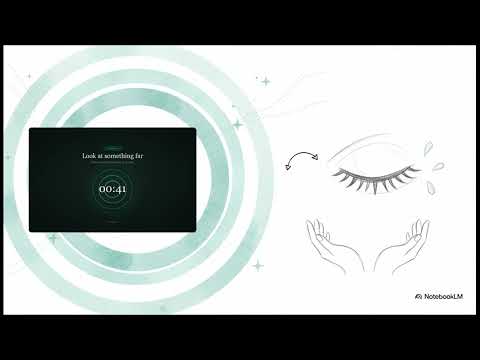
Eye Flow — automatic 20-20-20 eye break reminder for people who work at screens all day. THE PROBLEM ─────────────────── Developers, designers, writers, and remote workers spend 8–12 hours per day looking at screens. The American Optometric Association (AOA) links prolonged screen time to Computer Vision Syndrome (CVS) — a cluster of eye strain, dry eyes, blurred vision, and headaches affecting an estimated 90% of heavy screen users. The AOA-recommended solution is the 20-20-20 rule: every 20 minutes, look at something at least 20 feet (6 meters) away for at least 20 seconds. The problem is remembering to do it. WHAT EYE FLOW DOES ─────────────────── Eye Flow is a free Chrome extension that automatically implements the 20-20-20 rule while you work. It runs silently in the background and reminds you to take a 20-second eye break every 20 minutes — without locking your screen or interrupting your workflow. Each reminder opens a 60-second breathing-circle break screen. Look away, let your eyes soften, come back. No forced interruption. No screen lock. Just a breathing rhythm built into your work day. HOW IT WORKS ─────────────────── Install the extension — no account, no sign-in required A background timer counts 20 minutes of active work time A gentle notification fires: time to look 20 feet away Click to open a 60-second guided break with a breathing-circle visual Return to work. The 20-minute clock resets automatically. Set today's main focus and 2–3 tasks — the break screen brings you back to them every cycle KEY FEATURES ─────────────────── • 20-20-20 rule timer — fires every 20 minutes (customizable: 10–60 min) • 60-second guided eye break with breathing-circle animation • Works when popup is closed — background service worker keeps the rhythm • Today's focus + task list — review your progress on every break • Pause / resume timer — stop the rhythm when you step away • Deliberate skip — hold to skip a break, preventing accidental dismissals • Customizable break duration (20–120 seconds) • Customizable skip hold time (1–5 seconds) • Sound cues on break start/end (toggleable) • No sign-in · No account · No data collection · No ads · Forever free WHO IT'S FOR ─────────────────── Eye Flow is built for people whose work lives on a screen: → Software developers and engineers (long coding sessions, deep focus states) → UI/UX designers (pixel-level work, extended Figma/Sketch sessions) → Product managers and writers (document-heavy work days) → Remote workers and freelancers (no office ergonomics reminders) → Students doing long study sessions → Anyone diagnosed with or at risk for Computer Vision Syndrome (CVS) WHY EYE FLOW IS DIFFERENT FROM OTHER EYE BREAK EXTENSIONS ─────────────────── Most eye break extensions either lock your screen (forcing you to stop working) or simply show a popup you can instantly dismiss. Eye Flow takes a different approach: ✗ No screen lock — you decide when and whether to take each break ✓ Background timer — continues counting even when the popup is closed ✓ Deliberate skip — skipping requires a 3-second hold, not an accidental click ✓ Integrated task awareness — each break shows your daily focus and task progress ✓ Privacy-first — zero data leaves your device; no analytics, no telemetry ✓ Based on AOA medical guidance, not arbitrary intervals PRIVACY ─────────────────── Eye Flow collects zero user data. • No analytics or telemetry • No network requests of any kind • All state (timer, tasks, settings) is stored locally in your browser • No account creation required • No third-party SDKs Permissions requested: • alarms — to fire break reminders on schedule • notifications — to show break reminders when the popup is closed • storage — to save your settings and today's task list locally MEDICAL REFERENCE ─────────────────── The 20-20-20 rule is recommended by the American Optometric Association (AOA) as a primary method for reducing digital eye strain. Eye Flow implements this rule automatically, making it the lowest-friction way to follow AOA guidance during a normal work day. Reference: American Optometric Association, "Computer Vision Syndrome" https://www.aoa.org/healthy-eyes/eye-and-vision-conditions/computer-vision-syndrome FREQUENTLY ASKED QUESTIONS ─────────────────── Q: Does Eye Flow work when the popup is closed? A: Yes. Eye Flow uses a Chrome background service worker and the chrome.alarms API to keep the timer running even when you're not looking at the popup. Notifications fire on schedule regardless of whether the popup is open. Q: Does Eye Flow lock my screen or force me to stop working? A: No. Eye Flow never locks your screen. Each break is a notification you choose to act on. Skipping requires a deliberate 3-second hold — preventing accidents, but keeping you in control. Q: What is the 20-20-20 rule? A: Every 20 minutes of screen work, look at something 20 feet (approximately 6 meters) away for at least 20 seconds. This allows the ciliary muscles in your eyes to relax and reduces the accumulation of digital eye strain. Recommended by the American Optometric Association. Q: What is Computer Vision Syndrome (CVS)? A: CVS is a group of eye and vision-related problems caused by prolonged screen use. Symptoms include eye strain, dry eyes, headaches, blurred vision, and neck pain. The AOA estimates 50–90% of computer users experience CVS symptoms. Q: Is Eye Flow free? A: Yes. Eye Flow is completely free with no premium tier, no subscription, and no in-app purchases. Q: Does Eye Flow require an account or sign-in? A: No. Eye Flow works entirely offline and locally. No account, no email, no sign-in of any kind. Q: Can I customize the break interval? A: Yes. The eye break interval is adjustable from 10 to 60 minutes (default: 20 minutes). Break duration is adjustable from 20 to 120 seconds (default: 60 seconds). Q: What data does Eye Flow collect? A: None. Eye Flow stores your settings and task list locally in your browser using chrome.storage. No data is sent anywhere. No analytics. No telemetry. Q: Will Eye Flow drain my battery or slow Chrome? A: No. Eye Flow uses the lightweight chrome.alarms API, which is designed specifically for scheduled tasks. It has no continuous polling loop and no active network connections. Q: Does Eye Flow work on all websites? A: Yes. Eye Flow is a toolbar extension that works independently of any website you're visiting.
0 out of 5No ratings
Details
- Version1.0.0
- UpdatedMay 13, 2026
- Offered byJoseph Next
- Size242KiB
- Languages2 languages
- Developer
Email
joseph.nextlife@gmail.com - Non-traderThis developer has not identified itself as a trader. For consumers in the European Union, please note that consumer rights do not apply to contracts between you and this developer.
Privacy

This developer declares that your data is
- Not being sold to third parties, outside of the approved use cases
- Not being used or transferred for purposes that are unrelated to the item's core functionality
- Not being used or transferred to determine creditworthiness or for lending purposes