


Tổng quan
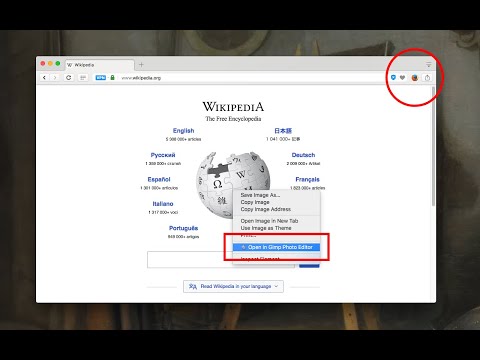
Run any external application with custom arguments from the browser toolbar or context menu to send links, text and more
The "External Application Launcher" extension enables you to define a toolbar button or several context menu items to execute external executables right from your browser. It extracts arguments from the current web page and passes them as command-line arguments of your choice to the external application. Use Cases: - You can send the current page to another browser - You can send selected text to a text editor - You can open your external email client and send selected text to it - You send download links to an external download manager! - You can directly send image URLs to a photo editor of your choice - You can browse links with specified patterns with an external application Notes: 1. A minimal native client is required for this extension to execute native commands. The native client uses the official NodeJS executable. 2. The native client is only available for Windows, Mac, and Linux operating systems. Usage Preview: https://www.youtube.com/watch?v=sTOHWbX7dKU&feature=emb_title Installtion Video tutorial: Windows: https://www.youtube.com/watch?v=18jAqTXBiZA Linux and Mac: https://www.youtube.com/watch?v=bB4Bj_APg4g
4,2/544 lượt xếp hạng
Chi tiết
- Phiên bản0.6.0
- Đã cập nhật1 tháng 7, 2025
- Nhà cung cấpyokris.dev
- Kích thước164KiB
- Ngôn ngữEnglish
- Nhà phát triển
Email
yokris.dev@gmail.com - Người bán phi thương mạiNhà phát triển này không tự nhận mình là người bán. Đối với người tiêu dùng ở Liên minh Châu Âu, xin lưu ý rằng các quyền của người tiêu dùng không được áp dụng trong hợp đồng giữa bạn và nhà phát triển này.
Quyền riêng tư

Nhà phát triển này tuyên bố rằng dữ liệu của bạn
- Không được bán cho bên thứ ba, ngoài những trường hợp sử dụng đã được phê duyệt
- Không được sử dụng hoặc chuyển nhượng cho các mục đích không liên quan đến chức năng chính của mặt hàng
- Không được sử dụng hoặc chuyển nhượng để xác định khả năng thanh toán nợ hoặc phục vụ mục đích cho vay
Hỗ trợ
Nếu bạn có câu hỏi, ý kiến đề xuất hoặc gặp vấn đề, hãy truy cập trang web hỗ trợ của nhà phát triển để được trợ giúp