

Extension Auditor - The Browser Security Platform

Overview
Scan extensions before you install and audit installed ones — permissions, malware detection, activity logs, privacy hardening.
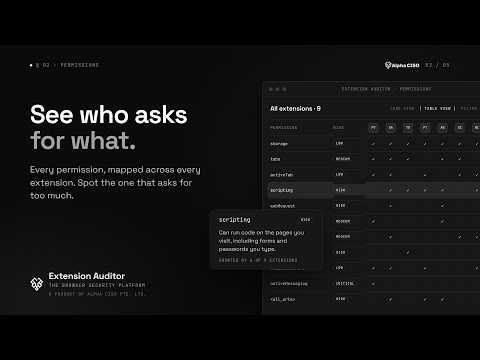
Extension Auditor – Audit, Assess, and Manage Your Browser Security Posture Overview Extension Auditor is a powerful all-in-one Chrome extension designed to help users manage, monitor, and secure their browser environment. It brings together three key features: Secure Extension Manager, Extension Activity Logs, and Privacy Settings Manager — all packaged into a single privacy-focused tool. Chrome Extension Security Perform comprehensive offline, on-device security analysis of installed browser extensions. • Permission Analysis: Understand the security implications of each permission requested. • Host Access Review: Detect extensions with overly broad host permissions, such as access to all websites (<all_urls>) or sensitive domains like banking portals or internal tools. • Content Script Inspection: Identify extensions injecting scripts into web pages, potentially impacting privacy and security. • Manifest Analysis: Review extension manifest configurations to assess compliance with best practices. • Dangerous Combinations Detection: Detect extensions that pose risks through combinations of permissions, host access, and content scripts. • Risk Dashboard: View a summary of all high-risk extensions and take action accordingly. • CRX/ZIP Archival: Automatically saves available CRX/ZIP packages for installed extensions. • Ideal for IT administrators, security professionals, and privacy-conscious users. Extension Activity Logs App Gain full lifecycle visibility into browser extensions through real-time logging. • Tracks important events: • Installation and uninstallation • Enable and disable events • Version upgrades and downgrades • Permission changes during version updates • Sort logs by extension name, state, ID, and event type. • Export logs for auditing, incident response, or backup purposes. • Presented in a clean, tabular format optimised for quick analysis. Privacy Settings Manager App Improve your browser security posture using a risk-based privacy score and configurable toggles. • Privacy Score: A snapshot of how secure your current browser settings are. • Quick Toggles: Control the most important browser privacy and tracking settings. • Manage the following privacy areas: • Block JavaScript, third-party cookies, and notification prompts • Disable referer headers, client hints, and predictive network behavior • Turn off autofill, omnibox suggestions, and spelling services • Block access to camera, microphone, and location • Disable images, custom fonts, and ad tracking • Strip tracking parameters from URLs • Auto-delete cookies on exit • Block pings, beacons, and CSP reports • Set Accept-Language header to en-US to minimize fingerprinting Optional permissions are requested only for the Privacy Settings Manager. Core functionality like Secure Extension Manager and Activity Logs work without additional permissions.
4.8 out of 518 ratings
Details
- Version8.0.2
- UpdatedSeptember 13, 2026
- Size5.65MiB
- Languages46 languages
- Developer
- TraderThis developer has identified itself as a trader per the definition from the European Union and committed to only offer products or services that comply with EU laws.
- D-U-N-S599466982
Privacy

Extension Auditor - The Browser Security Platform has disclosed the following information regarding the collection and usage of your data. More detailed information can be found in the developer's privacy policy.
Extension Auditor - The Browser Security Platform handles the following:
This developer declares that your data is
- Not being sold to third parties, outside of the approved use cases
- Not being used or transferred for purposes that are unrelated to the item's core functionality
- Not being used or transferred to determine creditworthiness or for lending purposes
Support
For help with questions, suggestions, or problems, please open this page on your desktop browser