
![Item logo image for Extended works with Paramount Plus [QVI]](https://lh3.googleusercontent.com/OwbuyyKMvc-fkmQq4uSghON6d3EFDXYWZ7uJzbPKrmcGI1pQO16kXQ42GH_MTm8gpPW0V839awXq0gi9dHWEInlb=s60)
Extended works with Paramount Plus [QVI]
10 ratings
)![Item media 2 (screenshot) for Extended works with Paramount Plus [QVI]](data:image/gif;base64,R0lGODlhAQABAIAAAP///////yH5BAEKAAEALAAAAAABAAEAAAICTAEAOw==)
Overview
Independent software not affiliated with Paramount. Control Paramount+ with speed adjust, skip intros and hide spoilers.
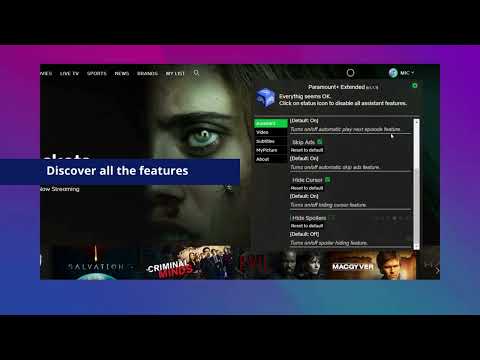
Paramount+ Extended is a great tool that unifies multiple functionalities in one easy-to-use extension and gives you more control over the Paramount Plus platform. Be in the driver’s seat of your viewing experience! ⚠️ Independent software – not affiliated with, endorsed by, or sponsored by Paramount Global or Paramount+. Paramount and Paramount+ are trademarks of their respective owners. 🎬 Smart Assistant Features: Skip Intros & Recaps – Automatically skip opening intros and episode recaps Auto-Play Next Episode – Seamlessly continue to the next episode without clicking Skip Ads – Automatically fast-forward through advertisements Hide Spoilers – Blur episode descriptions to avoid spoilers (hover to reveal) Auto-Hide Cursor – Cursor automatically hides during video playback for a cleaner viewing experience ⌨️ Keyboard Shortcuts: M – Mute/Unmute F – Toggle Fullscreen P – Play/Pause ← / → – Skip 10 seconds backward/forward < / > – Volume down/up + / - – Increase/Decrease playback speed 🎥 Video Controls: Playback Speed – Adjust from 0.25x to 16x with preset options Aspect Ratio – Choose Original, Fit Width, or Fit Height Video Zoom – Scale from 10% to 500% Video Rotation – Rotate video in 45° increments Picture-in-Picture – Watch in a floating window while multitasking 📝 Subtitle Customization: Font Size – Adjustable from 10px to 100px Text Color – Full color picker Background Color & Opacity – Customize subtitle background visibility Text Outline – Add outline with custom color for better readability 30+ Font Styles – Including Roboto, Montserrat, Poppins, Lato, and many more 👤 Personalization: Custom Profile Pictures – Upload personal photos for up to 5 user profiles All you need to do is add the Paramount+ Extended extension to your browser, open the control panel, and enjoy watching content tailored to your personal viewing preferences. It’s as simple as that! This extension is part of the Quality Viewership Initiative, a collaborative effort to enhance the understanding of audience engagement. It collects anonymous, aggregated viewing insights to support creators and studios in improving the quality of their content. You can stop sharing your information at any time by switching the toggle on the options page. Disclaimer: Paramount+ is a trademark of ViacomCBS Streaming. This website and extension have no association or affiliation with Paramount+ or any third-party companies.
3.7 out of 510 ratings
Details
- Version1.1.31
- UpdatedJune 24, 2026
- Offered byBestChromeExtensions
- Size149KiB
- Languages9 languages
- DeveloperHideApp
1021 E Lincolnway Cheyenne, WY 82001-4851 USEmail
disneypartyapp@gmail.comPhone
+1 920-714-7945 - TraderThis developer has identified itself as a trader per the definition from the European Union and committed to only offer products or services that comply with EU laws.
Privacy

Extended works with Paramount Plus [QVI] has disclosed the following information regarding the collection and usage of your data. More detailed information can be found in the developer's privacy policy.
Extended works with Paramount Plus [QVI] handles the following:
This developer declares that your data is
- Not being sold to third parties, outside of the approved use cases
- Not being used or transferred for purposes that are unrelated to the item's core functionality
- Not being used or transferred to determine creditworthiness or for lending purposes
Support
For help with questions, suggestions, or problems, please open this page on your desktop browser