

Export Tweets from User, Hashtag, and Search Term
การให้คะแนน 24 รายการ
)
ภาพรวม
Export twitter tweets from any user, hashtag, or search term to a CSV file.
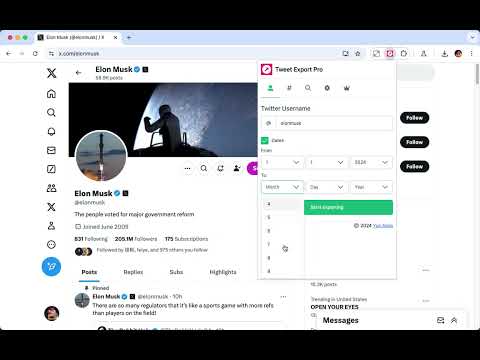
Tweet Export Pro allows you to quickly extract and export tweets from any account, hashtag, or search term as a CSV file with one click. 🏆 Advantage Our extension can export more data, as we comply with Twitter's rate limits. 👨🏻💻 Features ✓ Extract and export tweets from any user to CSV ✓ Extract and export tweets from any hashtag to CSV ✓ Extract and export tweets from any search term to CSV ✓ Extract and export tweets within a selected date range ✓ Supports exporting longer tweets ✓ Automatic handling of rate limits, requiring no action from you 🟢 indicates the normal time interval for requests 🟠 indicates the cooldown period's time interval 🔴 indicates the time interval for request errors 🗂️ What You Get? - ID - Text - Tweet URL - Language - Type - Author Name - Author Username - View Count - Bookmark Count - Favorite Count - Retweet Count - Reply Count - Quote Count - Created At - Source - Hashtags - URLs - Media Type - Media URLs ❓FAQ How Can I Export All Tweets? - By default, if the date option is not selected, all tweets will be exported. In theory, this extension can export all tweets, but when exporting a large amount of data, it may trigger Twitter's limits, causing the export to be interrupted. If this happens, you can use the date option to resume exporting tweets from where the last export was interrupted. ⚠️ Caution To avoid being flagged by Twitter's risk control for frequent data exports, we suggest creating a dedicated Twitter account for exporting data. 📬 Contact If you have any questions or suggestions to improve the extension, please feel free to contact us at jfl913@gmail.com. 📃 Terms Each time, you are entitled to export up to 150 data entries for free. To export more, you need to upgrade to Pro. 🔒 Data Privacy All the data you process stays on your local computer and never goes through our servers. ℹ️ Disclaimer Tweet Export Pro is an independent third-party chrome extension and has no affiliation with Twitter, Inc., or their affiliated companies. All trademarks and brand names mentioned are the property of their respective owners.
4.9 จาก 5 คะแนนการให้คะแนน 24 รายการ
รายละเอียด
- รุ่น1.7.0
- อัปเดตแล้ว15 ธันวาคม 2568
- ฟีเจอร์เสนอการซื้อในแอป
- นำเสนอโดยsasukeapps913
- ขนาด1.44MiB
- ภาษา54 ภาษา
- นักพัฒนาซอฟต์แวร์
อีเมล
sasukeapps913@gmail.com - ไม่ใช่ผู้ค้านักพัฒนาซอฟต์แวร์รายนี้ไม่ได้ระบุว่าตัวเองเป็นผู้ค้า สำหรับผู้บริโภคในสหภาพยุโรป โปรดทราบว่าสิทธิของผู้บริโภคไม่มีผลกับสัญญาระหว่างคุณกับนักพัฒนาซอฟต์แวร์รายนี้
ความเป็นส่วนตัว
นักพัฒนาซอฟต์แวร์รายนี้ประกาศว่าข้อมูลของคุณจะ
- ไม่ถูกขายไปยังบุคคลที่สามหากไม่ใช่ Use Case ที่ได้รับอนุมัติ
- ไม่ถูกใช้หรือถูกโอนเพื่อวัตถุประสงค์ที่ไม่เกี่ยวข้องกับฟังก์ชันการทำงานหลักของรายการ
- ไม่ถูกใช้หรือถูกโอนเพื่อพิจารณาความน่าเชื่อถือทางเครดิตหรือเพื่อวัตถุประสงค์การให้สินเชื่อ
สนับสนุน
โปรดไปที่เว็บไซต์สนับสนุนของนักพัฒนาซอฟต์แวร์ หากมีข้อสงสัย ต้องการขอคำแนะนำ หรือพบปัญหาใดๆ