

Export Gemini AI Chats to PDF
1 rating
)
Overview
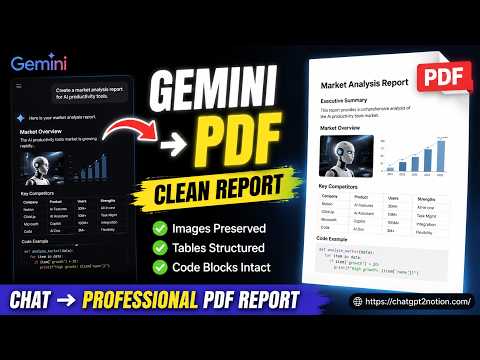
Instantly bulk export and convert your AI chats into clean PDF documents. Perfect for archiving, printing, and sharing.
Turn your Google Gemini conversations into portable PDF or image files. Export the conversation currently open in your browser, select multiple chats for batch export, or review individual messages in Custom Preview before saving. KEY FEATURES • Export the current conversation or select multiple chats for batch processing • Browse grouped conversations, including Gems and Spark • Preview conversation content and choose individual messages before export • Preserve readable formatting for code blocks, tables, lists, and structured responses • Render inline and display LaTeX, including fractions, matrices, Greek symbols, and aligned equations • Include uploaded images, generated images, and linked document content when available • Choose light, dark, or eye-care themes for exported content • Support long conversations and different account URL formats • Skip previously exported conversations and review success, skipped, and failed totals HOW TO USE 1. Open a supported conversation page. 2. Click the extension icon. 3. Export the current chat or open the batch export page. 4. Use Custom Preview when you want to review the content or select specific messages. 5. Save the result as a PDF or image file. USE CASES Create portable copies of research notes, study material, project discussions, code examples, mathematical explanations, and other useful AI-assisted work. PDF files are well suited for longer conversations, documentation, and archiving. Image exports are convenient for presentations, sharing, and saving selected content visually. PRIVACY AND PERMISSIONS Conversation data is processed locally in your browser and is not uploaded by the extension. PDF export uses Chrome's built-in page capture capability and requires the debugger permission. Chrome may display a notice that the extension started debugging while a PDF is being created. This permission is used only during the export process. RECENT UPDATES • 2026-09-16: Added LaTeX rendering to Custom Preview and PDF exports, including inline expressions, fractions, matrices, Greek symbols, and aligned equations. • 2026-08-24: Added Spark conversation support and included pinned conversations in batch export when they are not visible on the current history page. • 2026-06-26: Improved uploaded and generated image handling, table borders, themes, preview consistency, and YAML-style response headers. • 2026-06-11: Added selective batch export and grouped browsing for Gems. SUPPORT Report an issue or send feedback: https://github.com/joysey/chatgpt-to-notion/issues Contact: chatgpt2notion@gmail.com This is an independent extension and is not affiliated with or endorsed by Google LLC. Google Gemini is a trademark of Google LLC.
5 out of 51 rating
Details
- Version5.0.0
- UpdatedSeptember 29, 2026
- Offered byJack
- Size1.61MiB
- Languages8 languages
- Developer
Email
support@nexudesk.com - Non-traderThis developer has not identified itself as a trader. For consumers in the European Union, please note that consumer rights do not apply to contracts between you and this developer.
Privacy

Export Gemini AI Chats to PDF has disclosed the following information regarding the collection and usage of your data. More detailed information can be found in the developer's privacy policy.
Export Gemini AI Chats to PDF handles the following:
This developer declares that your data is
- Not being sold to third parties, outside of the approved use cases
- Not being used or transferred for purposes that are unrelated to the item's core functionality
- Not being used or transferred to determine creditworthiness or for lending purposes