


概要
メールメッセージとラベルをGoogleスプレッドシートにバックアップ、エクスポート、または解析します
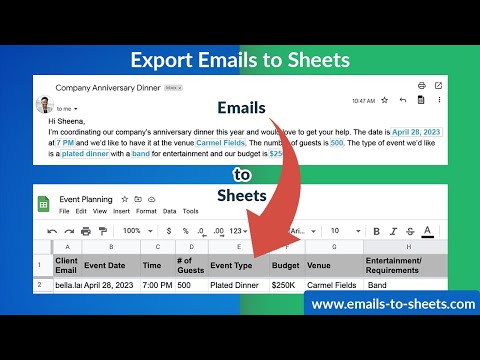
ビジネスに最適です。Gmailのメールに保存されているデータは、金鉱のようなものです。 しかし、そのデータを抽出し、より効果的な方法で見る方法を知らなければ、せっかくのデータもすぐに無意味なものになってしまいます。リード、注文、不動産物件、イベント予約、サポート問題などなど、様々な情報を把握するために、すべてのメールを検索し、必要な情報をスプレッドシートに手入力しなければならないのは大変なことです。 このアプリは、そのような面倒な作業をすべて簡素化し、自動化された連続的な方法で、過去のすべてのメールと、フィルター基準に一致する新しい受信メールがGoogleシートに自動入力されるようにするものです。まるでリアルタイムのレポートを見ているような感覚で、時間を大幅に節約できます。 以下は、Eメールを解析してSheetsに取り込む使用例です。 注文や出荷の通知をGmailからGoogle Sheetsにエクスポートする。 ✅ GmailからGoogle Sheetsにリードメールをエクスポートする ✅ Email List Builder。これまでにメールを交換した人の連絡先をすべてエクスポートします。受信トレイ全体、Gmail ラベル、または選択したメールから連絡先情報をエクスポートできます。 ✅ Eメールを解析して、バウンスしたEメールアドレスのレポートを取得できます(当社のEメールマーケティングソフトウェア、https://mailking.io で使用すると便利です)。 ✅ 顧客から受け取ったサポート問題を他のサポートチームと共有する。 ✅ メールメッセージのバックアップ 外国語の顧客からのメールをエクスポートし、翻訳サービスで翻訳してもらい、わかりやすく対応できるようにする ✅ 外国語の顧客からのメールをエクスポートし、翻訳サービスで翻訳してもらい、わかりやすく対応できるようにする。 ✅ 経費報告書や領収書をGoogle Sheetsに書き出すのに使う(税金対策に最適です) ✅ そして最後に、メールのデータをデータベースやCRMにインポートすることができます。 主な機能 Gmail ラベルにあるすべてのメールと、新しい受信メールを Google Sheets にリアルタイムでエクスポートします。 ⭐強力なメールパーサエディタで、Google Sheets にエクスポートしたい正確な情報を定義できます(メールメッセージからデータを抽出する方法)。 ⭐ メールメッセージをPDFにエクスポートし、Google Driveに保存することが可能 ⭐ 添付ファイル(請求書や領収書など)をPDFでGoogleドライブに保存可能 ⭐ 人工知能のルールにより、メール本文から何をエクスポートするか(支払い金額、注文番号、その他検出可能なパターン)を検出します。 ⭐ すべてのメールヘッダ(X-ヘッダを含む)をエクスポートします。 電話番号、メールアドレス、URLリンクなどの連絡先情報をメール本文からエクスポートするためのルールをあらかじめ設定できます。 ⭐ Amazonの注文、Paypalの購入、Stripeなどが含まれるメールに対応できるよう、すでに整理されています。 ⭐ G Suiteチームサポート(管理コンソールからメールのエクスポートをコントロールできます。) 今すぐ試して、貴重な時間を無駄にしないようにしましょう。この単調な作業を代行してくれるのが、このアプリケーションなのです 私たちの目標は、お客様にとって最適な戦略的決定を行うためのツールを提供することです。データがより理解しやすい形で提示されれば、あなたはその戦略的な決断を下すための知識の力を手にすることができるのです。Google Sheetsは、解析されたEメールデータの最新のスプレッドシートレポートで、あなたが把握する必要のあるあらゆるものの全体像を理解する手助けをします。 どのように機能するか 1. 拡張機能をインストールする 2. 左側で、エクスポートするラベルを選択し、ラベルメニューから「ラベルをGoogle Sheetsに保存」を選択します 3. オプションダイアログが開きます 4. エクスポートする列(件名、送信者など)、オプション(連続エクスポート、スプレッドシート名など)を選択する 5. 使いやすいエディターで、メールから解析したい情報を定義し、その情報をGoogle Sheetsに抽出します(注文番号、ユーザーコメントなど)。 6. エクスポートを開始する 🔍ステップバイステップの説明はこちらのブログをご覧ください: https://blog.cloudhq.net/how-to-create-a-zillow-spreadsheet-using-gmail-with-an-email-parser/ cloudHQです。1回のクリックで生産性を向上させます。 cloudHQウェブサイト: https://www.cloudhq.net/ アプリのウェブサイト:https://www.emails-to-sheets.com/ 価格: https://www.emails-to-sheets.com/pricing サポートページ: https://support.cloudhq.net/category/browser-extensions/export-emails-to-excel-csv-or-google-sheet/ ブログ:https://blog.cloudhq.net _____ EXCELLENT for business: The data sitting in your Gmail emails can be a goldmine. But if you don't know how to extract that data to look at it in a more effective way, that gold can quickly become worthless. It's overwhelming to have to search through all your emails and manually enter the information you want into a spreadsheet just to keep track of things like incoming: leads, orders, real estate listings, support issues, and more. This app simplifies ALL off that tedious work, and does it for you in an automated, continuous way so that every new email that matches your filter criteria (like order #) auto-populates into your Google Sheet. It's like having a real-time report on whatever you need to keep track of, and best of all, it's saves you a ton of time. Here are some use cases: ✅ Export order and shipping notifications from your email messages to Google Sheets ✅ Export email Leads from your email messages to Google Sheets ✅ Email List Builder: Export all contact information from anyone that you've ever exchanged emails with. You can export that contact information from your entire inbox, or from a Gmail label ✅ Parse emails to get a report of all bounced email addresses (This is great to use with mailking.io, our email marketing software) ✅ Share support issues coming in from customers with the rest of your support team ✅ Backup (archive) your email messages ✅ Export emails from foreign-language customers so that you can get them translated by a service ✅ Use it to export your expense reports or receipts into Google Sheets (tax time is upon us!) ✅ And finally, you can import your data from your emails into your database or CRM Key features: ⭐ Real time export of all emails in your Gmail label, and any new emails coming in, to Google Sheets ⭐ Powerful email parsing editor to define the exact information you want exported to Google Sheets (how to extract data from email message body) ⭐ Email messages can be exported to PDF and saved in Google Drive ⭐ Attachments (like invoices, receipts, etc.) saved as a PDF in Google Drive ⭐ Artificial Intelligence rules are used to detect what to export from your email body, like amount paid, order #, or other patterns it can detect, etc. ⭐ Export all email headers (including X- headers) ⭐ Pre-built rules to export all contact information like: phone#, email addresses, url links from email body ⭐ G Suite team support (control export of emails from admin console) Try it today and stop wasting your precious time. We have apps to do these kinds of monotonous jobs! Our goal is to give you the tools to make the best strategic decisions once your data is presented in a way that can be more easily understood. And we know the info might be in Gmail, but it's no way to make a good decision. Google Sheets will help you understand the bigger picture of whatever you need to keep track of. How it works: 1. Install the extension 2. On the left side, select the label to export and select "Save label to Google Sheets" in the label menu 3. The options dialog will open 4. Select columns to export (Subject, sender, etc.) and options (continuous export, name of a spreadsheet, etc.) 5. Our user-friendly editor will help you define what information you want to parse from your emails, and extract that information into Google Sheets (like order#, user comment, etc.) 6. Start the export 🔍 You can read our blog for step-by-step instructions here: https://blog.cloudhq.net/how-to-create-a-zillow-spreadsheet-using-gmail-with-an-email-parser/ cloudHQ. Helping your productivity, 1 click at a time. cloudHQ website: https://www.cloudhq.net/ App website: https://www.emails-to-sheets.com/ Pricing: https://www.emails-to-sheets.com/pricing Support page: https://support.cloudhq.net/category/browser-extensions/export-emails-to-excel-csv-or-google-sheet/ Blog: https://blog.cloudhq.net
5 点満点で 4.3148 件の評価
詳細
プライバシー

Export Emails to Sheets by cloudHQ から、お客様のデータの収集と使用に関する以下の情報が開示されています。 詳しくは、デベロッパーの privacy policy をご確認ください。
Export Emails to Sheets by cloudHQ は次を扱います。
このデベロッパーは、お客様のデータについて以下を宣言しています
- 承認されている以外の用途で第三者に販売しないこと
- アイテムの中心機能と関係のない目的で使用または転送しないこと
- 信用力を判断する目的または融資目的で使用または転送しないこと
サポート
質問や提案、問題がある場合は、デベロッパーのサポートサイトにアクセスしてください。