


Overview
Highlights exercise names on any webpage and links to ExerciseLibrary.com guides. Hover for info, click to learn more.
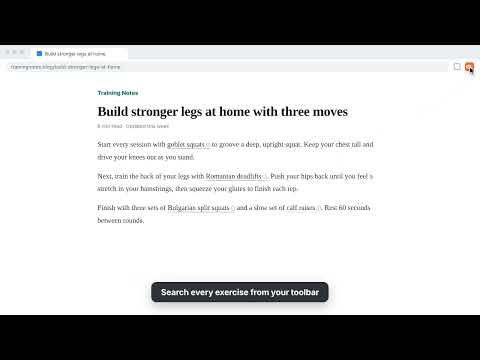
Read about an exercise anywhere on the web and get to a clear, step-by-step guide in one click. ExerciseLibrary.com Highlighter finds exercise names in the articles, blogs, forums and search results you already read. Each name gets a subtle orange underline. Hover to see a quick card, or click to open the full guide on ExerciseLibrary.com in a new tab. WHAT IT DOES • Highlights exercise names on any normal webpage, from strength training and running to yoga and mobility • Hover card shows the exercise name, with a link to the guide and a button to copy the link • Toolbar search finds any exercise in the library without leaving the page • Recently opened list takes you back to exercises you looked at before • Quick links to the Exercise Library, the Body Atlas and free fitness calculators SMART MATCHING • Understands the way people actually write: "push-ups", "pushups" and "push up" all link to the same guide • Recognizes plurals and common gym shorthand like RDL, OHP and "DB bench press" • Knows alternate names, so "Child's Pose" and "Balasana" both find the same pose • Reads the sentence around a name before linking it. "Add good mornings to strengthen your lower back" is linked; "Good morning everyone" is not LIGHT ON YOUR COMPUTER • Skips pages with no fitness content right away, so most of the web is untouched • Always off on heavy or private sites: email, documents, banking, AI chat, video calls, streaming, design tools and social feeds • Skips sign-in, checkout and account pages on every site • Stops on very large web apps and pages that never stop loading new content, so memory doesn't build up YOU STAY IN CONTROL • Turn highlighting off for any site with one click in the toolbar menu • Choose whether hover cards appear, or keep only the underline • Highlight each exercise once per page, or set a maximum number of highlights • Works in light and dark mode PRIVACY No account and no ads. The extension does not collect, sell or send your browsing history or the text of the pages you read. Your settings and recently opened exercises are stored in your browser; settings sync across your devices through your own Chrome sign-in. Once a week it downloads the public list of exercise names from ExerciseLibrary.com so it knows what to highlight. ABOUT EXERCISELIBRARY.COM ExerciseLibrary.com is a free library of exercise guides with step-by-step instructions, muscles worked and variations, plus a Body Atlas and fitness calculators.
0 out of 5No ratings
Details
- Version1.5.5
- UpdatedOctober 24, 2026
- Size60.29KiB
- LanguagesEnglish
- DeveloperLiaqa Fitness LLCWebsite
30 N Gould St ste r Sheridan, WY 82801-6317 USEmail
contact@liaqa.comPhone
+1 509-720-7580 - TraderThis developer has identified itself as a trader per the definition from the European Union and committed to only offer products or services that comply with EU laws.
- D-U-N-S119355288
Privacy

This developer declares that your data is
- Not being sold to third parties, outside of the approved use cases
- Not being used or transferred for purposes that are unrelated to the item's core functionality
- Not being used or transferred to determine creditworthiness or for lending purposes
Support
For help with questions, suggestions, or problems, visit the developer's support site