

ExactReply: Canned Responses & Text Expander with AI

Overview
Canned responses for Gmail, Outlook and web forms: shortcuts, fields, folders, AI rewrites. Flags changed amounts. Free.
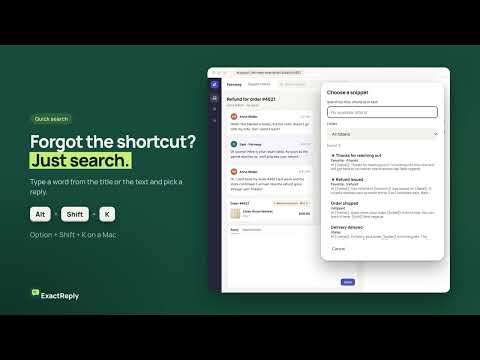
ExactReply is a text expander for canned responses. It keeps your best replies in one library and inserts them into Gmail, Outlook on the web and form fields on websites, with the customer's details filled in. Support teams answer the same questions every day. Copying old emails is slow, and a retyped reply can carry the wrong name or amount. ExactReply turns your replies into email templates with fields. Before you insert an edited reply, it shows which numbers, links and filled-in details changed, so you can check them first. HOW IT WORKS 1. Save a reply once. Add fields like {{name}} or {{amount}} and a shortcut such as /refund. 2. In a supported text field, type the shortcut and press Tab. Or press Alt + Shift + K (Option + Shift + K on Mac) to search your library. 3. Fill in the fields, check the reply and click Insert. You send the email yourself. WHAT YOU GET Text expander with fields A shortcut and Tab insert a full reply. Fields ask for the customer's details each time, and {{date}} adds today's date automatically. Quick search Forgot a shortcut? Open search from the keyboard, type a word from the title or the text and pick a snippet with the arrow keys. Filter by folder; favorites come first. Folders and backup Sort your Gmail templates and saved replies into folders such as Support or Sales. Export the library to a file and import it on another computer. AI rewrite in four styles Open "Improve with AI" to fix mistakes or make a reply friendlier, shorter or more formal. You see the suggestion before anything changes, and AI keeps the language of your reply. Check of key details After a manual or AI edit, ExactReply flags changed numbers, amounts, currencies, links, email addresses and field values. Insert and copy wait until you confirm. It is a check, not a guarantee, so read the reply before you send it. Undo and copy Undo an insert from the notice, or with Ctrl + Z (Cmd + Z on Mac) in the email. Copy the reply instead when you prefer to paste it yourself. FREE, WITH FAIR LIMITS - Snippets, folders, search and backup are free, with no limit on the number of snippets and no account. - AI: up to 15 AI replies per rolling 24 hours for each installation, up to 2,400 characters per request, one request at a time with a 10-second pause. - A shared daily AI budget can pause AI for everyone earlier. Snippets keep working without AI. - A suggestion you discard still counts toward the limit. PRIVACY - Your library is stored only in this browser. There is no account. - Text leaves the browser only when you click "Suggest a version". Then only that reply goes to the ExactReply server and to OpenAI. ExactReply asks for your permission once, and you can withdraw it in Settings. - The ExactReply server keeps an anonymous installation ID and usage counters, not your texts. OpenAI processes the text under its own data policy. - ExactReply never sends emails or messages for you. - Privacy policy: https://exactreply.org/privacy.html WHO IT'S FOR Customer support agents, small business owners, sales teams, recruiters and agencies who answer clients by email every day. GOOD TO KNOW - Works in Gmail, in regular text fields on websites and in Outlook on the web (still experimental). Other rich text editors are not supported yet. - Chrome does not allow extensions on its own pages (chrome://) or in the Chrome Web Store. - After installing, reload the tabs that were already open. - Shortcuts use Latin letters, digits, _ or -. - You can turn ExactReply off on chosen sites in Settings. - Interface in English, German and French, with light and dark themes.
0 out of 5No ratings
Details
- Version0.2.0
- UpdatedNovember 19, 2026
- Offered bymumobesazub63
- Size166KiB
- Languages3 languages
- DeveloperArtūrs Višņakovs
Avotu Iela 1a 3 Līvāni, Līvānu novads LV-5316 LVEmail
mumobesazub63@gmail.comPhone
+371 24 819 947 - TraderThis developer has identified itself as a trader per the definition from the European Union and committed to only offer products or services that comply with EU laws.
Privacy

ExactReply: Canned Responses & Text Expander with AI has disclosed the following information regarding the collection and usage of your data. More detailed information can be found in the developer's privacy policy.
ExactReply: Canned Responses & Text Expander with AI handles the following:
This developer declares that your data is
- Not being sold to third parties, outside of the approved use cases
- Not being used or transferred for purposes that are unrelated to the item's core functionality
- Not being used or transferred to determine creditworthiness or for lending purposes